File Details |
|
| File Size | 14.5 MB |
|---|---|
| License | Open Source |
| Operating System | Windows (All) |
| Date Added | November 23, 2008 |
| Total Downloads | 3,245 |
| Publisher | TortoiseCVS |
| Homepage | TortoiseCVS |
Publisher's Description
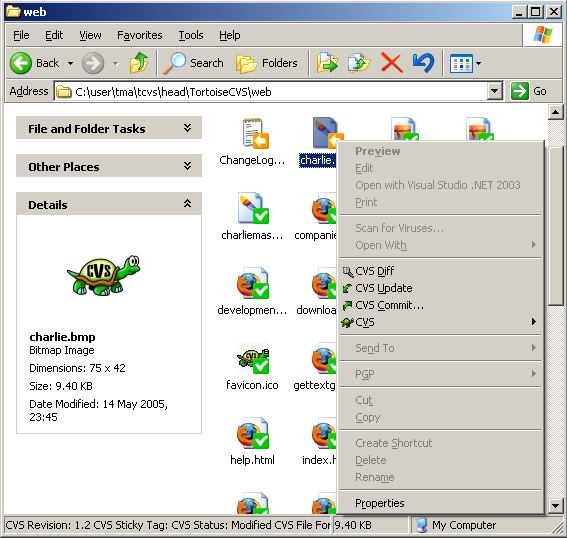
TortoiseCVS lets you directly check out modules, update, commit and see differences by right clicking on files and folders within Explorer. You can see the state of a file with overlays on top of the normal icons within Explorer. It even works from within the file open dialog. You can perform tagging, branching, merging and importing, and you can go directly to a browser web log (using ViewCVS or CVSWeb) on a particular file.
Latest Reviews

angelaff reviewed v1.10.8 on Nov 19, 2008
Hi does any one knows the meaning of the letters that appear to the left of the files that are synchronized on Tortoise CVS? "U" stands for updated, "C" for conflict, and "M" for merged, but what "P" for example stands for?
Thanks,

LRN reviewed v1.10.7 on Jun 23, 2008
Software is decent, but i like WinCVS - mainly because of "flat view", which is not possible to implement in TortoiseCVS, since it integrates directly into explorer.
WinCVS also has rich filter system.

mharvey reviewed v1.10.4 on Apr 8, 2008
I have found TortoiseCVS to be indespensible in my work where I have to deal with a CVS server. It is much better for me than the WinCVS client. Some may argue that CVS is old and should be dumped for something else (Subversion, etc) but that is not really the issue here. Since my codebase that I have to work with is in a CVS Repository (on a Linux server, BTW) I have found that this is the best client for me. Get WinMerge too as it integrates with TortoiseCVS.

buenamierdaxf reviewed v1.10.4 on Mar 19, 2008
This program is a complete piece of trash.
Go ahead and use it but be warned.
Go with another client.

raphaugusto reviewed v1.10.1 RC10 on Oct 24, 2007
Its the better cvs client, working togheter with winmerge and windiff.

Stoerpser reviewed v1.10.1 RC10 on Oct 16, 2007
Can anyone help me? What do I wrong?
I only want to create a local repository in drive e:\repository and checkin a directory on drive c:\ without server, but I can't.
Nobody at the Web seems to use ToroiseCVS
localy :-(

Arakiel reviewed v1.9.18 (Unstable) on Nov 7, 2006
azazel666 -
apparently you missed the big (UNSTABLE) at the end of the version number, what do you suppose that means?
TortoiseCVS is a great little client for CVS users, integrates quite well with explorer making version management as convenient as your everyday file management.

azazel666 reviewed v1.9.17 (Unstable) on Nov 2, 2006
Try this product and when things start going horribly wrong you are going to wish you never did.
Go with subversion instead of this abomination.

rilles reviewed v1.9.17 (Unstable) on Nov 1, 2006
Not sure why anyone is still sticking with CVS when Subversion provides a superior alternative.
4 points because TortoseSVN is based from this and its great.
mharvey reviewed v1.8.26 on Jul 18, 2006
I could not live with out it. Paired with WinMerge (http://fileforum.betanew...il/WinMerge/972710720/1) my life is made so much easier.

angelaff reviewed v1.10.8 on Nov 19, 2008
Hi does any one knows the meaning of the letters that appear to the left of the files that are synchronized on Tortoise CVS? "U" stands for updated, "C" for conflict, and "M" for merged, but what "P" for example stands for?
Thanks,
LRN reviewed v1.10.7 on Jun 23, 2008
Software is decent, but i like WinCVS - mainly because of "flat view", which is not possible to implement in TortoiseCVS, since it integrates directly into explorer.
WinCVS also has rich filter system.
mharvey reviewed v1.10.4 on Apr 8, 2008
I have found TortoiseCVS to be indespensible in my work where I have to deal with a CVS server. It is much better for me than the WinCVS client. Some may argue that CVS is old and should be dumped for something else (Subversion, etc) but that is not really the issue here. Since my codebase that I have to work with is in a CVS Repository (on a Linux server, BTW) I have found that this is the best client for me. Get WinMerge too as it integrates with TortoiseCVS.
buenamierdaxf reviewed v1.10.4 on Mar 19, 2008
This program is a complete piece of trash.
Go ahead and use it but be warned.
Go with another client.
raphaugusto reviewed v1.10.1 RC10 on Oct 24, 2007
Its the better cvs client, working togheter with winmerge and windiff.
Stoerpser reviewed v1.10.1 RC10 on Oct 16, 2007
Can anyone help me? What do I wrong?
I only want to create a local repository in drive e:\repository and checkin a directory on drive c:\ without server, but I can't.
Nobody at the Web seems to use ToroiseCVS
localy :-(
Arakiel reviewed v1.9.18 (Unstable) on Nov 7, 2006
azazel666 -
apparently you missed the big (UNSTABLE) at the end of the version number, what do you suppose that means?
TortoiseCVS is a great little client for CVS users, integrates quite well with explorer making version management as convenient as your everyday file management.
azazel666 reviewed v1.9.17 (Unstable) on Nov 2, 2006
Try this product and when things start going horribly wrong you are going to wish you never did.
Go with subversion instead of this abomination.
rilles reviewed v1.9.17 (Unstable) on Nov 1, 2006
Not sure why anyone is still sticking with CVS when Subversion provides a superior alternative.
4 points because TortoseSVN is based from this and its great.
mharvey reviewed v1.8.26 on Jul 18, 2006
I could not live with out it. Paired with WinMerge (http://fileforum.betanew...il/WinMerge/972710720/1) my life is made so much easier.

wuSam reviewed v1.8.0 RC8 on Sep 20, 2004
the best cvs-explorer-integration i know.

Mark Gillespie reviewed v1.8.0 RC8 on Sep 20, 2004
Best CVS client for Windows, period. If your a developer, and use CVS, this is the dogs nads.