File Details |
|
| File Size | 13.6 MB |
|---|---|
| License | Shareware, $9.99 |
| Operating System | Windows (All) |
| Date Added | April 6, 2011 |
| Total Downloads | 6,967 |
| Publisher | Vso-Software |
| Homepage | VSO PhotoDVD |
Publisher's Description
VSO PhotoDVD allows you to create an animated slide show with your digital photos on DVD or for YouTube with pan and zoom effect, easy to share with your friends and family on a home DVD player or the internet. Add comments and music too. A great way to save your memories.
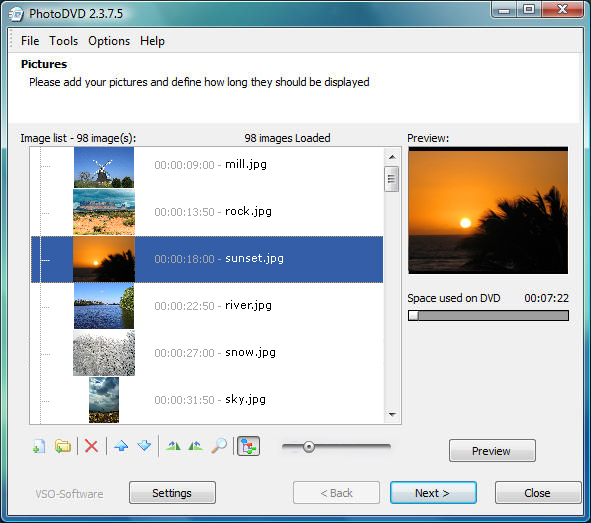
A wizard style interface lets you define the folders or files where to select the pictures. You can define a list of music files to play in the background. The transitions and animations of your pictures will enhance the experience of sharing your best memories; these can be set automatically or by you. Watch the results on a regular TV using a DVD Player or share on the internet on sites like YouTube. You can even create your slidshows in High Defnition (HD) foramt.
Latest Reviews

techgirl reviewed v4.0.0.37c on Nov 18, 2011
it's super easy to use. makes really nice slideshow with great transitions. I love it

goofygoat reviewed v4.0.0.37c on May 16, 2011
It is very easy to use. The transitions and animation make final result very nice. The menus are a plus. I definitely recommend this software especially if you are not very computer savy, like me. I am using to make memories of my vacation trips. I am on my 3rd DVD now.

lili29 reviewed v3.0.6.1 on Jul 10, 2009
I had Version 2 and just updated to V 3, and I am very pleased with this new version. The result really looks professional, especially with the new menus.
I really recommend it as it's so easy to use and the slideshows are stunning
lili29 reviewed v2.2.2.3 on Aug 4, 2006
Just to update you guys, PhotoDVD now supports RAW format !!
It also has a great new preview function
I use it and always recommend it as it is so easy to use and makes stunning slidewhows

JeRrYFaR reviewed v2.0.8 on Jul 15, 2005
I like the program a lot and it has great features, but at present it still doesn't have a menu creator (why it gets a 4 instead of a 5) and I had a couple of glitches on the dvd's I burned w/ it, but it's still very new and I think will be a large contender very soon in this type of program..

clairew reviewed v1.0.4 on Feb 17, 2005
I used this product compared to three others out on the market. It is true others come with more options for transitions, and adding captions and snow flakes falling, etc. Honestly most of the effects I could add or adjust simply made the slideshow cheezy and I ended up not using them at all.
This program was the easiest to use, the quality is great, and the execution time is remarkable.
More options may not always be the best way to go.
Very impressed and loving it everyday.

brainfight reviewed v0.9.7 on Oct 22, 2004
I disagree with previous review, well in a point of view it is true, but personnaly I don't want to edit the transition. The software is easy like this and I like the vibrant pictures animation generated.

bmac2 reviewed v0.9.4 Beta on Aug 30, 2004
Doesn't handle raw files. Does not allow you to have any control over the transition. No ablity to prview the slideshow before burning it to the DVD.

techgirl reviewed v4.0.0.37c on Nov 18, 2011
it's super easy to use. makes really nice slideshow with great transitions. I love it
goofygoat reviewed v4.0.0.37c on May 16, 2011
It is very easy to use. The transitions and animation make final result very nice. The menus are a plus. I definitely recommend this software especially if you are not very computer savy, like me. I am using to make memories of my vacation trips. I am on my 3rd DVD now.
lili29 reviewed v3.0.6.1 on Jul 10, 2009
I had Version 2 and just updated to V 3, and I am very pleased with this new version. The result really looks professional, especially with the new menus.
I really recommend it as it's so easy to use and the slideshows are stunning
lili29 reviewed v2.2.2.3 on Aug 4, 2006
Just to update you guys, PhotoDVD now supports RAW format !!
It also has a great new preview function
I use it and always recommend it as it is so easy to use and makes stunning slidewhows
JeRrYFaR reviewed v2.0.8 on Jul 15, 2005
I like the program a lot and it has great features, but at present it still doesn't have a menu creator (why it gets a 4 instead of a 5) and I had a couple of glitches on the dvd's I burned w/ it, but it's still very new and I think will be a large contender very soon in this type of program..
clairew reviewed v1.0.4 on Feb 17, 2005
I used this product compared to three others out on the market. It is true others come with more options for transitions, and adding captions and snow flakes falling, etc. Honestly most of the effects I could add or adjust simply made the slideshow cheezy and I ended up not using them at all.
This program was the easiest to use, the quality is great, and the execution time is remarkable.
More options may not always be the best way to go.
Very impressed and loving it everyday.
brainfight reviewed v0.9.7 on Oct 22, 2004
I disagree with previous review, well in a point of view it is true, but personnaly I don't want to edit the transition. The software is easy like this and I like the vibrant pictures animation generated.
bmac2 reviewed v0.9.4 Beta on Aug 30, 2004
Doesn't handle raw files. Does not allow you to have any control over the transition. No ablity to prview the slideshow before burning it to the DVD.