File Details |
|
| File Size | 1.3 MB |
|---|---|
| License | Shareware, $29.95 |
| Operating System | Windows 2000/9x/Server 2003/XP |
| Date Added | February 22, 2007 |
| Total Downloads | 6,489 |
| Publisher | MorningSound |
| Homepage | VirtualCamera |
Publisher's Description
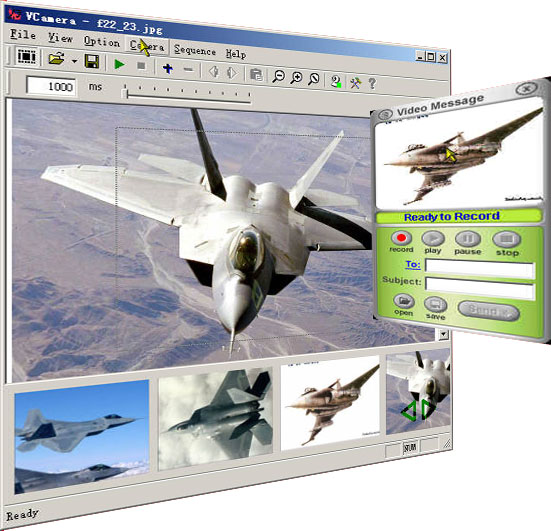
VirtualCamera is a virtual software camera. It needs no hardware. It can use your former medias, including pictures, video clips etc. as its sources, and let your application use it as a real camera. Most popular IM software such as MSN Messenger, Yahoo! Messenger, PalTalk, etc. support real time video chat. But if you have no camera, you will lose some interesting things. So you need the VirtualCamera.
If you already have a Web cam, you can use VirtualCamera too. It can easily switch its input to your real camera and easily switch it out. Sometimes when you want share some pictures with your net friends or you want to play your movies to them, you can use VirtualCamera.
Latest Reviews

aldo reviewed v1.2.1 Beta Build 0221 on Feb 22, 2007
Interesting software, but I can buy a REAL camera for less than that price.

rpavl reviewed v0.9.2.0516 Beta on May 18, 2006
Junk...they refunded my money ... program is buggy, and wont work in many applications that use cameras, mainly paltalk.

marclund reviewed v0.9.1.1008 Beta on Oct 12, 2005
been a registered user of this software for a year now and it's by far the best
it does everything the developers site says it does without any bugs i've encountered

daveyboy reviewed v0.80 Beta Build 0310 on Mar 11, 2004
Great idea and the first time I tried it, it worked fine. The controls aren't the most user friendly (playing images should be like playing movies - not choose between one or the other). When I opened a second time, the webcam is frozen on the last movie played and I can't get it to play anything else. Also I can play movies but I can't get it to display an image. Buggy.

Nicholas440 reviewed v0.80 Beta on Mar 5, 2004
Sounds cool but I cant get it to work the way it says it works. If I go into a video chat, turn on my cam its fine, I click the virtual cam, and select a video file and it plays the video file to the chat room. So far so good, but if I try to just display a still image from my picture folder , the virtual cam insists on showing the video file again. If you click the controls a few times, the program will go full screen, with a gray blur to it, and your only way out is to kill the program ( ctrl-alt-del) and restart it again. The documentation is very poor, the web page is of no help. There is no detailed help file on " how to" show an image or video file, its just bare bones help. Open file opens an image etc etc etc.. I dont think it will serve my purpose very well so I can only rate it as a 3 because its very frustrating not to have a help file that shows you how to run this thing. It also says you can switch back and forth from your real webcam to the virtual cam, but I havent been able to manage that either. Maybe future versions will improve.

Jeffsoft reviewed v0.70 on Nov 17, 2003
sounds coool

aldo reviewed v1.2.1 Beta Build 0221 on Feb 22, 2007
Interesting software, but I can buy a REAL camera for less than that price.
rpavl reviewed v0.9.2.0516 Beta on May 18, 2006
Junk...they refunded my money ... program is buggy, and wont work in many applications that use cameras, mainly paltalk.
marclund reviewed v0.9.1.1008 Beta on Oct 12, 2005
been a registered user of this software for a year now and it's by far the best
it does everything the developers site says it does without any bugs i've encountered
daveyboy reviewed v0.80 Beta Build 0310 on Mar 11, 2004
Great idea and the first time I tried it, it worked fine. The controls aren't the most user friendly (playing images should be like playing movies - not choose between one or the other). When I opened a second time, the webcam is frozen on the last movie played and I can't get it to play anything else. Also I can play movies but I can't get it to display an image. Buggy.
Nicholas440 reviewed v0.80 Beta on Mar 5, 2004
Sounds cool but I cant get it to work the way it says it works. If I go into a video chat, turn on my cam its fine, I click the virtual cam, and select a video file and it plays the video file to the chat room. So far so good, but if I try to just display a still image from my picture folder , the virtual cam insists on showing the video file again. If you click the controls a few times, the program will go full screen, with a gray blur to it, and your only way out is to kill the program ( ctrl-alt-del) and restart it again. The documentation is very poor, the web page is of no help. There is no detailed help file on " how to" show an image or video file, its just bare bones help. Open file opens an image etc etc etc.. I dont think it will serve my purpose very well so I can only rate it as a 3 because its very frustrating not to have a help file that shows you how to run this thing. It also says you can switch back and forth from your real webcam to the virtual cam, but I havent been able to manage that either. Maybe future versions will improve.
Jeffsoft reviewed v0.70 on Nov 17, 2003
sounds coool