File Details |
|
| File Size | 0.7 MB |
|---|---|
| License | Shareware, $30.00 |
| Operating System | Windows 2000/9x/XP |
| Date Added | October 11, 2005 |
| Total Downloads | 4,461 |
| Publisher | Windows Grep |
| Homepage | Windows Grep |
Publisher's Description
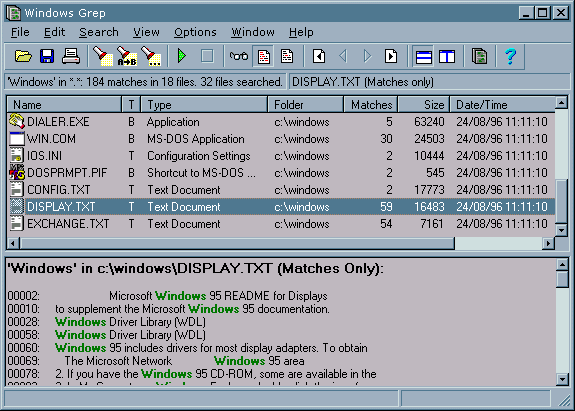
Windows Grep is a tool for searching files on your disks for occurrences of text strings that you specify. Although Windows and many other programs have file searching capabilities built-in, none can match the power and versatility of this program. It combines the power and flexibility of traditional command line grep utilities available on DOS, UNIX and other platforms with the ease of use of Microsoft Windows. In addition to searching, it can also perform global replacing in your files, with complete safety. It is designed for searching plain-ASCII text files, such as program source, HTML, RTF and batch files, but it can also search binary files such as word processor documents, databases, spreadsheets and executables.
Latest Reviews

dougk2 reviewed v2.3.0.2262 Beta on Jan 5, 2005
Comparing xfind to Windows Grep is like comparing a Chevy Corvair to a Corvette! This is a much more advanced search tool. Granted, you can get similar functionality using a command line grep in a UNIX shell, but if you want the convenience of a GUI, Windows Grep is the way to go. It includes quick, regex and soundex searches, date & size filters, settings for unformatted, delimited and fixed-width text files (also binary files) and a search & replace option. The output window is configurable as well.
I've used this tool for the past 3 years and have no complaints. However it appears that since there are no bugs to fix, the author has stopped development of this tool. This beta version was released two years ago!

otonet reviewed v2.3.0.2262 Beta on Jan 5, 2005
Honestly $30 is way too much if you just want to find strings. Looks like Xteq X-Find does the same job and is free
http://www.xteq.com/products/xfnd/
Or otherwise use plain cygwin grep.
If you need the replace feature, you may consider it, but there sure is freeware around for this, too.

dougk2 reviewed v2.3.0.2262 Beta on Jan 5, 2005
Comparing xfind to Windows Grep is like comparing a Chevy Corvair to a Corvette! This is a much more advanced search tool. Granted, you can get similar functionality using a command line grep in a UNIX shell, but if you want the convenience of a GUI, Windows Grep is the way to go. It includes quick, regex and soundex searches, date & size filters, settings for unformatted, delimited and fixed-width text files (also binary files) and a search & replace option. The output window is configurable as well.
I've used this tool for the past 3 years and have no complaints. However it appears that since there are no bugs to fix, the author has stopped development of this tool. This beta version was released two years ago!
otonet reviewed v2.3.0.2262 Beta on Jan 5, 2005
Honestly $30 is way too much if you just want to find strings. Looks like Xteq X-Find does the same job and is free
http://www.xteq.com/products/xfnd/
Or otherwise use plain cygwin grep.
If you need the replace feature, you may consider it, but there sure is freeware around for this, too.