File Details |
|
| File Size | 2.5 MB |
|---|---|
| License | Freeware |
| Operating System | Windows (All) |
| Date Added | May 26, 2020 |
| Total Downloads | 20,829 |
| Publisher | Phillip Gibbons |
| Homepage | X-Mouse Button Control |
Publisher's Description
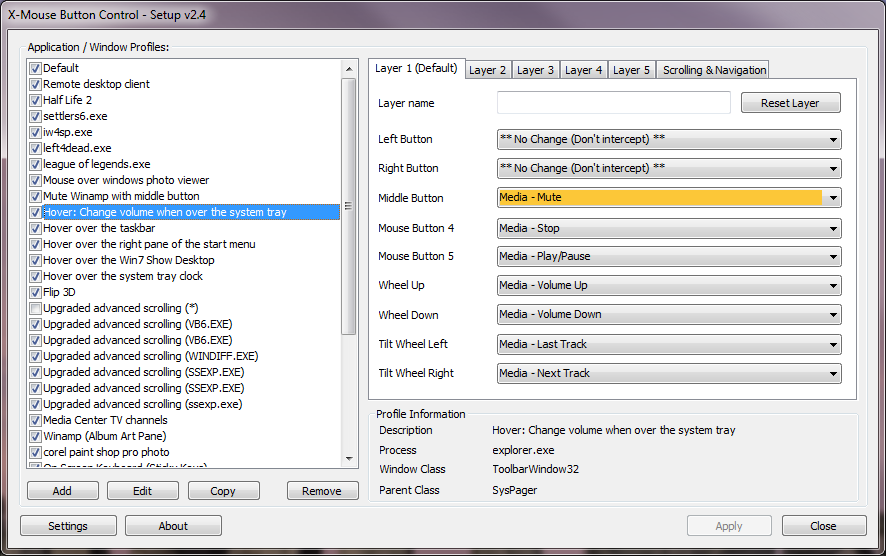
X-Mouse Button Control is a windows application to remap your mouse buttons. You are able to provide an application specific mappings, which means one application can use the mouse differently from another. This is useful for games which do not inherently support the extended mouse buttons, because you can map keys to each button.
What's more, the list of functions available to map to is somewhat more comprehensive than the 32bit MS Intellimouse Software can handle, including things like: Volume Up/Down/Mute; Media Player control; Send a custom keystroke sequence; and Launch an email application.
Latest Reviews

CyberDoc999 reviewed v2.10 on Feb 26, 2015
ignore some guy.. he has a defective computer... this is perfect I blocked it in my firewall

some guy reviewed v2.9.2 on Dec 27, 2014
when I blocked this program from access to the internet " phone home" through firewall it brought my mouse to a craw

Kylde reviewed v2.4 on Mar 6, 2012
Great app, & the author is more than willing to help with any bugs over at his forum

FreeSpeech reviewed v2.1 on Aug 15, 2011
Great app! Very usefull!

mjm01010101 reviewed v1.36 on Dec 10, 2008
Because most decent mice have more than 5 buttons/functions, and this app doesn't support those mice or those functions.

tatool reviewed v1.36 on Dec 10, 2008
why use a crap like logitech setpoint when the brilliant thing like x-mouse is around? ;)

davana reviewed v1.36 on Apr 5, 2008
Fantastic!! Wow thanks for this great app!

Nighted reviewed v1.30 on Dec 23, 2007
Simply awesome! I was using M$ IntelliPoint to add some functionality to my mouse but then found this. Being able to set different functions for different programs makes this program extremely useful. You'll be thinking of new ways to use it all the time.
A must have! I only wish it were portable.

CyberDoc999 reviewed v2.10 on Feb 26, 2015
ignore some guy.. he has a defective computer... this is perfect I blocked it in my firewall
some guy reviewed v2.9.2 on Dec 27, 2014
when I blocked this program from access to the internet " phone home" through firewall it brought my mouse to a craw
Kylde reviewed v2.4 on Mar 6, 2012
Great app, & the author is more than willing to help with any bugs over at his forum
FreeSpeech reviewed v2.1 on Aug 15, 2011
Great app! Very usefull!
mjm01010101 reviewed v1.36 on Dec 10, 2008
Because most decent mice have more than 5 buttons/functions, and this app doesn't support those mice or those functions.
tatool reviewed v1.36 on Dec 10, 2008
why use a crap like logitech setpoint when the brilliant thing like x-mouse is around? ;)
davana reviewed v1.36 on Apr 5, 2008
Fantastic!! Wow thanks for this great app!
Nighted reviewed v1.30 on Dec 23, 2007
Simply awesome! I was using M$ IntelliPoint to add some functionality to my mouse but then found this. Being able to set different functions for different programs makes this program extremely useful. You'll be thinking of new ways to use it all the time.
A must have! I only wish it were portable.