
File Details |
|
| File Size | 4.5 MB |
|---|---|
| License | Shareware, $39.95 |
| Operating System | Windows (All) |
| Date Added | May 6, 2022 |
| Total Downloads | 21,339 |
| Publisher | Donald Lessau |
| Homepage | XYplorer |
Publisher's Description
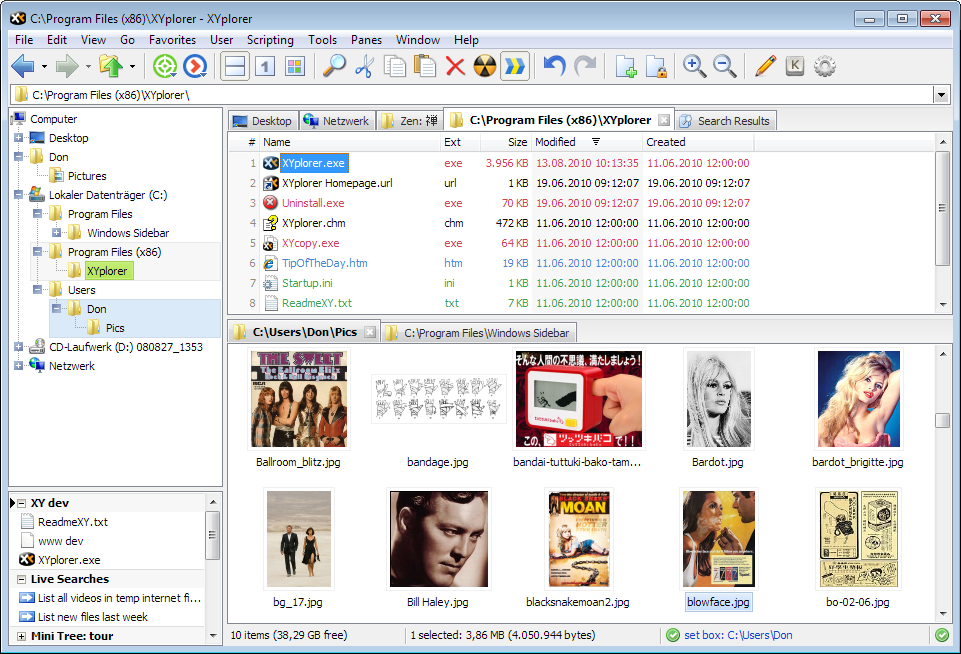
XYplorer is a tabbed file manager for Windows. It features a powerful file search, a versatile preview, a highly customizable interface, optional dual pane, and a large array of unique ways to efficiently automate frequently recurring tasks. It's fast and light, it's innovative, and it's portable.
Latest Reviews

Vivek Kowshik reviewed v19.40.0000 on Nov 26, 2018
Why does anyone have to pay for a file manager anymore? Free Commander and Just File Manager are available at no cost. I just cannot imagine paying this kind of price. What is it that this software offers that is not available in the free stuff, and is it worth the difference?

reddy.shyam reviewed v17.60.0100 on Mar 3, 2017
No more free version. Bit of a dampener. Have moved on.
http://freecommander.com/

NyaR reviewed v15.50.0000 on Jul 30, 2015
Really nice, I'm torn between 4 and 5 stars. The reason is that there are compatibility issues with drag/drop and 32/64 bit applications.

mamorrison reviewed v14.50.0300 on Nov 17, 2014
It has a plethora of valuable options. The menus are so well designed and intuitive that, although I've used XYplorer heavily for almost two weeks I've yet to have to consult the on-line documentation. That documentation, by the way, is excellent: thorough without being overwhelming, designed to facilitate access to particular topics, and there is even an extensive manual one can download in PDF from the site. It does have an awful lot of features; but because it's so well designed, users can just ignore features they don't need at the moment and/or don't want to bother learning about. I could get it doing moderately complicated file-management tasks in a very short period of time.
Windows Explorer has never been particularly well-designed; it’s dorky and awkward to use. Worse, it lacks several obviously important features. Many years ago I switched to an alternative shareware file manager which was a vast improvement in every respect over Explorer. But for some reason, over the years, as the designers of this produce modified and issued new releases of, they’ve screwed it up in a variety of ways: removed some useful features, added some whose purpose seems inscrutable,introduced bugs and irritating reminders that pop up to not purpose, embedded in it mechanisms for upgrades and to ensure that it’s used on only one machine---mechanisms that malfunction more often than they should (that is, more often than never). Having finally gotten fed up, I did a lot of research on line in search of an alternative; XYplorer was one of a handful of packages I decided to try.It only took a day or two of testing to decide that XYplorer is so good that I had no need to even try any of the other options I downloaded. Almost every time I use it, I discover new features that are useful, features I didn't even know it has. It has already earned back its (extremely modest cost) many times over.
NyaR reviewed v14.30.0200 on Jul 17, 2014
Most customizable file manager that's constantly updated with useful features!
PS: aaverian works for mycommander, lol.

aaverian reviewed v14.20.0300 on Jul 5, 2014
Pretty god file manager, I tried all file managers available on the market.
My Commander is my favorite.

infectiphibian reviewed v14.10.0000 on May 19, 2014
It comes right after Directory Opus but that one is really expensive.

Loco78 reviewed v13.80.0000 on Mar 26, 2014
XYplorer is the best manager to manage the files I've ever used, automate and simplify my work on your computer like never before. Clear and easy user interface, easily accessible functions and many other features that make a program that is in my opinion the best manager of files on the market that seamlessly integrates with the system and can perfectly replace Windows Explorer.
His strong powerful functions and easy availability of the interface not only replace the Explorer, but also many other programs and gives us all these features in one place.
When once you try working with XYplorer will not be able to think that someday you could use a computer without it.
The program really worth buying!

HeilNizar reviewed v13.50.0000 on Dec 18, 2013
Tried almost all other file managers, none come even close.
I don't know how I lived before it!
-Portable directly from the author, that included file types and icons.
-Regularly maintained.
-Tons of options.

Blaxima reviewed v13.00.0000 on Sep 27, 2013
With Windows 7 Explorer replacements became unnecssary for me but if I was stuck with Win8 I would be using one again. XY isn't bad at all though I find it chokes on large image folders. With so many great free alternatives it's also hard to justify it's price tag.
While I love tabbed browsing for internet browsers I hate them for working between explorer windows, I find dual pane to be better. Enter NexusFile, a free dual pane explorer replacement that has all the features I need. Sadly the last update was close to a year ago, showing just how little used these types of software of become

Vivek Kowshik reviewed v19.40.0000 on Nov 26, 2018
Pros: Nothing to offer
Cons: Over priced
Bottom Line: Why does anyone have to pay for a file manager anymore? Free Commander and Just File Manager are available at no cost. I just cannot imagine paying this kind of price. What is it that this software offers that is not available in the free stuff, and is it worth the difference?
reddy.shyam reviewed v17.60.0100 on Mar 3, 2017
No more free version. Bit of a dampener. Have moved on.
http://freecommander.com/
NyaR reviewed v15.50.0000 on Jul 30, 2015
Really nice, I'm torn between 4 and 5 stars. The reason is that there are compatibility issues with drag/drop and 32/64 bit applications.
mamorrison reviewed v14.50.0300 on Nov 17, 2014
It has a plethora of valuable options. The menus are so well designed and intuitive that, although I've used XYplorer heavily for almost two weeks I've yet to have to consult the on-line documentation. That documentation, by the way, is excellent: thorough without being overwhelming, designed to facilitate access to particular topics, and there is even an extensive manual one can download in PDF from the site. It does have an awful lot of features; but because it's so well designed, users can just ignore features they don't need at the moment and/or don't want to bother learning about. I could get it doing moderately complicated file-management tasks in a very short period of time.
Windows Explorer has never been particularly well-designed; it’s dorky and awkward to use. Worse, it lacks several obviously important features. Many years ago I switched to an alternative shareware file manager which was a vast improvement in every respect over Explorer. But for some reason, over the years, as the designers of this produce modified and issued new releases of, they’ve screwed it up in a variety of ways: removed some useful features, added some whose purpose seems inscrutable,introduced bugs and irritating reminders that pop up to not purpose, embedded in it mechanisms for upgrades and to ensure that it’s used on only one machine---mechanisms that malfunction more often than they should (that is, more often than never). Having finally gotten fed up, I did a lot of research on line in search of an alternative; XYplorer was one of a handful of packages I decided to try.It only took a day or two of testing to decide that XYplorer is so good that I had no need to even try any of the other options I downloaded. Almost every time I use it, I discover new features that are useful, features I didn't even know it has. It has already earned back its (extremely modest cost) many times over.
NyaR reviewed v14.30.0200 on Jul 17, 2014
Most customizable file manager that's constantly updated with useful features!
PS: aaverian works for mycommander, lol.
aaverian reviewed v14.20.0300 on Jul 5, 2014
Pretty god file manager, I tried all file managers available on the market.
My Commander is my favorite.
infectiphibian reviewed v14.10.0000 on May 19, 2014
It comes right after Directory Opus but that one is really expensive.
Loco78 reviewed v13.80.0000 on Mar 26, 2014
XYplorer is the best manager to manage the files I've ever used, automate and simplify my work on your computer like never before. Clear and easy user interface, easily accessible functions and many other features that make a program that is in my opinion the best manager of files on the market that seamlessly integrates with the system and can perfectly replace Windows Explorer.
His strong powerful functions and easy availability of the interface not only replace the Explorer, but also many other programs and gives us all these features in one place.
When once you try working with XYplorer will not be able to think that someday you could use a computer without it.
The program really worth buying!
HeilNizar reviewed v13.50.0000 on Dec 18, 2013
Tried almost all other file managers, none come even close.
I don't know how I lived before it!
-Portable directly from the author, that included file types and icons.
-Regularly maintained.
-Tons of options.
Blaxima reviewed v13.00.0000 on Sep 27, 2013
With Windows 7 Explorer replacements became unnecssary for me but if I was stuck with Win8 I would be using one again. XY isn't bad at all though I find it chokes on large image folders. With so many great free alternatives it's also hard to justify it's price tag.
While I love tabbed browsing for internet browsers I hate them for working between explorer windows, I find dual pane to be better. Enter NexusFile, a free dual pane explorer replacement that has all the features I need. Sadly the last update was close to a year ago, showing just how little used these types of software of become

smaragdus reviewed v12.70.0000 on Jul 23, 2013
Version 12 and still no FTP support.

guru_v reviewed v12.70.0000 on Jul 23, 2013
To begin, I'm not knocking this program completely, but it is, in my opinion, not the best of its type. I received a free version [Giveaway of the Day] a while back, and was really excited to get it. But, after about a week, I found myself using it less and less. That was over a year ago.
Definitely a good program, just not a great program.
I much prefer Explorer², from Zabkatremia Software, and there is a freeware version which does not nag, nor time out. {I have not been compensated in any way, I simply believe that users should help other users whenever possible, and Explorer² is so much more useful to me, I think it may be to others}
Rating good but not great...3 stars

dubstepmaker reviewed v12.10.0000 on Feb 14, 2013
love this program