File Details |
|
| File Size | 36.3 MB |
|---|---|
| License | Freeware |
| Operating System | Windows 2000/Vista/XP |
| Date Added | December 3, 2008 |
| Total Downloads | 410,589 |
| Publisher | Xpadder |
| Homepage | Xpadder |
Publisher's Description
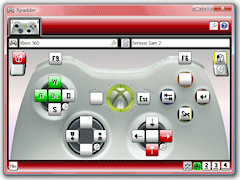
Xpadder simulates keypresses and mouse movements using a gamepad. This allows you to use your controller to play PC games with poor or no joystick support (including DOS games in a Windows DOS box and Shockwave/Java internet games).
Latest Reviews

tirpider reviewed v5.3 on Sep 13, 2014
But it's not freeware?
$9.99 USD
Great program, and it does good things, but it is not freeware by any means.
It is feature limited unless you buy it.
(-3 stars for lies)

dubstepmaker3000 reviewed v5.3 on May 8, 2013
very good!

Alicruz reviewed v5.3 on Feb 27, 2013
Good!

reviewer reviewed v5.3 on Apr 12, 2012
cbngfrn

playzegame reviewed v5.3 on May 29, 2011
Very nice!

Kingwaddy1 reviewed v5.3 on May 23, 2011
Very Nice!

abossail reviewed v5.3 on Mar 11, 2011
tth

tiagoxpd reviewed v5.3 on Jan 17, 2011
very useful

trents reviewed v5.3 on Dec 2, 2010
Hi,
It is nice...We will upload this..

MC reviewed v5.3 on Nov 7, 2010
MUST PAY ?

tirpider reviewed v5.3 on Sep 13, 2014
But it's not freeware?
$9.99 USD
Great program, and it does good things, but it is not freeware by any means.
It is feature limited unless you buy it.
(-3 stars for lies)
dubstepmaker3000 reviewed v5.3 on May 8, 2013
very good!
Alicruz reviewed v5.3 on Feb 27, 2013
Good!
reviewer reviewed v5.3 on Apr 12, 2012
cbngfrn
playzegame reviewed v5.3 on May 29, 2011
Very nice!
Kingwaddy1 reviewed v5.3 on May 23, 2011
Very Nice!
abossail reviewed v5.3 on Mar 11, 2011
tth
tiagoxpd reviewed v5.3 on Jan 17, 2011
very useful
trents reviewed v5.3 on Dec 2, 2010
Hi,
It is nice...We will upload this..
MC reviewed v5.3 on Nov 7, 2010
MUST PAY ?

bryanst reviewed v5.3 on Aug 24, 2010
excelente xD

deforth reviewed v5.3 on Aug 4, 2010
gracias

lopez78900 reviewed v5.3 on Apr 8, 2010
Uhh i cant download it so not help ful

surp777 reviewed v5.3 on Mar 30, 2010
tank you men

geylex reviewed v5.3 on Mar 30, 2010
grasias

islap reviewed v5.3 on Mar 15, 2010
cool

marcosrios reviewed v5.3 on Feb 1, 2010
gracias

No_you reviewed v5.3 on Jan 11, 2010
nice 1 thx

angelpunkred reviewed v5.3 on Dec 18, 2009
'0+u9ryjhtrhyu

terrymed11 reviewed v5.3 on Nov 9, 2009
This is great! I like this.

baluman reviewed v5.3 on Sep 21, 2009
asd

csfefdds reviewed v5.3 on Aug 22, 2009
control

appnormal reviewed v5.3 on Jun 30, 2009
thx

eric11992 reviewed v5.3 on Mar 6, 2009
hgmym

Andriux260 reviewed v5.3 on Mar 5, 2009
How to download it?

Dj_DarunxXx reviewed v5.3 on Jan 25, 2009
Great this programis Great

jhonja reviewed v5.3 on Jan 25, 2009
gamepag

hardtofindaname reviewed v5.3 on Jan 20, 2009
doesn't work at all here... Neither the PS3 controller (for which only a few buttons work) nor the X360 controller, which isn't even recognized...

us3r reviewed v5.2 on Jun 24, 2008
Controler randomly stops responding. Untill this bug will be fixed it's useless, at least for me.

Adrian79 reviewed v2008.02 on Feb 8, 2008
Great!! been using this for 2 months, my profiles for some games are on the webpage... download and enjoy!
DONATE

Nighted reviewed v2008.01 on Jan 24, 2008
Holy freakin' crap! This is AWESOME. I tried many others and somehow missed this one. The others are such a pain in the butt to setup that I just gave up (all except for Joystick Cursor Tool which is very simple and quite good although you need another app by the same guy to map your mouse). This is the best one overall because it has not only keyboard mapping but mouse as well.
Adrian79 reviewed v2008.01 on Jan 12, 2008
Love it!! uploaded some profiles.. author is very generous and friendly! DONATE!!
xbox360 controller is native to windows now.. ps3 controller is useless, but i will get home and test what it can do with this :-)
thx

Chocobito reviewed v2007.12 on Nov 30, 2007
This little soft is wonderfull. Now I can play Flash games (and much more) with me PS2 Original control. Excellent.
Adrian79 reviewed v2007.11 on Oct 26, 2007
thanks!! enjoy
Adrian79 reviewed v2007.10a on Oct 1, 2007
life is wonderful now!!!!!!!!!!!!!!!!!!!!!!!!!!!!
Adrian79 reviewed v2007.08 on Aug 2, 2007
am i dreaming?...just yesterday i was thinking ..."wish i could use my xbox360 pad for battlefield 2142!", once i install this i will report back!

Ryusennin reviewed v2007.08 on Aug 1, 2007
Powerful tool, but much more confusing than JoyToKey to configure.

sarrik reviewed v2007.07.06 on Jul 6, 2007
Works really well on both XP and Vista, and takes so much less memory than logitech's aging gaming software, which doesn't even appear to be updated anymore.
It's easy to set up once you have the right picture for your pads and can potentially support any pad you care to throw at it.
The only thing I can think of to add is analog stick axis inversion in a single profile. I can only find options to assign inverted mouse axes.
The only other thing is that downloading the controller pictures doesn't seem to work. But this may be my firewall, so I haven't reduced the rating for that.

darkwater reviewed v2007.06.29 on Jul 1, 2007
Xpadder is a lot better than JoyToKey because it recognises what your gamepad can do and can use all of the features on it, including vibration and dual sticks.
It also has a much better UI and allows you to use a picture to remind you which button does what, rather than trying to remember exactly which one button 16 is.

bouncyboingy reviewed v2006.09.06 on Sep 6, 2006
As an update to my previous review, I submitted the settings for my gamepad and it was included into the app overnight !!
Impressive
Cant wait to tweak some of the limitations of this pad using this.
Works great so far
bouncyboingy reviewed v2006.09.04 on Sep 5, 2006
Good Potential here, but for me it did not recognize my MadCatz Gamepad ( basically a PC version of an XBox pad). It does allow you to test your pad and submit the results to be included, but it failed to detect the analogue triggers.
For now I will stick with JoyToKey Ver3.7.4 and check back later