File Details |
|
| File Size | 0.5 MB |
|---|---|
| License | Shareware, $15.00 |
| Operating System | Windows 2000/9x/Server 2003/XP |
| Date Added | March 28, 2005 |
| Total Downloads | 914 |
| Publisher | Basta Computing, Inc. |
| Homepage | ZMover |
Publisher's Description
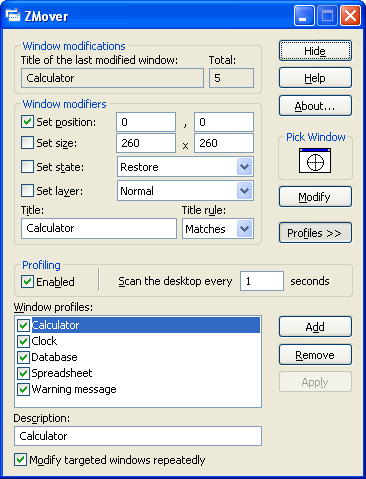
ZMover gives you control of your desktop layout by allowing you to set the size, position, state, and layering of application windows. You can define window positions on-the-fly or give ZMover a list of windows to remember. When these windows appear, ZMover will automatically arrange them for you.
Latest Reviews

mkosinski reviewed v5.0 on Dec 7, 2007
Is there any similar app around to test?
This one doesn't work if you try to set size of PuTTY terminal windows.

stisev reviewed v5.0 on Aug 10, 2007
There's no other program like it. Hands down the best way to deal with programs that steal focus or popup in your face!

bugmenot reviewed v5.0 on Jan 27, 2007
Not very useful, since it only allows you to specify window titles for targeting, and not class names. How ridiculous is this? Many times, child windows will have the same title, but a different class, as their parent. Many times, window titles are totally dynamic, and don't have the application name in them at all. Many times, window titles simply aren't unique. What a joke.

PC Rat reviewed v5.0 on Mar 28, 2005
Seems to do what it says it'll do. And, hopefully, is less glitchy than Actual Windows Guard.
The Computer Rodent

mkosinski reviewed v5.0 on Dec 7, 2007
Is there any similar app around to test?
This one doesn't work if you try to set size of PuTTY terminal windows.
stisev reviewed v5.0 on Aug 10, 2007
There's no other program like it. Hands down the best way to deal with programs that steal focus or popup in your face!
bugmenot reviewed v5.0 on Jan 27, 2007
Not very useful, since it only allows you to specify window titles for targeting, and not class names. How ridiculous is this? Many times, child windows will have the same title, but a different class, as their parent. Many times, window titles are totally dynamic, and don't have the application name in them at all. Many times, window titles simply aren't unique. What a joke.
PC Rat reviewed v5.0 on Mar 28, 2005
Seems to do what it says it'll do. And, hopefully, is less glitchy than Actual Windows Guard.
The Computer Rodent