
File Details |
|
| File Size | 1.9 MB |
|---|---|
| License | Shareware, $29.95 |
| Operating System | Windows (All) |
| Date Added | November 10, 2023 |
| Total Downloads | 13,771 |
| Publisher | ZEDTEK, Inc. |
| Homepage | ZTreeWin |
Publisher's Description
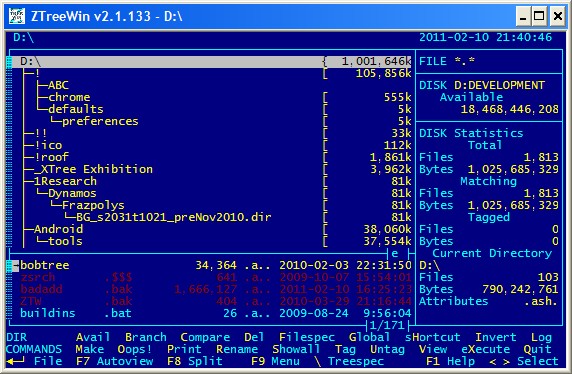
ZTreeWin is a text-mode file/directory manager for Windows. It has been developed as a successor to the legendary DOS file-managers of the past, which software vendors have abandoned, in todays GUI-centric computing world.
Latest Reviews

Arawak Deserter reviewed v2.4.217 Beta on Aug 12, 2024
One hundred stars!!!

ANDREFERNANDES reviewed v2.2 on Aug 3, 2024
Despite its dated appearance in this world of windows and web applications, it remains the best tool for manipulating files in the Windows environment today.

ILP reviewed v2.2 on Jul 18, 2024
This may look like a throwback but it is very very fast and capable of file operations no other file manager comes close too. You can get complex tasks done literally in seconds. For instances comparing and synchronising folders between drives. Add in it's batch script capability, throw ROBOCOPY in there and sit back. Feature rich is an understatement. Just RTFM and away you go.
As a retired IT professional in Networking and Development for some of the biggest banks in the world this was always my secret weapon that made everyone else look like chumps. The old Ztree got rewritten using 32 bit Windows API backend for file operations.

jwolfley reviewed v2.2 on Sep 9, 2021
anybody remember Q-DOS:
https://winworldpc.com/product/gazelle-q-dos/3x
weve come a long way baby.
thx again and ill send my $20.

dbcole reviewed v2.2 on Dec 23, 2020
Extraordinary file manager!
But hard to learn.

marcelx reviewed v2.2 on Jul 30, 2015
the most powerful and easier to use file manager.
You can log a complete 2T in seconds,
search at the same time for *.pdf *.xls* wooowwwww
You can even search all tag files for a word inside them without opening them one by one.
or rename a bunch of files from abc.xyz to 123abc.xyz in a simple operation that only takes a couple of second
you can sort ALL the files in ALL directories in ONE window. You can also sort ALL the directories and search their names with filters....
you can edit a file in text mode or in hex mode...
woooooowwwwwwwww The possibilities are nearly endless.
No other files manager can do that much.
No other files manager is as fast.
No other files managers can do as much!
Like any powerful tools it takes a little use to is is worth it.

jif0riddim reviewed v2.2 on Dec 9, 2014
If your serious about file management then you seriously need ZTreeWin and this beta has not given me any problems - it just gets better - and easier!
To abuse a line from a song "...every little thing he does is magic...".
I emailed Kim with a query and within a couple of hours I had my answer - "you can list in date created order, it's in beta v2.4.145". I can stop going mad at last, thank you, thank you, thank you for yet again saving me from hours of Windows Explorer tedium. Never needed such a thing as date created listing 'til recently and yet again it's one of the zillion things you can do properly with files in ZTreeWin with the result you want. OK, it's not zillions but there's more here than I've had use for to date ...but one day I may! Like many others, been with this since XTree so I'm a fan but do use it, read the help, make your life easier and save hours!! And send him a donation now and then...

judsonrandall reviewed v2.2 on Mar 5, 2014
I've been a user of XTree, and all its successors to date, and find it to be the most easily useful file manager. Windows Explorer is no match for this wonderful program.

raulhernandez reviewed v2.2 on Mar 25, 2012
I have been Ztree user since its rebirth from Xtree.
It is so powerful when you become familiar with it, that when I have to use a computer without Ztree I feel like trying to run in the mud.
Thank you Kim, from Mexico
Raul Hernandez

anyoneis reviewed v2.2 on Sep 9, 2011
I clung to my copy of XTree until XTree Gold came out - I didn't like the latter and continued to use XTree until it no longer worked for me. Then I found ZTreeWin and I have never looked back.
This is an indespensable tool for IT folk, developers, and other file wranglers. That said, the basic interface is intuitive enough for the casual PC-savvy user. (Advanced commands require some digging around and might frustrate a beginner.)
If I find a file-wrangling task I want to do, I just assume it is in there and go find it - I am seldom disappointed!
David
Arawak Deserter reviewed v2.4.217 Beta on Aug 12, 2024
Pros: I started using ZTreeWin when it still was XTree (quite a long ago, eh?...), and nowadays it's the air that I breathe! Counting the minutes to see an Ubuntu-compatible version!
Cons: Cons?? you kidding me?? ;-)
Bottom Line: One hundred stars!!!
ANDREFERNANDES reviewed v2.2 on Aug 3, 2024
Pros: Extremely fast tool for file searches, text searches within files, comparing files, copying and moving files, editing files with your favourite editor (I prefer Vim, but you're free to choose), creating batches with reference to files and whatever else your creativity can think of relating to file manipulation.
Cons: There's no native version for Linux.
Lack of integration with git. It would be perfect to get basic information about folders that are under Git version control, even if it were through an optional plugin.
Bottom Line: Despite its dated appearance in this world of windows and web applications, it remains the best tool for manipulating files in the Windows environment today.
ILP reviewed v2.2 on Jul 18, 2024
Pros: Very very fast and capable of file operations no other file manager comes close too. Get complex tasks done literally in seconds.
Cons: NOT a gui interface ... which is actually a pro as it vastly quicker.
Bottom Line: This may look like a throwback but it is very very fast and capable of file operations no other file manager comes close too. You can get complex tasks done literally in seconds. For instances comparing and synchronising folders between drives. Add in it's batch script capability, throw ROBOCOPY in there and sit back. Feature rich is an understatement. Just RTFM and away you go.
As a retired IT professional in Networking and Development for some of the biggest banks in the world this was always my secret weapon that made everyone else look like chumps. The old Ztree got rewritten using 32 bit Windows API backend for file operations.

jwolfley reviewed v2.2 on Sep 9, 2021
Pros: its indispensable.
Cons: none
Bottom Line: anybody remember Q-DOS:
https://winworldpc.com/product/gazelle-q-dos/3x
weve come a long way baby.
thx again and ill send my $20.
dbcole reviewed v2.2 on Dec 23, 2020
Pros: I LOVE zTree! I've been using it since I ran across its DOS based predecessor, xTree, in the 1990s!
zTree is an extraordinarily file manager. It can manage any or all files on your harddrive. It can manage any or all files across your entire local network!
zTree can display and act up file lists of any length. I've personally been able to select and perform operations upon file lists containing literally millions of file names.
File lists can be selected:
- By directory
- By branch
- By harddrive
- By the entire network (or any subset)
- By file name masks
- By "tagging" (where you get to select the files to list both manually and categorically).
Ditto for folder names a well!
- Folders can be displayed as a tree
- Or as a flat list where you can perform the same sort of selections by tagging and/or masks as you can with file names.
zTree does not replace File Explorer, but it does complement it nicely. You can do many useful things with FE. You can do many AMAZING things with zTree!
Cons: zTree is a 100% text based device. It does not accept mouse actions of any sort:
- No selections by clicks
- No dragging-dropping anything
To use zTree, you have to learn a very large set of shortcut keystrokes. There is a hints list at the bottom of its displays. But you can't learn from it. It is useful only as reminders, not for training.
There is comprehensive help via the F1 key, but I find it hard to navigate and search. My work-around for that is to bring up the underlying text file in my favorite editor (SPF/Pro, if you want to know) and use its tools to find what I want.
Sadly, because of all this, I have been the only person at my organization willing to go to the effort needed to learn zTree. The learning curve is simply too steep for everyone else here. But in my own case, I have found the learning effort has been VASTLY will worth it.
Bottom Line: Extraordinary file manager!
But hard to learn.
marcelx reviewed v2.2 on Jul 30, 2015
the most powerful and easier to use file manager.
You can log a complete 2T in seconds,
search at the same time for *.pdf *.xls* wooowwwww
You can even search all tag files for a word inside them without opening them one by one.
or rename a bunch of files from abc.xyz to 123abc.xyz in a simple operation that only takes a couple of second
you can sort ALL the files in ALL directories in ONE window. You can also sort ALL the directories and search their names with filters....
you can edit a file in text mode or in hex mode...
woooooowwwwwwwww The possibilities are nearly endless.
No other files manager can do that much.
No other files manager is as fast.
No other files managers can do as much!
Like any powerful tools it takes a little use to is is worth it.
jif0riddim reviewed v2.2 on Dec 9, 2014
If your serious about file management then you seriously need ZTreeWin and this beta has not given me any problems - it just gets better - and easier!
To abuse a line from a song "...every little thing he does is magic...".
I emailed Kim with a query and within a couple of hours I had my answer - "you can list in date created order, it's in beta v2.4.145". I can stop going mad at last, thank you, thank you, thank you for yet again saving me from hours of Windows Explorer tedium. Never needed such a thing as date created listing 'til recently and yet again it's one of the zillion things you can do properly with files in ZTreeWin with the result you want. OK, it's not zillions but there's more here than I've had use for to date ...but one day I may! Like many others, been with this since XTree so I'm a fan but do use it, read the help, make your life easier and save hours!! And send him a donation now and then...
judsonrandall reviewed v2.2 on Mar 5, 2014
I've been a user of XTree, and all its successors to date, and find it to be the most easily useful file manager. Windows Explorer is no match for this wonderful program.
raulhernandez reviewed v2.2 on Mar 25, 2012
I have been Ztree user since its rebirth from Xtree.
It is so powerful when you become familiar with it, that when I have to use a computer without Ztree I feel like trying to run in the mud.
Thank you Kim, from Mexico
Raul Hernandez
anyoneis reviewed v2.2 on Sep 9, 2011
I clung to my copy of XTree until XTree Gold came out - I didn't like the latter and continued to use XTree until it no longer worked for me. Then I found ZTreeWin and I have never looked back.
This is an indespensable tool for IT folk, developers, and other file wranglers. That said, the basic interface is intuitive enough for the casual PC-savvy user. (Advanced commands require some digging around and might frustrate a beginner.)
If I find a file-wrangling task I want to do, I just assume it is in there and go find it - I am seldom disappointed!
David

arayat reviewed v2.2 on Mar 10, 2011
ZTreeWin can be best described as a much better alternative to Windows Explorer.
It is much much faster. It has many additional and useful functions.
Everything having to do with viewing, searching and organising (copying, renaming, backing up) files and directories work much easier, quicker and stress-free with ZTree.
A user saves easily an hour per week just by swithcing from Esplorer to ZTree
For one particular task (quickly viewing the contents of text files with non .txt extensions ) I saved 2 -3 hours a day.
But you must learn how to use it first. This takes some time and getting used to. It's however time well invested.

skylight reviewed v2.1 on Jan 22, 2011
I am glad that even though Norton bought out XtreeGold and killed it Kim Henkel created a new incarnation of it as ZTreeWin. Though I must say I never thought that Ztree was as popular as the reviews here on fileforum.
Here is my experience with Ztree - "When All Else Fails Go To Ztree for Disk or File Management". Even though Windows 7 has about the best search feature I have experienced. When that fails it is time for Ztree because you can use wildcard characters. And if in your original search on Win& you made a syntax error you can check out whether or not you did in Ztree using wild cards.
Some of the other reviewers here have said they cannot understand why more people don't use ZtreeWin. I think it is because those of us who were weaned on the DOS interface are very comfortable using keyboard commands. Those who arrived on the scene since may not have the keyboarding skills and might be thinking of the non-GUI text-based interface of ZtreeWin as a bit disorienting. Personally I love it and liken it to going into a technology store, and checking out stuff out in the back where they normally won't let you go.
I would have given ZtreeWin a 5 star rating but I took 1 star off only because I would like to see one feature extended beyond what it does presently. I am referring to opening up a file's long filename, extension, date, attributes and size the long filename gets cut off and you need to keep switching back and forth between the long filename view and the file details view. Hope Kim can address this in a future upgrade.
In my experience with ZtreeWin for over a decade at least Kim Henkel has been nothing but generous. He has NEVER demanded anything, and every time there is a major upgrade to ZtreeWin even then he has let us download the upgrade. It is only recently on the introduction of ZtreeWin 2x that he requested for a donation of $ 10. Given the degree of ZtreeWin's functionality when you are really in need and don't have time to try out a GUI file search. I count this aspect of the incredible utility of ZtreeWin as it's greatest selling point. And those tech-savvy folks who are uncomfortable with ZtreeWin's text-based interface, well they are missing out on the ability to dig deep into their hard disk.
Thank you Kim Henkel.

bmaltz reviewed v2.1 on Oct 8, 2010
ZTree is BY FAR the program I used the most. For what it does, file management and search, it beats anything available. I like it so much that I've sent numerous donations throughout the past 10+ years, in addition to buying a license in 1998. I started with Xtree and moved over to Ztree when Xtree went away. I've been using Ztree since the EARLY 1.x days, when it was free, (sometime WELL before 1998, when I purchased a license).
Keep up the great work