File Details |
|
| File Size | 0.0 MB |
|---|---|
| License | Shareware, $8.00 |
| Operating System | Windows 2000/Server 2003/Vista/XP |
| Date Added | May 12, 2008 |
| Total Downloads | 1,359 |
| Publisher | ACAPsoft |
| Homepage | iTimeSync |
Publisher's Description
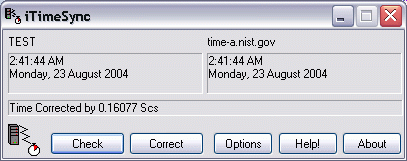
iTimeSync will keep the clock of your PC, or even your whole LAN, synchronized to the correct time. This can be done manually, with no configuration needed, by simply running the program and pressing "Correct". Alternatively, iTimeSync can also be set to automatically synchronize any minute / hour / day period and/or can be run as a Windows Service so it runs automatically and transparently in the background. TIME and SNTP are both supported.
Latest Reviews

cricri_pingouin reviewed v1.4 on Jun 20, 2009
Has always been working reliably for me, and I use it quite often since the time gets rapidly out of sync on my machine (maybe a crap oscillator or something?). I tried many free alternatives, but this one does the job very well, is very easy to use, very small and portable.

emanresU deriseD reviewed v1.4 on Apr 20, 2009
Unreliable. Avoid.
@cricri_pingouin: You think this software is reliable? What about that bug (in version 1.4, maybe still present in later versions) where iTimeSync hammers NTP servers every millisecond? Oh, that didn't happen to you, so it doesn't exist, right? The author cutely refers to that problem as "high frequency syncing" and merely "hopes" it has been solved, but "can't be sure". (Those are actual quotes from the author--check for yourself.)
For everyone else--unless you enjoy having your IP address banned from every NTP server--I recommend using software that actually works.
cricri_pingouin reviewed v1.201 on Jun 23, 2007
WebTime 2000 leaves some keys in the registry.
This one doesn't and can batch check the servers (which saved me some time to find one which works for me!).
Also small and portable, so it gets a 4.

yokozuna reviewed v1.13 Beta 1 on Mar 28, 2005
To the people who stated this is worthless in XP: This is not always true. If your XP machine is on a domain the Internet tab does not appear. Tech guys don't always keep the times set correctly on domain servers, so in this instance it's not a bad program to use.
Moreover, I travel the world often (I live in Europe but I spend quite a lot of time in Asia) with my laptop and I have to tell you that Windows XP & XP SP2 (Win XP SP1 seems to be OK) has a bug which unables syncing when you use different connections simultaneously (like WiFi, ADSL via USB, GPRS via Bluetooth and my cell phone), or more precisely it works in a chimaeric way. To be honest, I work with a different world time sync program but I think that iTimeSync works very well too (I gave it a try). What is very funny - I also use Becky! Internet Mail for e-mailing, and it has a plugin (http://www.kt.sakura.ne.jp/~shinoda/cgi-bin/bkpin) which ALWAYS works very well (my e-mail client is synced every time is send/get mail) even if Win XP natively cannot sync any world time server. So third party programs are much better than the built in module.
BTW, I advice to change the default world time server. IMO there are two in Switzerland which are the best (no lags, always work etc.) - swisstime.ethz.ch and ntp.metas.ch.

httpd.confused reviewed v1.11 on Aug 24, 2004
Do you people even try--or at least learn about--software before reviewing it? Yes, there are freeware utilities that offer time-sync features (including NISTime, which is offerred by NIST directly). But iTimeSync works nicely, and offers features that the native Windows Time service does not. iTimeSync can automatically try multiple servers, perform logging, maximum time correction, offsets, and more.
If he was asking $40 for it, I'd rate it with 1 star too. But he's only charging $7, which is reasonable. Rate fairly.

tvaccari reviewed v1.02 Beta on Sep 27, 2003
This may be good for anything other then XP. If you have XP dont waste your cash.

cricri_pingouin reviewed v1.4 on Jun 20, 2009
Has always been working reliably for me, and I use it quite often since the time gets rapidly out of sync on my machine (maybe a crap oscillator or something?). I tried many free alternatives, but this one does the job very well, is very easy to use, very small and portable.
emanresU deriseD reviewed v1.4 on Apr 20, 2009
Unreliable. Avoid.
@cricri_pingouin: You think this software is reliable? What about that bug (in version 1.4, maybe still present in later versions) where iTimeSync hammers NTP servers every millisecond? Oh, that didn't happen to you, so it doesn't exist, right? The author cutely refers to that problem as "high frequency syncing" and merely "hopes" it has been solved, but "can't be sure". (Those are actual quotes from the author--check for yourself.)
For everyone else--unless you enjoy having your IP address banned from every NTP server--I recommend using software that actually works.
cricri_pingouin reviewed v1.201 on Jun 23, 2007
WebTime 2000 leaves some keys in the registry.
This one doesn't and can batch check the servers (which saved me some time to find one which works for me!).
Also small and portable, so it gets a 4.
yokozuna reviewed v1.13 Beta 1 on Mar 28, 2005
To the people who stated this is worthless in XP: This is not always true. If your XP machine is on a domain the Internet tab does not appear. Tech guys don't always keep the times set correctly on domain servers, so in this instance it's not a bad program to use.
Moreover, I travel the world often (I live in Europe but I spend quite a lot of time in Asia) with my laptop and I have to tell you that Windows XP & XP SP2 (Win XP SP1 seems to be OK) has a bug which unables syncing when you use different connections simultaneously (like WiFi, ADSL via USB, GPRS via Bluetooth and my cell phone), or more precisely it works in a chimaeric way. To be honest, I work with a different world time sync program but I think that iTimeSync works very well too (I gave it a try). What is very funny - I also use Becky! Internet Mail for e-mailing, and it has a plugin (http://www.kt.sakura.ne.jp/~shinoda/cgi-bin/bkpin) which ALWAYS works very well (my e-mail client is synced every time is send/get mail) even if Win XP natively cannot sync any world time server. So third party programs are much better than the built in module.
BTW, I advice to change the default world time server. IMO there are two in Switzerland which are the best (no lags, always work etc.) - swisstime.ethz.ch and ntp.metas.ch.
httpd.confused reviewed v1.11 on Aug 24, 2004
Do you people even try--or at least learn about--software before reviewing it? Yes, there are freeware utilities that offer time-sync features (including NISTime, which is offerred by NIST directly). But iTimeSync works nicely, and offers features that the native Windows Time service does not. iTimeSync can automatically try multiple servers, perform logging, maximum time correction, offsets, and more.
If he was asking $40 for it, I'd rate it with 1 star too. But he's only charging $7, which is reasonable. Rate fairly.
tvaccari reviewed v1.02 Beta on Sep 27, 2003
This may be good for anything other then XP. If you have XP dont waste your cash.