
File Details |
|
| File Size | 13.7 MB |
|---|---|
| License | Open Source |
| Operating System | Windows 7/8/Vista/XP |
| Date Added | March 19, 2024 |
| Total Downloads | 49,439 |
| Publisher | Audacity Development Team |
| Homepage | Audacity |
Publisher's Description
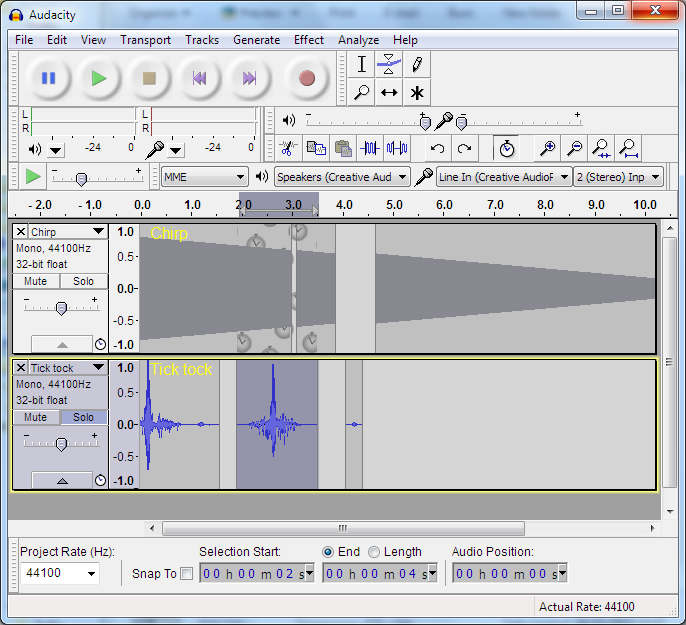
Audacity is a free audio editor that can record sounds, play sounds, import and export WAV, AIFF, and MP3 files, and more. Use it to edit your sounds using Cut, Copy, and Paste (with unlimited Undo), mix tracks, or apply effects to your recordings. It also has a built-in amplitude envelope editor, a customizable spectrogram mode, and a frequency analysis window for audio analysis applications. Built-in effects include Bass Boost, Wahwah, and Noise Removal, and it also supports VST plug-in effects.
Latest Reviews

Slug_Coordinator reviewed v2.3.1 on Mar 12, 2019
S U C K S stick with your older version if you made a lot of Custom Batches...

uberfly reviewed v2.1.2 on Aug 4, 2016
Stefan you review are all idiotic. Best free audio editor there is. Keep finding new ways to use it.

nilst2006 reviewed v2.1.2 on Mar 30, 2016
Don't allow fake user agents on their site. Therefore a 1.

boaz reviewed v2.1.0 RC2 on Mar 9, 2015
This is the best of the free/open source audio editors. Has a lot of features, works well, and they update it every so often. I don't know how anyone could complain about this software, if you don't like it - go buy a professional software.... It's that simple.

FatBastard reviewed v2.1.0 RC1 on Mar 4, 2015
Thank god for this amazing and free program!

Monkey_Punch reviewed v2.0.4 on Sep 10, 2013
"I, roj, have uttered a maxim and thus it is true and applies to everything I get for free and to which I did not contribute a single line of code."
@Roj: You are a mental midget. What are you some kind of friggin' Tory or BNP member? You sure speak like one you audacious wank. If you didn't contribute one iota of code to the program or donate to support the programmer, you have no expectation of ANYTHING. You didn't PAY for anything. You got something for nothing and are complaining about it! It's akin to being given a free car but complaining because it's not a Bugatti Veyron. You have debunked NOTHING. The only thing you've debunked is that you are a waste of a sperm cell. If you don't like it because it's missing features, learn programming and write the code or code an audio editor yourself, you fap slap.
As for Audacity, it's a great free program for doing basic audio editing tasks. Throw money at the developers for their hard work. Throw rocks at FAILroj.

roj reviewed v2.0.3 on Jan 23, 2013
To those who trumpted the whole "it's FREE" rubbish as if that excuses shortcomings:
FREE is not an excuse for lack of features or usability. I and anyone who uses an application has every right to expect a certain level of ease of use or functionality given that the author of the program undertook the endeavor in the first place. In short, get a grip and stop being apologists.
Now that this point is crystal clear and the "FREE so don't complain" nonsense thoroughly debunked and consigned to the dung heap where it belongs, Audacity is a very competent beginners audio editor. I would appreciate the versatility of Goldwave's mixing and cue functions and expect to see the program evolve more towards them in the future just for the sake of ease of use.
I'd give it a FOUR and a recommendation as an excellent work in progress.

egg83 reviewed v2.0.3 RC1 on Jan 21, 2013
I use this program all the time. Works very well, it is a must have for audio editing.

gatorfan95 reviewed v2.0.2 RC4 on Aug 21, 2012
Yes the look is "retro", it's still an excellent sound editor and it's free.
FatBastard reviewed v2.0.1 on Jul 3, 2012
Very nice program

Slug_Coordinator reviewed v2.3.1 on Mar 12, 2019
Pros: NONE
Cons: I customized Audacity with my own Settings and some of them got wiped out with the update. You moved stuff without Notice of that and opted to wipe out Bass / Treble which I used a Custom Setting for as well as other tools I used.
Oh not they are Chains etc., they are buried where I cant find them without days of reading. Then half the stuff I custom made is gone cause your wanted to screw with it.
Bottom Line: S U C K S stick with your older version if you made a lot of Custom Batches...
uberfly reviewed v2.1.2 on Aug 4, 2016
Stefan you review are all idiotic. Best free audio editor there is. Keep finding new ways to use it.
nilst2006 reviewed v2.1.2 on Mar 30, 2016
Don't allow fake user agents on their site. Therefore a 1.
boaz reviewed v2.1.0 RC2 on Mar 9, 2015
This is the best of the free/open source audio editors. Has a lot of features, works well, and they update it every so often. I don't know how anyone could complain about this software, if you don't like it - go buy a professional software.... It's that simple.
FatBastard reviewed v2.1.0 RC1 on Mar 4, 2015
Thank god for this amazing and free program!
Monkey_Punch reviewed v2.0.4 on Sep 10, 2013
"I, roj, have uttered a maxim and thus it is true and applies to everything I get for free and to which I did not contribute a single line of code."
@Roj: You are a mental midget. What are you some kind of friggin' Tory or BNP member? You sure speak like one you audacious wank. If you didn't contribute one iota of code to the program or donate to support the programmer, you have no expectation of ANYTHING. You didn't PAY for anything. You got something for nothing and are complaining about it! It's akin to being given a free car but complaining because it's not a Bugatti Veyron. You have debunked NOTHING. The only thing you've debunked is that you are a waste of a sperm cell. If you don't like it because it's missing features, learn programming and write the code or code an audio editor yourself, you fap slap.
As for Audacity, it's a great free program for doing basic audio editing tasks. Throw money at the developers for their hard work. Throw rocks at FAILroj.
roj reviewed v2.0.3 on Jan 23, 2013
To those who trumpted the whole "it's FREE" rubbish as if that excuses shortcomings:
FREE is not an excuse for lack of features or usability. I and anyone who uses an application has every right to expect a certain level of ease of use or functionality given that the author of the program undertook the endeavor in the first place. In short, get a grip and stop being apologists.
Now that this point is crystal clear and the "FREE so don't complain" nonsense thoroughly debunked and consigned to the dung heap where it belongs, Audacity is a very competent beginners audio editor. I would appreciate the versatility of Goldwave's mixing and cue functions and expect to see the program evolve more towards them in the future just for the sake of ease of use.
I'd give it a FOUR and a recommendation as an excellent work in progress.
egg83 reviewed v2.0.3 RC1 on Jan 21, 2013
I use this program all the time. Works very well, it is a must have for audio editing.
gatorfan95 reviewed v2.0.2 RC4 on Aug 21, 2012
Yes the look is "retro", it's still an excellent sound editor and it's free.
FatBastard reviewed v2.0.1 on Jul 3, 2012
Very nice program
gatorfan95 reviewed v2.0.1 on Jun 29, 2012
Good Stuff. A very nice FREE sound editor. What is there to complain about?

tickleonthetum reviewed v2.0.1 RC2 on Jun 27, 2012
Goldwave is shareware, Audacity is Freeware, you can't compare them!

suphong reviewed v2.0 on Mar 19, 2012
yes, very good
or download here is 100% clean http: // downchecker . com/download/audacity-for-windows