File Details |
|
| File Size | 0.3 MB |
|---|---|
| License | Freeware |
| Operating System | Windows 2000/9x/Server 2003/XP |
| Date Added | December 3, 2008 |
| Total Downloads | 2,525 |
| Publisher | South Bay Software |
| Homepage | AutoSizer |
Publisher's Description
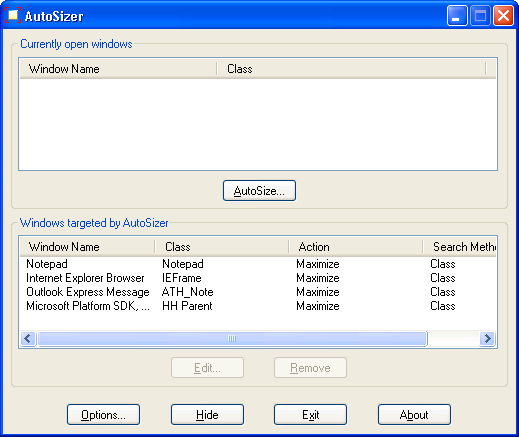
AutoSizer automatically resizes any window you specify. For instance, some web browsers open up in a non-maximized window. You can set those windows to automatically maximize every time they’re opened. It works with almost any program, including web browsers, Notepad, etc. AutoSizer stays running in the system tray, so it stays out of your way while it works.
Latest Reviews

Kevin_S reviewed v1.71 on Jul 8, 2009
Easy to install. Easy to use. Tiny footprint. No ads. Perfect! I'm using it on Windows 7 x85-64. While they don't list this as a supported operating system, I'll tell you that it works just fine. Furthermore, I have 2 monitors and it properly places the apps on the appropriate monitor. A must have for the utility collection!

dhry reviewed v1.71 on Dec 4, 2008
I agree with applaudmedia. This program NEEDS an option to keep windows on screen, like Shove-It and WinSize. With that, it'll get 5 stars from me.

gate1975mlm reviewed v1.7 on Nov 17, 2008
Love this Tool!
"Always On Top" feature is the best!
@ Nighted
Changing the setting to "Compare using Window Title" And "Title must match exactly" should fix your issues with other windows.
Using "Class Name" was causing the problem you are having for me.

applaudmedia reviewed v1.61 on Dec 15, 2006
You can't ask for more for freeware. Does what it needs to very well and is easy to use. The only reason I don't give it 5 is that it doesn't have an option to "Keep Windows on Screen" and I would also like to see it add "Always On Top", both options found in the good old WinSize. These are very minor issues though and I'm thrilled to have finally found a WinSize replacement!

DunbarKC reviewed v1.61 on Aug 15, 2006
A MUST-HAVE.
Where's 6 stars???

PC Rat reviewed v1.6 on Aug 14, 2006
...
Nice applet !
...
The Computer Rodent
...

zeeZee reviewed v1.6 on Aug 14, 2006
i found this little gem years ago. there is only a couple programs in the world that do this. kinda weird for a major annoyance. i dislike non-maximized windows. it does it great.

nefarious1 reviewed v1.54 on Feb 7, 2006
It's FREEWARE for a reason--a dearth of options and functionality. I'd rather use Alpha Wolf's SetWindowSizePos.exe from a command line--at least it does what I need.

Enamour reviewed v1.4 on Jan 31, 2004
As isaacg said..this is FREEWARE. Its a great anti-annoyance program for IE, notepad and anything else that might bother you by refusing to open as you want it. Next to no memory usage...
5/5

isaacg reviewed v1.4 on Apr 13, 2002
Oh, BTW, AutoSizer is FREEWARE, not SHAREWARE, get it right people!

Kevin_S reviewed v1.71 on Jul 8, 2009
Easy to install. Easy to use. Tiny footprint. No ads. Perfect! I'm using it on Windows 7 x85-64. While they don't list this as a supported operating system, I'll tell you that it works just fine. Furthermore, I have 2 monitors and it properly places the apps on the appropriate monitor. A must have for the utility collection!
dhry reviewed v1.71 on Dec 4, 2008
I agree with applaudmedia. This program NEEDS an option to keep windows on screen, like Shove-It and WinSize. With that, it'll get 5 stars from me.
gate1975mlm reviewed v1.7 on Nov 17, 2008
Love this Tool!
"Always On Top" feature is the best!
@ Nighted
Changing the setting to "Compare using Window Title" And "Title must match exactly" should fix your issues with other windows.
Using "Class Name" was causing the problem you are having for me.
applaudmedia reviewed v1.61 on Dec 15, 2006
You can't ask for more for freeware. Does what it needs to very well and is easy to use. The only reason I don't give it 5 is that it doesn't have an option to "Keep Windows on Screen" and I would also like to see it add "Always On Top", both options found in the good old WinSize. These are very minor issues though and I'm thrilled to have finally found a WinSize replacement!
DunbarKC reviewed v1.61 on Aug 15, 2006
A MUST-HAVE.
Where's 6 stars???
PC Rat reviewed v1.6 on Aug 14, 2006
...
Nice applet !
...
The Computer Rodent
...
zeeZee reviewed v1.6 on Aug 14, 2006
i found this little gem years ago. there is only a couple programs in the world that do this. kinda weird for a major annoyance. i dislike non-maximized windows. it does it great.
nefarious1 reviewed v1.54 on Feb 7, 2006
It's FREEWARE for a reason--a dearth of options and functionality. I'd rather use Alpha Wolf's SetWindowSizePos.exe from a command line--at least it does what I need.
Enamour reviewed v1.4 on Jan 31, 2004
As isaacg said..this is FREEWARE. Its a great anti-annoyance program for IE, notepad and anything else that might bother you by refusing to open as you want it. Next to no memory usage...
5/5
isaacg reviewed v1.4 on Apr 13, 2002
Oh, BTW, AutoSizer is FREEWARE, not SHAREWARE, get it right people!