File Details |
|
| File Size | 0.8 MB |
|---|---|
| License | Freeware |
| Operating System | Windows 2000/Server 2003/XP |
| Date Added | January 6, 2005 |
| Total Downloads | 120,160 |
| Publisher | AutoStreamer |
Publisher's Description
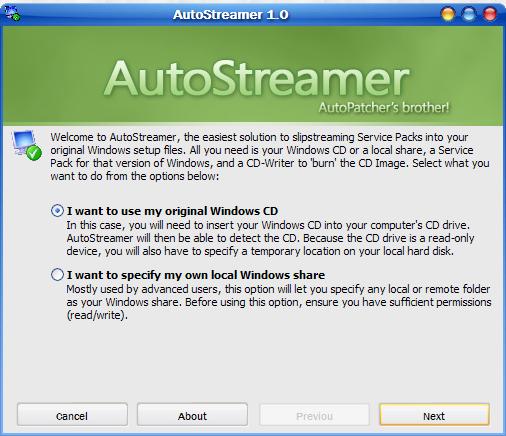
AutoStreamer will slipstream Service Packs into original Windows setup files. All you need is your Windows CD or a local share, a Service Pack for that version of Windows, and a CD-Writer to burn the CD image.
Latest Reviews

chrispaul reviewed v1.0.33 on Feb 17, 2014
nice!

jacobjackson reviewed v1.0.33 on Aug 24, 2013
autostreamer is where its at

trents reviewed v1.0.33 on Dec 2, 2010
Hi,
Autostreamer is a free slipstreaming utility for Windows. It can integrate a service pack into a Windows XP installation CD-ROM image.I like the features it has..

Manthrax reviewed v1.0.33 on Jan 9, 2010
It worked like a charm for me, starting with a bootable XP CD and copying my SP2 disc contents onto my hard drive. Couldn't be easier.

mtnsteve reviewed v1.0.33 on May 2, 2008
I tried a couple other methods to slipstream SP3 and this was by far the easiest, It made a bootable ISO and I installed it with no problems.
Very easy to use, no coasters, it works!

daver18qc reviewed v1.0.33 on Jan 6, 2005
Well, the program seems great but does it makes a Bootable ISO ??

iLLz reviewed v1.00 on Aug 16, 2004
I have used this program and it works like a charm. It is simple and saves anyone plenty of steps in SlipStreaming themselves. The best part is that it creates an ISO file so you can just burn it with your favorite CD-Writing Software. Excellent!

deda reviewed v1.00 on Aug 16, 2004
A simple command line without any modifications in the result:
to extract the Service Pack:
C:\Temp\xpsp2.exe -U -X:D:\Works
where C:\Temp is the source folder and D:\Works the destination folder;
to intregate to the source CD:
D:\Works\i386\Update\Update.exe -S:C:\Works
D:Works\i386 is the source folder
C:\Works id the destination folder

slegg reviewed v1.00 on Aug 16, 2004
Maybe there are some bugs in this program. I slipstreamed my WinXPSP1 Pro Corporate CD with official SP2, but why it made my slipstreamed ISO about 200MB smaller than original was? Is it supposed to be that way... I doubt. I'll try these AutoStreamer-slipstreamed ISOs couple times under Virtual PC, but I think that even the "buggy" nLite'll give me better results. (And I love the unnattended install features in nLite, too.

ComradeF reviewed v1.00 on Aug 16, 2004
Also posting to offset the troll's "review". I have not tried this software.

chrispaul reviewed v1.0.33 on Feb 17, 2014
nice!
jacobjackson reviewed v1.0.33 on Aug 24, 2013
autostreamer is where its at
trents reviewed v1.0.33 on Dec 2, 2010
Hi,
Autostreamer is a free slipstreaming utility for Windows. It can integrate a service pack into a Windows XP installation CD-ROM image.I like the features it has..
Manthrax reviewed v1.0.33 on Jan 9, 2010
It worked like a charm for me, starting with a bootable XP CD and copying my SP2 disc contents onto my hard drive. Couldn't be easier.
mtnsteve reviewed v1.0.33 on May 2, 2008
I tried a couple other methods to slipstream SP3 and this was by far the easiest, It made a bootable ISO and I installed it with no problems.
Very easy to use, no coasters, it works!
daver18qc reviewed v1.0.33 on Jan 6, 2005
Well, the program seems great but does it makes a Bootable ISO ??
iLLz reviewed v1.00 on Aug 16, 2004
I have used this program and it works like a charm. It is simple and saves anyone plenty of steps in SlipStreaming themselves. The best part is that it creates an ISO file so you can just burn it with your favorite CD-Writing Software. Excellent!
deda reviewed v1.00 on Aug 16, 2004
A simple command line without any modifications in the result:
to extract the Service Pack:
C:\Temp\xpsp2.exe -U -X:D:\Works
where C:\Temp is the source folder and D:\Works the destination folder;
to intregate to the source CD:
D:\Works\i386\Update\Update.exe -S:C:\Works
D:Works\i386 is the source folder
C:\Works id the destination folder
slegg reviewed v1.00 on Aug 16, 2004
Maybe there are some bugs in this program. I slipstreamed my WinXPSP1 Pro Corporate CD with official SP2, but why it made my slipstreamed ISO about 200MB smaller than original was? Is it supposed to be that way... I doubt. I'll try these AutoStreamer-slipstreamed ISOs couple times under Virtual PC, but I think that even the "buggy" nLite'll give me better results. (And I love the unnattended install features in nLite, too.
ComradeF reviewed v1.00 on Aug 16, 2004
Also posting to offset the troll's "review". I have not tried this software.

GoodThings2Life reviewed v1.00 on Aug 16, 2004
I haven't tried this program yet, but I want to offset the troll's 1 rating.
Not everyone is knowledgeable in using the command-prompt... Hell, I know plenty who don't even know what the command-prompt is at all. Nevermind the fact that even with Nero and Roxio, pulling the boot sector information off a CD isn't a trivial task or knowing that the 2000, XP, and 2003 CD's have to have 4 boot blocks and not just one.
It seems to me from the other two reviews that Autostreamer does exactly what it should... slipstream an install without a lot of extra (and buggy) baggage like nLite. When products do what they should without bugs... that deserves a high rating, not someone who asks why it's needed.

boomdboom reviewed v1.00 on Aug 16, 2004
Did I need to use it, No. Does it do what it's supposed to do, Yes. Like paulo71 said, not everyone knows how to slipstream using cmd prompt. So this makes it easier for them.

paulo71 reviewed v1.00 on Aug 16, 2004
Not everyone knows how to slipstream service packs via a dos command.
This software makes it so simple.
Fantastic.