File Details |
|
| File Size | 7.5 MB |
|---|---|
| License | Shareware, $29.95 |
| Operating System | Windows (All) |
| Date Added | January 13, 2021 |
| Total Downloads | 9,736 |
| Publisher | Duality Software |
| Homepage | Calendarscope |
Publisher's Description
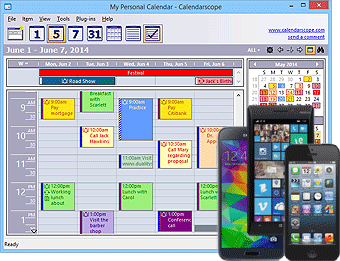
Calendarscope is a full-featured calendar program for planning, managing, and scheduling appointments, meetings, birthdays, vacations, and special events. It allows you to view all your events in a daily, weekly, monthly, or yearly overview. Reminders have customizable fonts, colors, and sounds, and may contain live web URLs and email addresses. Many of the main program features are accessible from a tray icon. Using it, you can create single or recurring events, color-code different event types, set reminders for upcoming events, and more. A Drag and drop feature allows you to easily reschedule an event, or change its duration. You can also synchronize your data with Palm OS and Pocket PC handhelds, print your calendar to take it with you, or save it in HTML to publish it to the Web or to a company intranet. Unauthorized access to your data is prevented with strong encryption algorithms.
Latest Reviews

vesku reviewed v5.6 on May 23, 2012
This is the best calendar app i have tried. Had v1.x, then v3.x . Then used EssentialPIM for a while, now got an idea to try the latest version v5.6.
Calendarscope is more stable, intuitive, and has better usability. What's great, i haven't find a bug yet! It was nice to have the old good friend back. After testing it for some days, i upgraded my license. It was very nice to find that though my old license (for v3.1) was from 2006, i still got the discounted upgrade price 19,95 USD and now i have v5.6 up and running. I appreciate that!
I also find the licensing policy fair. One single-user license allows installing and registering second copy to another computer as long as the user remains the same and the programs are not running at the same time. So one can access to the common database over the network.
If there's need to use the program by multiple users/network users there's also a Family license and Network edition available.
Full 5 stars to the great calendar program!!

325wcoupe reviewed v5.5 on Feb 3, 2012
calendarscope is a very basic program. It can be very useful. The support is even more basic than the software and really slow to get.

DaComboMan reviewed v5.1 Beta 4 on Nov 1, 2010
Pay for Calendscope + pay for HandySync for Google = an arm and a leg.
How good is this sync to Google?
Not so sure.

tranglos reviewed v5.0 on Sep 10, 2010
Beautiful, functional, snappy, and seemingly bug-free too. A feature-complete calendar with a lot of nice touches, like the option to show event reminders on your secondary screen. That little feature, along with the extensive customization options for reminders, is what won me over. It's how software should be designed to keep the user happy.
So it costs money - well, find a free desktop calendar that can compete with Calendarscope in elegance and usability, then we'll talk.
My only wish is that Calendarscope handled to-do items as well as it handles events and appointments. While it does have a basic task list, that part is too rudimentary for serious use. But then, it's a calendar. I don't think you'll find a better one for Windows.

emanresU deriseD reviewed v4.1 on Mar 3, 2009
Cheaper doesn't mean better. EssentialPIM is crap. Calendarscope wins hands down.

zridling reviewed v3.5 Beta on Jun 19, 2007
EssentialPIM is good, but not for calendaring. It'd be nice if Calendarscope tied into Google Calendar somehow.

Diam0nd reviewed v3.5 Beta on Jun 19, 2007
I'd suggest you all to check EssentialPIM. But all in all, even Outlook is better than this, imho. :/
zridling reviewed v3.2 on Mar 28, 2007
Works like a pro in Vista-64!
zridling reviewed v3.1 on Nov 30, 2006
The synching abilities alone make Calendarscope highly useful. Moreover, its export and printing capabilities are extremely broad.

elpopi reviewed v3.0 on Sep 26, 2006
Nice calendar application.
Featurewise I do miss though the very useful ability to open and layer multiple calendars (such as work, personal, Bdays, etc...); free Sunbird can do this.

vesku reviewed v5.6 on May 23, 2012
This is the best calendar app i have tried. Had v1.x, then v3.x . Then used EssentialPIM for a while, now got an idea to try the latest version v5.6.
Calendarscope is more stable, intuitive, and has better usability. What's great, i haven't find a bug yet! It was nice to have the old good friend back. After testing it for some days, i upgraded my license. It was very nice to find that though my old license (for v3.1) was from 2006, i still got the discounted upgrade price 19,95 USD and now i have v5.6 up and running. I appreciate that!
I also find the licensing policy fair. One single-user license allows installing and registering second copy to another computer as long as the user remains the same and the programs are not running at the same time. So one can access to the common database over the network.
If there's need to use the program by multiple users/network users there's also a Family license and Network edition available.
Full 5 stars to the great calendar program!!
325wcoupe reviewed v5.5 on Feb 3, 2012
calendarscope is a very basic program. It can be very useful. The support is even more basic than the software and really slow to get.
DaComboMan reviewed v5.1 Beta 4 on Nov 1, 2010
Pay for Calendscope + pay for HandySync for Google = an arm and a leg.
How good is this sync to Google?
Not so sure.
tranglos reviewed v5.0 on Sep 10, 2010
Beautiful, functional, snappy, and seemingly bug-free too. A feature-complete calendar with a lot of nice touches, like the option to show event reminders on your secondary screen. That little feature, along with the extensive customization options for reminders, is what won me over. It's how software should be designed to keep the user happy.
So it costs money - well, find a free desktop calendar that can compete with Calendarscope in elegance and usability, then we'll talk.
My only wish is that Calendarscope handled to-do items as well as it handles events and appointments. While it does have a basic task list, that part is too rudimentary for serious use. But then, it's a calendar. I don't think you'll find a better one for Windows.
emanresU deriseD reviewed v4.1 on Mar 3, 2009
Cheaper doesn't mean better. EssentialPIM is crap. Calendarscope wins hands down.
zridling reviewed v3.5 Beta on Jun 19, 2007
EssentialPIM is good, but not for calendaring. It'd be nice if Calendarscope tied into Google Calendar somehow.
Diam0nd reviewed v3.5 Beta on Jun 19, 2007
I'd suggest you all to check EssentialPIM. But all in all, even Outlook is better than this, imho. :/
zridling reviewed v3.2 on Mar 28, 2007
Works like a pro in Vista-64!
zridling reviewed v3.1 on Nov 30, 2006
The synching abilities alone make Calendarscope highly useful. Moreover, its export and printing capabilities are extremely broad.
elpopi reviewed v3.0 on Sep 26, 2006
Nice calendar application.
Featurewise I do miss though the very useful ability to open and layer multiple calendars (such as work, personal, Bdays, etc...); free Sunbird can do this.

Raven Sati reviewed v3.0 on Jun 12, 2006
It claims to be a calendar and it is - and a pretty good one. No BS about managing ALL your essential life needs etc. Most people need more than just a calendar, but they need a calendar.
zridling reviewed v3.0 Beta 2 on Mar 7, 2006
Except for a few usability features, I honestly did not think Calendarscope could get any better. Version 3.x sets the bar very high for any other calendaring app users will consider this year.

nefarious1 reviewed v2.6 on Mar 6, 2006
Very nice, but lacks some very important features, such as undo/redo. How is that possible?
As greedy as the author is, you'd think such an important feature would sneak its way in there somehow.
The 2nd beta of version 3.0 is out now, and it doesn't have undo/redo, either. Pathetic.