File Details |
|
| File Size | 0.6 MB |
|---|---|
| License | Open Source |
| Operating System | Windows 7/Vista/XP |
| Date Added | October 19, 2013 |
| Total Downloads | 5,055 |
| Publisher | CamStudio.org |
| Homepage | CamStudio |
Publisher's Description
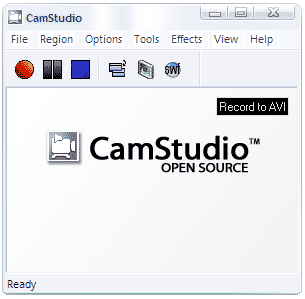
CamStudio is able to record all screen and audio activity on your computer and create AVI video files and using it's built-in SWF Producer can turn those AVIs into streaming Flash videos. You have total control over the output of your video: you can choose to use custom cursors, to record the whole screen or just a section of it and can reduce or increase the quality of the recording depending on if you want smaller videos (for emailing to people, for instance) or you can have "best quality" ones for burning onto CD/DVD. It can also add anti-aliased screen captions to your recordings with the Video Annotation feature you can even personalise your videos by including a Web cam movie of yourself "picture-in-picture" over your desktop.
Latest Reviews

horst reviewed v2.5 Beta 1 on Feb 10, 2009
This is an excellent tool, but version 2.0 is not new at all. It's been around like this as open source since 2003. The product is no longer updated.
It's offspring became RoboDemo, which has now become Macromedia Captivate.
Beware: There is a version 2.1 around somewhere that is a more limited edition of v2.0 and is NOT open source

gr1298 reviewed v2.5 Beta 1 on Sep 10, 2007
I read on the blog about the problems descripted by cricri in 2005. These "bugs" are descripted and have normal solution doing as the blog/site instruct, so i don't understand why this comment is still here in Betanews???
I will download and test the new version, thanks!!!

kbsoftware reviewed v2.5 Beta 1 on Sep 10, 2007
Nice program, has a few problems but still nice.
I can see a possible problem maybe in the future with TechSmith. So I could see a gui change and name change :)

DudeBoyz reviewed v2.0 on Nov 7, 2006
It's free and it gets the job done, and I'm glad I found it. It does what I need and is very useful for showing Tech Support folks what is happening on my screen.
I do wish some development would continue on the keyboard shortcuts, etc. but all in all, it's a nice, helpful little app.

cricri_pingouin reviewed v2.0 on Dec 16, 2005
I was looking for a free alternative to Camtasia and was deeply disappointed.
Problems:
1 - you cannot set the area to a window, you have to select the window area manually
2 - no shortcut to stop recording. My captured videos contain the bit were I switch to CamStudio to stop the recording! I checked all options without success, and still hope that I missed something.
3 - when I tried to record to swf, I got an error telling me that it couldn't find this component (although I did a normal installation without modifying any default option)
4 - so I tried to record an avi, and then use the AVI to SWF converter. My AVI video was 20MB for around 1 minute, the converter crashed because apparently it ran out of memory (I have 512MB).
5 - I told it to save the videos to my system temp directory, and it saved everything to C:\ (which is not my temp folder).
There is no way this can be seriously considered as an alternative to commercial packages.
I give it a 2 because it's free and to encourage further development.
horst reviewed v2.0 on Dec 15, 2005
This is an excellent tool, but version 2.0 is not new at all. It's been around like this as open source since 2003. The product is no longer updated.
It's offspring became RoboDemo, which has now become Macromedia Captivate.
Beware: There is a version 2.1 around somewhere that is a more limited edition of v2.0 and is NOT open source.

horst reviewed v2.5 Beta 1 on Feb 10, 2009
This is an excellent tool, but version 2.0 is not new at all. It's been around like this as open source since 2003. The product is no longer updated.
It's offspring became RoboDemo, which has now become Macromedia Captivate.
Beware: There is a version 2.1 around somewhere that is a more limited edition of v2.0 and is NOT open source
gr1298 reviewed v2.5 Beta 1 on Sep 10, 2007
I read on the blog about the problems descripted by cricri in 2005. These "bugs" are descripted and have normal solution doing as the blog/site instruct, so i don't understand why this comment is still here in Betanews???
I will download and test the new version, thanks!!!
kbsoftware reviewed v2.5 Beta 1 on Sep 10, 2007
Nice program, has a few problems but still nice.
I can see a possible problem maybe in the future with TechSmith. So I could see a gui change and name change :)
DudeBoyz reviewed v2.0 on Nov 7, 2006
It's free and it gets the job done, and I'm glad I found it. It does what I need and is very useful for showing Tech Support folks what is happening on my screen.
I do wish some development would continue on the keyboard shortcuts, etc. but all in all, it's a nice, helpful little app.
cricri_pingouin reviewed v2.0 on Dec 16, 2005
I was looking for a free alternative to Camtasia and was deeply disappointed.
Problems:
1 - you cannot set the area to a window, you have to select the window area manually
2 - no shortcut to stop recording. My captured videos contain the bit were I switch to CamStudio to stop the recording! I checked all options without success, and still hope that I missed something.
3 - when I tried to record to swf, I got an error telling me that it couldn't find this component (although I did a normal installation without modifying any default option)
4 - so I tried to record an avi, and then use the AVI to SWF converter. My AVI video was 20MB for around 1 minute, the converter crashed because apparently it ran out of memory (I have 512MB).
5 - I told it to save the videos to my system temp directory, and it saved everything to C:\ (which is not my temp folder).
There is no way this can be seriously considered as an alternative to commercial packages.
I give it a 2 because it's free and to encourage further development.
horst reviewed v2.0 on Dec 15, 2005
This is an excellent tool, but version 2.0 is not new at all. It's been around like this as open source since 2003. The product is no longer updated.
It's offspring became RoboDemo, which has now become Macromedia Captivate.
Beware: There is a version 2.1 around somewhere that is a more limited edition of v2.0 and is NOT open source.