File Details |
|
| File Size | 0.6 MB |
|---|---|
| License | Freeware |
| Operating System | Windows Server 2003/XP |
| Date Added | August 30, 2006 |
| Total Downloads | 1,253 |
| Publisher | Michael Walter |
| Homepage | Colibri |
Publisher's Description
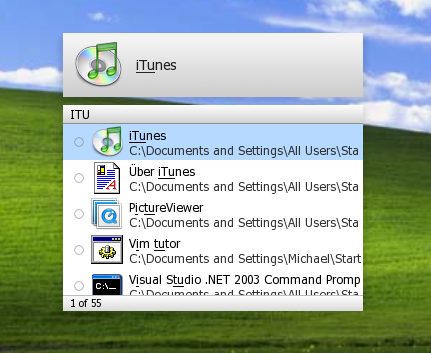
Colibri combines the raw power of the command line with the intuitive nature of a modern graphical user interface to define a revolutionary new way of managing your computer.
Latest Reviews

arg0 reviewed v11 Alpha on Aug 17, 2006
Nice app. Great launcher, as is Launchy.

thealanberman reviewed v11 Alpha on Aug 8, 2006
This is my favorite launcher program that I've found so far. The learning curve is extremely low, provided you know how to type.
This is NOT a point and click utility.
@bugmenot: use the arrow keys. If you want to change a colibri setting, type 'colibri'.

latinoV1 reviewed v11 Alpha on Aug 6, 2006
I've rated it a 4 because it's defenitely my favorite amongst all the launchers. The new version has a couple bugfixes and hints at new features such as themes and choosing where Colibri can and can't search. Hopefully we'll get to see a more full update later.
Edit: This has gone past ver 11 alpha to 14a.
http://colibri.leetspeak...releases/Colibri14a.exe

bugmenot reviewed v11 Alpha on Aug 4, 2006
Hmm... the app has some potential, but I give it a 3 because:
- I never get to reach app's settings; I press ctrl+space then tab and instead of Settings, Hotekey, all I get is Windows Firewall icon!? And there's no other way to get to settings...
- then I type in something to search and in the list I can see he found... 1 of 8 for instance, but there's no way for you to scroll that list or to launch any of the apps found in that list. Then, why do I get to see that list if it's only 25% usable?
- there's no way to know what app version you are using... u know, that Help - About (read your app version here)
All of those issues found in 10 mins... how do you guys rate so high? You high on drugs?

ILLEGALien reviewed v11 Alpha on Aug 3, 2006
Nice program. Launchy is faster and appears to use less resources (also freeware)
http://launchy.net/

summoner reviewed v11 Alpha on Aug 3, 2006
Very nice! Works just like Google Desktop, but restricts search results to Start Menu contents.
I do like the way it displays program names and their icons.
It has never been this easy to bring up Nero, the Command Prompt or any application you can think of without scrolling through hideous menus.
Who needs that silly Start Menu anyway!? :p

guitardave78 reviewed v11 Alpha on Aug 3, 2006
EDIT.
Use the cursor keys to scroll through the list of apps available. As for the settings, read the instructions. Open colibri, press tab select colibri then cursor to the settings.
This is great. As stated the description is not very good. It is a launcher that works with search terms instead of icons. It indexes your start menu shortcuts and then as you type an app name it gives you what it thinks you are looking for.
If like me you have a very large start menu, this is fantastic!! For me it is quicker than ploughing through the start menu.
Good work :)

LyyNx reviewed v11 Alpha on Aug 3, 2006
a more informative describtion is needed for this. it's actually a nice product. it acts like a launchpad. has a hotkey which with you activate it and then type some keywords for the task you want to perform. it can search for items through start menu and control panel as far as i looked. also has some internal items like 'colibri' which is the menu of the app itself. has 'wikipedia' item, 'google'. didn't look deep though. this is a review based on 5 minutes of usage so i can't tell if it's buggy or not. also i can't image myself using this, but someone else would probably be happy to have it.

arg0 reviewed v11 Alpha on Aug 17, 2006
Nice app. Great launcher, as is Launchy.
thealanberman reviewed v11 Alpha on Aug 8, 2006
This is my favorite launcher program that I've found so far. The learning curve is extremely low, provided you know how to type.
This is NOT a point and click utility.
@bugmenot: use the arrow keys. If you want to change a colibri setting, type 'colibri'.
latinoV1 reviewed v11 Alpha on Aug 6, 2006
I've rated it a 4 because it's defenitely my favorite amongst all the launchers. The new version has a couple bugfixes and hints at new features such as themes and choosing where Colibri can and can't search. Hopefully we'll get to see a more full update later.
Edit: This has gone past ver 11 alpha to 14a.
http://colibri.leetspeak...releases/Colibri14a.exe
bugmenot reviewed v11 Alpha on Aug 4, 2006
Hmm... the app has some potential, but I give it a 3 because:
- I never get to reach app's settings; I press ctrl+space then tab and instead of Settings, Hotekey, all I get is Windows Firewall icon!? And there's no other way to get to settings...
- then I type in something to search and in the list I can see he found... 1 of 8 for instance, but there's no way for you to scroll that list or to launch any of the apps found in that list. Then, why do I get to see that list if it's only 25% usable?
- there's no way to know what app version you are using... u know, that Help - About (read your app version here)
All of those issues found in 10 mins... how do you guys rate so high? You high on drugs?
ILLEGALien reviewed v11 Alpha on Aug 3, 2006
Nice program. Launchy is faster and appears to use less resources (also freeware)
http://launchy.net/
summoner reviewed v11 Alpha on Aug 3, 2006
Very nice! Works just like Google Desktop, but restricts search results to Start Menu contents.
I do like the way it displays program names and their icons.
It has never been this easy to bring up Nero, the Command Prompt or any application you can think of without scrolling through hideous menus.
Who needs that silly Start Menu anyway!? :p
guitardave78 reviewed v11 Alpha on Aug 3, 2006
EDIT.
Use the cursor keys to scroll through the list of apps available. As for the settings, read the instructions. Open colibri, press tab select colibri then cursor to the settings.
This is great. As stated the description is not very good. It is a launcher that works with search terms instead of icons. It indexes your start menu shortcuts and then as you type an app name it gives you what it thinks you are looking for.
If like me you have a very large start menu, this is fantastic!! For me it is quicker than ploughing through the start menu.
Good work :)
LyyNx reviewed v11 Alpha on Aug 3, 2006
a more informative describtion is needed for this. it's actually a nice product. it acts like a launchpad. has a hotkey which with you activate it and then type some keywords for the task you want to perform. it can search for items through start menu and control panel as far as i looked. also has some internal items like 'colibri' which is the menu of the app itself. has 'wikipedia' item, 'google'. didn't look deep though. this is a review based on 5 minutes of usage so i can't tell if it's buggy or not. also i can't image myself using this, but someone else would probably be happy to have it.