File Details |
|
| File Size | 12.3 MB |
|---|---|
| License | Open Source |
| Operating System | Windows 2000/Server 2003/Server 2008/Vista/XP |
| Date Added | March 1, 2009 |
| Total Downloads | 3,511 |
| Publisher | Scirra |
| Homepage | Construct |
Publisher's Description
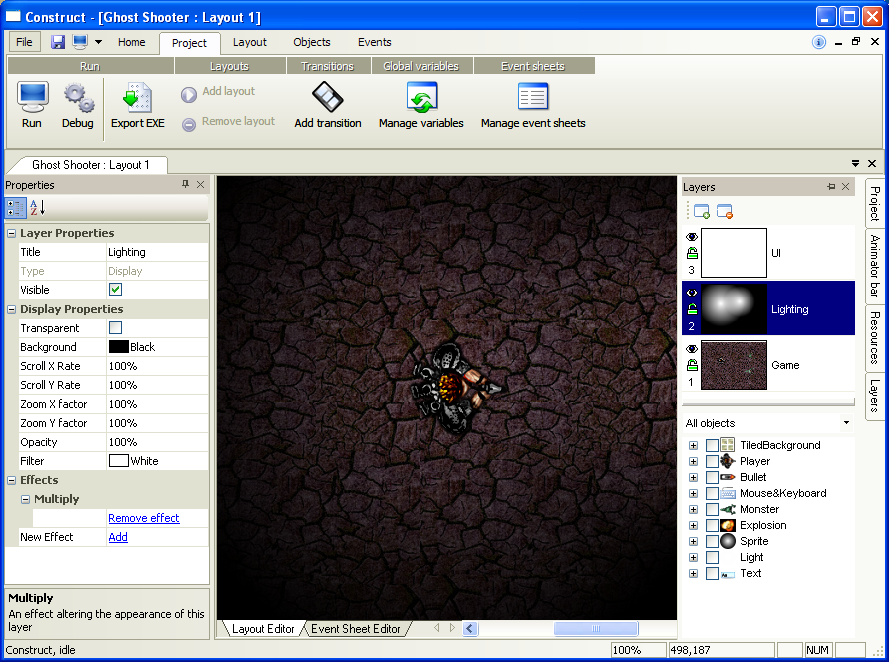
Construct is a free, open-source game development program that allows you to quickly and easily put together games in a drag-and-drop environment. Using the event sheet editor, you can define your game's behaviour programming-free with events, or you can use Python scripts to control it instead. It is based off a powerful hardware-accelerated DirectX 9 rendering engine with support for pixel shader effects, physics, layers, a debugger, and plugins for advanced features. There is also support for some 3D features.
Latest Reviews

mohaldeeb reviewed v0.92 on Mar 13, 2008
In some way its kind of cool to create your very own games****************************************
once you get the hang of it**********************
*************************************************

therealdeadeye reviewed v0.92 on Mar 12, 2008
Construct's strengths lie in two main areas: power, and ease of use. For the beginning game designer or hobbyist game maker interested in creating 2D games there really is no better choice out there. Construct makes it easy to begin creating hardware-accelerated, DirectX 9 driven games right away. It's event coding system is logical and easy to understand, but flexible enough to create complex interactions with all of your game objects. And for the advanced game developer there is integrated Python scripting.
There are also many built-in functions that allow the designer to get a jump-start on making specific types of games, such as a solid platform engine, vehicle movement, and even a 2D physics engine. Creating game art is as easy as using the built-in image editor or importing your own artwork into backgrounds or sprite animations.
Another great feature is the price... free. Not only is Construct a great tool for developing games, but it offers features that aren't even available with some of the more popular paid game-creation software. You'd be hard pressed to find a comparable product that has the same perks for less than a hundred dollars. I've tried a few similar programs - Game Maker, Multimedia Fusion 2, and Torque - and they don't stand up. While Torque has more power behind it, Construct is still superior in the ease of use department. MMF2 is over $150 and lacks scripting and modularity of code, and Game Maker just doesn't have the power.

why hello there reviewed v0.92 on Mar 12, 2008
Genius

mohaldeeb reviewed v0.92 on Mar 13, 2008
In some way its kind of cool to create your very own games****************************************
once you get the hang of it**********************
*************************************************
therealdeadeye reviewed v0.92 on Mar 12, 2008
Construct's strengths lie in two main areas: power, and ease of use. For the beginning game designer or hobbyist game maker interested in creating 2D games there really is no better choice out there. Construct makes it easy to begin creating hardware-accelerated, DirectX 9 driven games right away. It's event coding system is logical and easy to understand, but flexible enough to create complex interactions with all of your game objects. And for the advanced game developer there is integrated Python scripting.
There are also many built-in functions that allow the designer to get a jump-start on making specific types of games, such as a solid platform engine, vehicle movement, and even a 2D physics engine. Creating game art is as easy as using the built-in image editor or importing your own artwork into backgrounds or sprite animations.
Another great feature is the price... free. Not only is Construct a great tool for developing games, but it offers features that aren't even available with some of the more popular paid game-creation software. You'd be hard pressed to find a comparable product that has the same perks for less than a hundred dollars. I've tried a few similar programs - Game Maker, Multimedia Fusion 2, and Torque - and they don't stand up. While Torque has more power behind it, Construct is still superior in the ease of use department. MMF2 is over $150 and lacks scripting and modularity of code, and Game Maker just doesn't have the power.
why hello there reviewed v0.92 on Mar 12, 2008
Genius