File Details |
|
| File Size | 0.3 MB |
|---|---|
| License | Freeware |
| Operating System | Windows (All) |
| Date Added | November 25, 2009 |
| Total Downloads | 9,203 |
| Publisher | data product services ltd. |
| Homepage | Dead Pixel Tester |
Publisher's Description
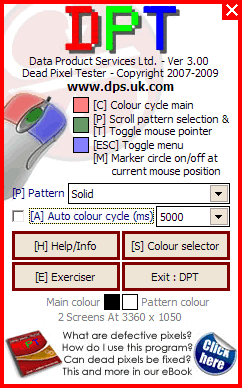
Dead Pixel Tester - TFT screens have thousands of pixels, on a 1024x768 monitor, there are three cells for each pixel - one each for red, green, and blue - which amounts to nearly 2.4 million cells (1024x768x 3 = 2,359,296). There's only a slim chance that all of these will be perfect; more likely, some will be stuck on (creating a "bright" defect) or off (resulting in a "dark" defect). Simply select a color then closely inspect your monitor in each of the primary colours checking for pixels that are not operating as expected. Stuck pixels (always on) are easier to noticed then pixels that are not on due to their size (normally under .5mm).
Latest Reviews

Morningdove reviewed v3.00 on Nov 30, 2009
A useful program to have in your toolbox.
I find NO adware in this standalone executable.
Neither does Softpedia or CNET.

Skyfrog reviewed v2.50 on Feb 13, 2009
Um yeah, I already have one of these. It's called Microsoft Paint. Seriously, you just need something to display the three solid colors on your screen and look for stuck or dead pixels. Usually you don't even need that, I mean if you have to go to such lengths to even find them why bother. Mostly I don't like adware though, especially useless adware.

ssb reviewed v2.50 on Feb 12, 2009
Adware (!!!) No thanks.

kbsoftware reviewed v2.50 on Feb 12, 2009
Nice program, but there are better.
It's not freeware, but ad sponsored. I don't think it goes online to get the adds, they are built in to the program but that doesn't make it freeware.
Just my 2 cents until I get a cut of bail out money :)

Paul Skinner reviewed v2.50 on Feb 12, 2009
UDPixel is far more useful.
It can actually fix the *stuck* pixels as well as detect them. Dead ones are dead and can't be saved.

Hall9000 reviewed v2.30 on Oct 15, 2007
Does the job supposed to do. Like the Nokia Monitor tester but with added dead pixel finder. Aires commented about a lack of help but it really is straightforward to use. Maybe when he tried it they didn't have the "Help and about" button? Since this can only show a problen that can not be corrected, like a dead pixel, I can't see what could have been added more than the examples of dead pixel appearances. Anyway, I give it a five.

anomoly reviewed v2.20 on Jul 25, 2006
"What is the point of this program?"
"Dead Pixel Tester" if i'm reading it right.
Link broken
http://www.dps.uk.com/download.php?file=4

zee7 reviewed v2.10 on Mar 2, 2006
Very useful in diagnosing possible monitor problems.

Aires reviewed v2.10 on Jan 26, 2006
My monitor's years old and I'd be suprised if there were no dead pixels. So unless that's the case then I'm not using this app right and that's gotta be because the help for using this is non-existent. I'm not sure if I'm using this right or not and until the help improves - a lot - only two stars I'm afraid.

matt2971 reviewed v2.10 on Jan 26, 2006
Well yeah, I can already see I have a stuck red pixel... I'll give this utility 5 stars when it can fix the damn thing ;-)

Morningdove reviewed v3.00 on Nov 30, 2009
A useful program to have in your toolbox.
I find NO adware in this standalone executable.
Neither does Softpedia or CNET.
Skyfrog reviewed v2.50 on Feb 13, 2009
Um yeah, I already have one of these. It's called Microsoft Paint. Seriously, you just need something to display the three solid colors on your screen and look for stuck or dead pixels. Usually you don't even need that, I mean if you have to go to such lengths to even find them why bother. Mostly I don't like adware though, especially useless adware.
ssb reviewed v2.50 on Feb 12, 2009
Adware (!!!) No thanks.
kbsoftware reviewed v2.50 on Feb 12, 2009
Nice program, but there are better.
It's not freeware, but ad sponsored. I don't think it goes online to get the adds, they are built in to the program but that doesn't make it freeware.
Just my 2 cents until I get a cut of bail out money :)
Paul Skinner reviewed v2.50 on Feb 12, 2009
UDPixel is far more useful.
It can actually fix the *stuck* pixels as well as detect them. Dead ones are dead and can't be saved.
Hall9000 reviewed v2.30 on Oct 15, 2007
Does the job supposed to do. Like the Nokia Monitor tester but with added dead pixel finder. Aires commented about a lack of help but it really is straightforward to use. Maybe when he tried it they didn't have the "Help and about" button? Since this can only show a problen that can not be corrected, like a dead pixel, I can't see what could have been added more than the examples of dead pixel appearances. Anyway, I give it a five.
anomoly reviewed v2.20 on Jul 25, 2006
"What is the point of this program?"
"Dead Pixel Tester" if i'm reading it right.
Link broken
http://www.dps.uk.com/download.php?file=4
zee7 reviewed v2.10 on Mar 2, 2006
Very useful in diagnosing possible monitor problems.
Aires reviewed v2.10 on Jan 26, 2006
My monitor's years old and I'd be suprised if there were no dead pixels. So unless that's the case then I'm not using this app right and that's gotta be because the help for using this is non-existent. I'm not sure if I'm using this right or not and until the help improves - a lot - only two stars I'm afraid.
matt2971 reviewed v2.10 on Jan 26, 2006
Well yeah, I can already see I have a stuck red pixel... I'll give this utility 5 stars when it can fix the damn thing ;-)

mharvey reviewed v2.10 on Jan 25, 2006
Cool utility that does what it says and does it simple. Not install... just run the small exe.
Why would you need a utility like this? You are correct in that you can not do anything (to fix) a dead or stuck pixel, but if you are thinking about buying a particular laptop or LCD monitor you can use this to check it out first. You can also use it to verify that you do (or do not) have enough dead pixels to warrant a free replacement on a new laptop. (i.e. Just about every listing for a laptop on Newegg includes: "Dead Pixel Policy: There must be 7+ dead pixels in order to obtain a replacement notebook.")

jspratjr reviewed v2.10 on Jan 25, 2006
Genuine question .. I just don't get it. What is the point of this program? What can you do about a "dead pixel" or two? Thanks.
**Thanks mharvey** - sounds reasonable!

spiked reviewed v2.10 on Jan 25, 2006
Neat little tool. Never imagined how many features such a thing could have, but it really is worthy of the 2.10 version number. Would be curious to see how it evolved but no changelog was available.