File Details |
|
| File Size | 0.2 MB |
|---|---|
| License | Freeware |
| Operating System | Windows Vista/XP |
| Date Added | October 12, 2021 |
| Total Downloads | 1,708 |
| Publisher | Microsoft Corp. |
| Homepage | Desktops |
Publisher's Description
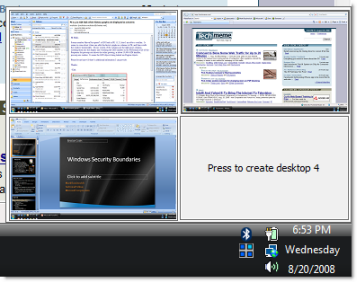
Desktops allows you to organize your applications on up to four virtual desktops. Read email on one, browse the web on the second, and do work in your productivity software on the third, without the clutter of the windows youâ??re not using. After you configure hotkeys for switching desktops, you can create and switch desktops either by clicking on the tray icon to open a desktop preview and switching window, or by using the hotkeys
Latest Reviews

gchenry reviewed v1.0 on Oct 24, 2008
I think the winxp power toy - virtual desktop
manager is better.
Of course Dexpot and WinSpace are much better.

shantanu reviewed v1.0 on Oct 24, 2008
This a sweeet app!!!
One problem though ... I have my task bar at double height and the "available screen size" calculation gets thrown off!!!
Once Windows starts, a "maximize window" resizes the window as if the taskbar was at 'single' height'.
If I "Unlock Taskbar", all the maximized windows recalculate the area correctly and then are resized properly!
A bit annoying, otherwise really sweeet!!!

Esquire reviewed v1.0 on Oct 23, 2008
Pros:
1. Works under Vista (DeskHedron only supports 2000/XP)
Cons:
1. Once loaded there is no exit function
2. Cannot select Windows key as a hotkey in Vista - it clashes with application shortcuts stored in QuickLaunch (press Windows key and a number will launch the corresponding application on QuickLaunch in Vista)
3. Vista doesn't recognize it as a legitimate application and requests permission to launch.

Rafel reviewed v1.0 on Oct 23, 2008
Nice and light.
Perfect

Nighted reviewed v1.0 on Oct 23, 2008
Nice. I also like how they did the preview. NOT better than VirtuaWin though. ;)
Also, not 62 KB, more like 117 KB. DeskHedron is only 340 KB and supports up to 9 desktops. Oh, and graphically, it puts this to shame.
http://tokyodownstairs.b...2008/10/deskhedron.html

Diam0nd reviewed v1.0 on Oct 23, 2008
The best virtual desktops manager I've ever seen. WAY better than VirtualWin. Why? Mainly because it has preview of virtual desktops in use (look at the picture that comes with the program). But also this little babe is TINY (62 kb), simple and yet has everything that I need in this kind of program.
I LOVE it!
To Esquire:
The so-called "cons" of yours you listed is not really Desktops's fault. You got hotkeys taken by another application already. How is that Desktops's fault? Vists shows promts. How is that Desktops's fault? (Vista's UAC is crappier than crap, everybody knows that)

DatabaseBen reviewed v1.0 on Oct 23, 2008
it's not a bad add-on.
seems more effecient than microsoft's virtual desktop power toy.
however, it is unclear how it performs on systems that have low memory.

gchenry reviewed v1.0 on Oct 24, 2008
I think the winxp power toy - virtual desktop
manager is better.
Of course Dexpot and WinSpace are much better.
shantanu reviewed v1.0 on Oct 24, 2008
This a sweeet app!!!
One problem though ... I have my task bar at double height and the "available screen size" calculation gets thrown off!!!
Once Windows starts, a "maximize window" resizes the window as if the taskbar was at 'single' height'.
If I "Unlock Taskbar", all the maximized windows recalculate the area correctly and then are resized properly!
A bit annoying, otherwise really sweeet!!!
Esquire reviewed v1.0 on Oct 23, 2008
Pros:
1. Works under Vista (DeskHedron only supports 2000/XP)
Cons:
1. Once loaded there is no exit function
2. Cannot select Windows key as a hotkey in Vista - it clashes with application shortcuts stored in QuickLaunch (press Windows key and a number will launch the corresponding application on QuickLaunch in Vista)
3. Vista doesn't recognize it as a legitimate application and requests permission to launch.
Rafel reviewed v1.0 on Oct 23, 2008
Nice and light.
Perfect
Nighted reviewed v1.0 on Oct 23, 2008
Nice. I also like how they did the preview. NOT better than VirtuaWin though. ;)
Also, not 62 KB, more like 117 KB. DeskHedron is only 340 KB and supports up to 9 desktops. Oh, and graphically, it puts this to shame.
http://tokyodownstairs.b...2008/10/deskhedron.html
Diam0nd reviewed v1.0 on Oct 23, 2008
The best virtual desktops manager I've ever seen. WAY better than VirtualWin. Why? Mainly because it has preview of virtual desktops in use (look at the picture that comes with the program). But also this little babe is TINY (62 kb), simple and yet has everything that I need in this kind of program.
I LOVE it!
To Esquire:
The so-called "cons" of yours you listed is not really Desktops's fault. You got hotkeys taken by another application already. How is that Desktops's fault? Vists shows promts. How is that Desktops's fault? (Vista's UAC is crappier than crap, everybody knows that)
DatabaseBen reviewed v1.0 on Oct 23, 2008
it's not a bad add-on.
seems more effecient than microsoft's virtual desktop power toy.
however, it is unclear how it performs on systems that have low memory.