
File Details |
|
| File Size | 7.1 MB |
|---|---|
| License | Freeware |
| Operating System | Windows (All) |
| Date Added | February 8, 2021 |
| Total Downloads | 20,700 |
| Publisher | FSPro Labs |
| Homepage | Event Log Explorer |
Publisher's Description
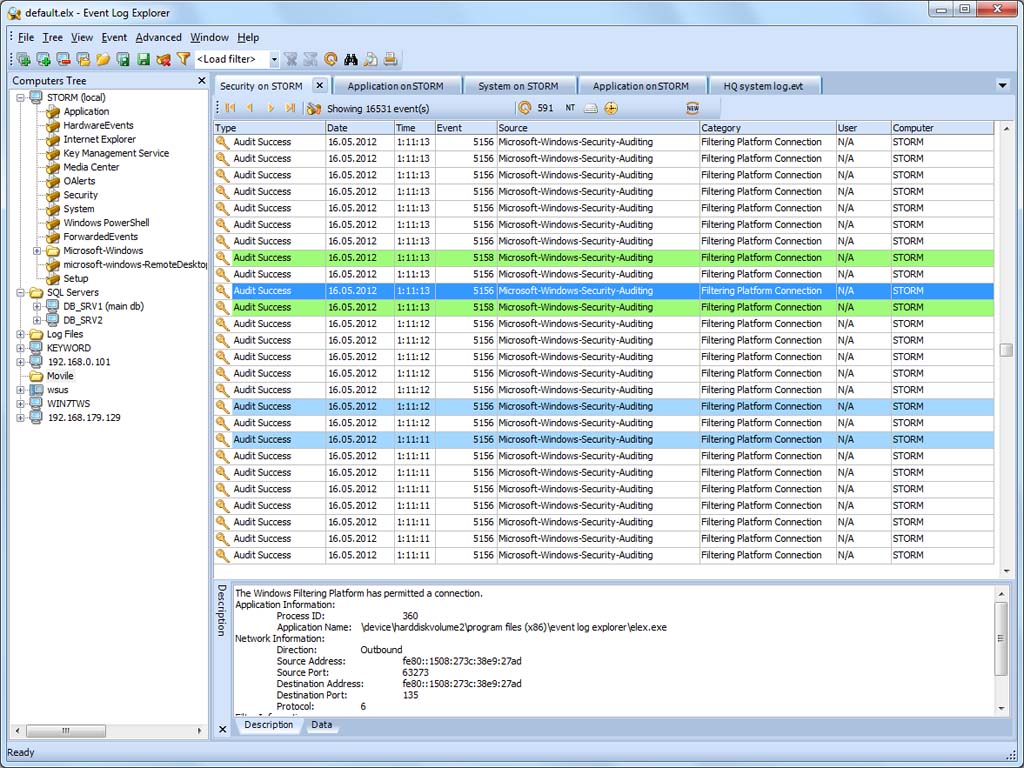
Event Log Explorer is a software for viewing, monitoring and analyzing events recorded in Security, System, Application and other logs of Microsoft Windows. It extends standard Event Viewer monitoring functionality and brings a lot of new features.
Free for non-commercial use.
Latest Reviews

h8red reviewed v4.5 on Aug 24, 2015
You really need to be clueless to like Nirsoft's MyEventViewer. It doesn't even display events properly; many of them don't show at all in the content pane, or only have a tiny bit of random text that show there. It's also lacking many of the features that Event Log Explorer has.

CyberDoc999 reviewed v4.5 Beta on Jun 15, 2015
Nirsoft's MyEventViewer way better

Sativarg reviewed v4.1 Beta on Oct 2, 2012
I can not get past an error and the documentation for the program does not list it. the error is not listed on the internet in relation to this software.
I can not access my logs and all I get is
---------------------------
Connect Error
---------------------------
Error accessing {my computer here}. Error code: 2138.
---------------------------
OK
---------------------------
the only online reference I can find is...
You can't search the field for the specified value
Windows has no trouble accessing my logs though with Windows\system32\eventvwr.msc
And I had to give them my name and address and blood samples and a DNA swab to get this thing registered for "FREE". Data mine much????
this may be the only bad review I have written but at least they could list the error online...
UPDATE: OH this is BETA OK I will move my rating up from 1 to 3 but still I don't like being interogated to be permitted to use a "free" app

emanresU deriseD reviewed v3.1 Beta 1 on Apr 20, 2009
How I hate these third-party interfaces. It's slower than a typical windows application of this type should be, and things like Ctrl+Tab and Ctrl+Shift+Tab don't work. Grab a scroll bar knob, and the window content doesn't scroll with the cursor--you have to release, then it jumps suddenly.
Other than that, yeah a flat view would be nice, and an easier way to set predefined filters (rather than opening multiple dialogs and navigating for a file). And no, the "quick filters" doesn't solve this problem. But still a helpful utility.

dhry reviewed v3.0 Beta 3 on Aug 29, 2008
Skyfrog: I gave it a 1 because they've spelled "standard" wrong in the file description. And because you can save downloading 2 megabytes by using a program that you already have on your computer.

gcaleval reviewed v3.0 Beta 3 on May 2, 2008
The advantages over other options includes one click access to event code explanations on MS (the explanations on the private site usually provide no useful info). It is an agile app and the user interface is professional. The Nirsoft alternative provides more information out of the log, giving better granularity, noting for example a CHAP logon event as opposed to a wdigest event while EL explorer simply reports them as logon events. So I say add both to your tool box. They're free after all.

smai33 reviewed v3.0 Beta 3 on May 1, 2008
I also find Nirsoft's MyEventViewer a better viewer of events. It shows all events in a simple one window view, no need to keep opening up new windows to view details and its free and lite.
Check out http://www.nirsoft.net/utils/my_event_viewer.html

why hello there reviewed v3.0 Beta 1 on Mar 18, 2008
Ever since NirSoft's MyEventViewer came out (which BetaNews refuses to list), I uninstalled this annoying thing. MyEventViewer offers a flat (i.e. combined) list of events, which is just what I want. I got sick of Event Log Explorer constantly forgetting column sizes and settings as well.

Skyfrog reviewed v3.0 Beta 1 on Mar 18, 2008
dhry: "It extends starndard Event Viewer monitoring functionality and brings new features." It's also completely free. So what is your reason for giving it a 1 again? That's right, you don't have one.
dhry reviewed v3.0 Beta 1 on Mar 18, 2008
Alternately, just use Windows' Event Viewer.

h8red reviewed v4.5 on Aug 24, 2015
You really need to be clueless to like Nirsoft's MyEventViewer. It doesn't even display events properly; many of them don't show at all in the content pane, or only have a tiny bit of random text that show there. It's also lacking many of the features that Event Log Explorer has.
CyberDoc999 reviewed v4.5 Beta on Jun 15, 2015
Nirsoft's MyEventViewer way better
Sativarg reviewed v4.1 Beta on Oct 2, 2012
I can not get past an error and the documentation for the program does not list it. the error is not listed on the internet in relation to this software.
I can not access my logs and all I get is
---------------------------
Connect Error
---------------------------
Error accessing {my computer here}. Error code: 2138.
---------------------------
OK
---------------------------
the only online reference I can find is...
You can't search the field for the specified value
Windows has no trouble accessing my logs though with Windows\system32\eventvwr.msc
And I had to give them my name and address and blood samples and a DNA swab to get this thing registered for "FREE". Data mine much????
this may be the only bad review I have written but at least they could list the error online...
UPDATE: OH this is BETA OK I will move my rating up from 1 to 3 but still I don't like being interogated to be permitted to use a "free" app
emanresU deriseD reviewed v3.1 Beta 1 on Apr 20, 2009
How I hate these third-party interfaces. It's slower than a typical windows application of this type should be, and things like Ctrl+Tab and Ctrl+Shift+Tab don't work. Grab a scroll bar knob, and the window content doesn't scroll with the cursor--you have to release, then it jumps suddenly.
Other than that, yeah a flat view would be nice, and an easier way to set predefined filters (rather than opening multiple dialogs and navigating for a file). And no, the "quick filters" doesn't solve this problem. But still a helpful utility.
dhry reviewed v3.0 Beta 3 on Aug 29, 2008
Skyfrog: I gave it a 1 because they've spelled "standard" wrong in the file description. And because you can save downloading 2 megabytes by using a program that you already have on your computer.
gcaleval reviewed v3.0 Beta 3 on May 2, 2008
The advantages over other options includes one click access to event code explanations on MS (the explanations on the private site usually provide no useful info). It is an agile app and the user interface is professional. The Nirsoft alternative provides more information out of the log, giving better granularity, noting for example a CHAP logon event as opposed to a wdigest event while EL explorer simply reports them as logon events. So I say add both to your tool box. They're free after all.
smai33 reviewed v3.0 Beta 3 on May 1, 2008
I also find Nirsoft's MyEventViewer a better viewer of events. It shows all events in a simple one window view, no need to keep opening up new windows to view details and its free and lite.
Check out http://www.nirsoft.net/utils/my_event_viewer.html
why hello there reviewed v3.0 Beta 1 on Mar 18, 2008
Ever since NirSoft's MyEventViewer came out (which BetaNews refuses to list), I uninstalled this annoying thing. MyEventViewer offers a flat (i.e. combined) list of events, which is just what I want. I got sick of Event Log Explorer constantly forgetting column sizes and settings as well.
Skyfrog reviewed v3.0 Beta 1 on Mar 18, 2008
dhry: "It extends starndard Event Viewer monitoring functionality and brings new features." It's also completely free. So what is your reason for giving it a 1 again? That's right, you don't have one.
dhry reviewed v3.0 Beta 1 on Mar 18, 2008
Alternately, just use Windows' Event Viewer.

ghammer reviewed v2.2.5 on Nov 14, 2007
Works MUCH better than "builtins with a couple of scripts".
After they made a mistake with expiring personal licenses, they have changed to never expiring personal licenses. Free and no hassle with renewing.

fsprolabs reviewed v2.1 RC 1 on Feb 12, 2007
This is FREE for personal use software.
After install, it runs in evaluation mode, but if you are agree with the terms of the license agreement (personal noncommercial use), you can get a personal license from our site absolutely FREE.

comeoffit reviewed v2.0 on Nov 29, 2006
Nice, certainly better than the default MMC piece of crap that comes with Windows. The grid lines get screwed up when I scroll with my mouse wheel, though, and I could do without having to screw around obtaining a "personal license" (which, by the way, expires).