File Details |
|
| File Size | 6.1 MB |
|---|---|
| License | Shareware, $14.95 |
| Operating System | Windows 7/Server 2003/Server 2008/Vista/XP |
| Date Added | January 18, 2013 |
| Total Downloads | 14,717 |
| Publisher | CodeSnake Software |
| Homepage | Explore&Burn |
Publisher's Description
Explore&Burn is an intuitive and easy to use CD/DVD burner, integrated with Windows Explorer. It is the easiest and fastest way to burn files and ISO images on your computer to CD or DVD. Explore&Burn is extremely lightweight comparing to other bloated CD/DVD burning programs, and does just what you need.
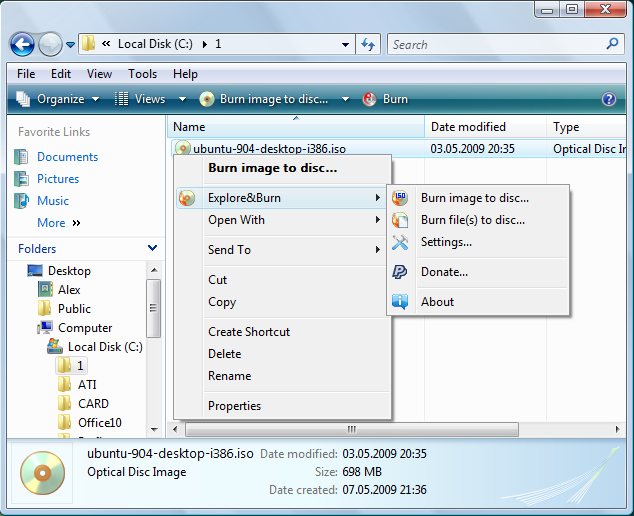
Unlike other CD/DVD burning software, Explore&Burn does not require you to start any programs to burn a CD or a DVD. Just, while browsing your files in Windows Explorer, select the needed files or folders, choose "Burn files to disc..." from right-click menu, and the burning wizard will guide you through the simple steps of burning these files to CD or DVD. If there are some files already present on the disc, Explore&Burn will automatically create multi-session disc and add your files to the end of it. In much the same way you can easily select and burn ISO image, or a DVD-Video disc.
Latest Reviews

Plumber reviewed v1.6.5 on Nov 8, 2010
I guess we'll have to agree to disagree on all points, "Lord" (someone using the nickname "Lord" calling me "immature"--rich!). I find ImgBurn inconvenient and clunky. I do agree that it usually works well.
As far as Windows having a native ability to burn images to disc, well I have to disagree. None of my WinXP machines have this capability. The only thing I can do is burn images to discs as files.
If I were friends with every author I've been accused of being friends with, wow, that would be a big happy family. Always, if it's freeware, you're free to rave about it, but if it's shareware, you're insulted and accused of being a biased liar. Yet I'm the "immature" and "closed minded" one!

-Lord- reviewed v1.6.4 on Oct 28, 2010
First, ImgBurn is not overly complicated. At install and first launch, you get a very clear and concise dialog asking what kind of project you'd like to complete; be it burn an image to disk, or create one etc. It does have the more complicated features for disk mastering for more advanced users, but they're not required as the defaults have never failed me regardless of the task I wish to perform.
Second, BurnAware, while an ok type of app, falls short in some of its functionality and abilty, but can't be totally ignored because it is, after all, free.
Plumber should focus on a more intelligent and lucid explanation as to why he thinks one program beats another, and leave the passion out of it. Slamming other people for their own beliefs simply because they don't fall in line with yours is immature and closed minded. Rating a program high because the authors included adding it into the context menu or because they're a friend of yours is simply ridiculous. What other folks are mentioning here is simply this:
When you compare this program to others, it doesn't do anything more than the others do besides that context menu thing. I, for one, don't care much about that since I prefer to get into the program itself and do the disk mastering myself. That being said, considering that the other programs are free and this one is not, I would go with the others, and between those two mentioned, ImgBurn is by far the more powerful and comprehensive. Now I did give this program a fair shake and tried it, and quite frankly I am very not impressed with it. It's burner software. it works. So it gets a 3. Does it work better? No, so it doesn't get an extra point which would have been a 4. When comparing apples to apples, is it free also? No, there goes the other point that could have brought it up to a 5. So to be clear, it works, but it's not free or as powerful as other free ones, it gets a 3.
Also, one other thing... take note of the image. Right above this program's dialog for burning an image to disk, is Windows BUILT IN ability to burn an image to disk, which is also (ahem) FREE. So is one really expected to pay to do something that can be done in literally the same step for FREE?
And I don't know any of the authors to any of the programs.

figaro331 reviewed v1.6.4 on Oct 27, 2010
Plumber is a friend of the developer of this crapware that's why he put 5 stars rating. This program doesn't even have appropriate interface to be burning program. I wouldn't install it even for free or if they pay me to do it.
ImageBurn is the best free burning program which outperforms any of shareware programs of that kind !
Plumber reviewed v1.6.3 on Oct 4, 2010
BurnAware is crap and ImgBurn is overcomplicated, extremely clunky, and poorly documented. And neither has the primary feature that Explore&Burn offers, which is access from the Explorer shell.
Next to the internet, I can't think of any other aspect of life that is so full of whiny spoiled crybabies with an overinflated sense of self-entitlement. Under no other circumstances do people expect the best and also expect for it to be free. Nor do they settle for sub-par performance but rave about it just because it's free.
Why don't they offer a free version? Because they don't have to. It's their product. You're not entitled to free anything. Go use something else--see who cares.

niknetpc reviewed v1.6.1 on Mar 26, 2010
Money talks..from top freeware used of thousands of people many cool projects always later transform to so far shareware,remember BassicTech ORT etc. and these people always forget about it and switch to other free alternatives, BurnAware or ImgBurn.Why developers do not make free version with some limitations and paid version instead if start with full free version?

catchpole reviewed v1.6.1 on Mar 25, 2010
Ain't gonna pay. Thank you.

Jezz_X reviewed v1.6.1 on Mar 24, 2010
emanresU deriseD sure it may not be killing it but its not a great thing to do and completely alienates all the users that beta tested reported bugs and help make it was it is today (even if they didn't code it).
As for a rating I'll give it a 3 as well because it still didn't sully integrate into windows 7 and replace the inbuilt stuff

emanresU deriseD reviewed v1.6.1 on Mar 24, 2010
Killing the program? Oh no, so the author will no longer be able to develop and support it for free. How terrible!
Panning software because of its free/pay status is idiotic beyond belief.
I'm giving it a 3 because it still has no queue feature.

hubbe reviewed v1.6 on Mar 15, 2010
Why Shareware ????? Wath´s the point,you are "killing" you own program,I stay with 1.5.3 or go back to img burn, it´s still free
catchpole reviewed v1.6 on Mar 15, 2010
What's new in version 1.6?
* License changed to shareware
----------------------------------------------------------
Gonna stick with ImgBurn, thank you.

Plumber reviewed v1.6.5 on Nov 8, 2010
I guess we'll have to agree to disagree on all points, "Lord" (someone using the nickname "Lord" calling me "immature"--rich!). I find ImgBurn inconvenient and clunky. I do agree that it usually works well.
As far as Windows having a native ability to burn images to disc, well I have to disagree. None of my WinXP machines have this capability. The only thing I can do is burn images to discs as files.
If I were friends with every author I've been accused of being friends with, wow, that would be a big happy family. Always, if it's freeware, you're free to rave about it, but if it's shareware, you're insulted and accused of being a biased liar. Yet I'm the "immature" and "closed minded" one!
-Lord- reviewed v1.6.4 on Oct 28, 2010
First, ImgBurn is not overly complicated. At install and first launch, you get a very clear and concise dialog asking what kind of project you'd like to complete; be it burn an image to disk, or create one etc. It does have the more complicated features for disk mastering for more advanced users, but they're not required as the defaults have never failed me regardless of the task I wish to perform.
Second, BurnAware, while an ok type of app, falls short in some of its functionality and abilty, but can't be totally ignored because it is, after all, free.
Plumber should focus on a more intelligent and lucid explanation as to why he thinks one program beats another, and leave the passion out of it. Slamming other people for their own beliefs simply because they don't fall in line with yours is immature and closed minded. Rating a program high because the authors included adding it into the context menu or because they're a friend of yours is simply ridiculous. What other folks are mentioning here is simply this:
When you compare this program to others, it doesn't do anything more than the others do besides that context menu thing. I, for one, don't care much about that since I prefer to get into the program itself and do the disk mastering myself. That being said, considering that the other programs are free and this one is not, I would go with the others, and between those two mentioned, ImgBurn is by far the more powerful and comprehensive. Now I did give this program a fair shake and tried it, and quite frankly I am very not impressed with it. It's burner software. it works. So it gets a 3. Does it work better? No, so it doesn't get an extra point which would have been a 4. When comparing apples to apples, is it free also? No, there goes the other point that could have brought it up to a 5. So to be clear, it works, but it's not free or as powerful as other free ones, it gets a 3.
Also, one other thing... take note of the image. Right above this program's dialog for burning an image to disk, is Windows BUILT IN ability to burn an image to disk, which is also (ahem) FREE. So is one really expected to pay to do something that can be done in literally the same step for FREE?
And I don't know any of the authors to any of the programs.
figaro331 reviewed v1.6.4 on Oct 27, 2010
Plumber is a friend of the developer of this crapware that's why he put 5 stars rating. This program doesn't even have appropriate interface to be burning program. I wouldn't install it even for free or if they pay me to do it.
ImageBurn is the best free burning program which outperforms any of shareware programs of that kind !
Plumber reviewed v1.6.3 on Oct 4, 2010
BurnAware is crap and ImgBurn is overcomplicated, extremely clunky, and poorly documented. And neither has the primary feature that Explore&Burn offers, which is access from the Explorer shell.
Next to the internet, I can't think of any other aspect of life that is so full of whiny spoiled crybabies with an overinflated sense of self-entitlement. Under no other circumstances do people expect the best and also expect for it to be free. Nor do they settle for sub-par performance but rave about it just because it's free.
Why don't they offer a free version? Because they don't have to. It's their product. You're not entitled to free anything. Go use something else--see who cares.
niknetpc reviewed v1.6.1 on Mar 26, 2010
Money talks..from top freeware used of thousands of people many cool projects always later transform to so far shareware,remember BassicTech ORT etc. and these people always forget about it and switch to other free alternatives, BurnAware or ImgBurn.Why developers do not make free version with some limitations and paid version instead if start with full free version?
catchpole reviewed v1.6.1 on Mar 25, 2010
Ain't gonna pay. Thank you.
Jezz_X reviewed v1.6.1 on Mar 24, 2010
emanresU deriseD sure it may not be killing it but its not a great thing to do and completely alienates all the users that beta tested reported bugs and help make it was it is today (even if they didn't code it).
As for a rating I'll give it a 3 as well because it still didn't sully integrate into windows 7 and replace the inbuilt stuff
emanresU deriseD reviewed v1.6.1 on Mar 24, 2010
Killing the program? Oh no, so the author will no longer be able to develop and support it for free. How terrible!
Panning software because of its free/pay status is idiotic beyond belief.
I'm giving it a 3 because it still has no queue feature.
hubbe reviewed v1.6 on Mar 15, 2010
Why Shareware ????? Wath´s the point,you are "killing" you own program,I stay with 1.5.3 or go back to img burn, it´s still free
catchpole reviewed v1.6 on Mar 15, 2010
What's new in version 1.6?
* License changed to shareware
----------------------------------------------------------
Gonna stick with ImgBurn, thank you.

stylemessiah reviewed v1.5.3 on Feb 17, 2010
Simply gives me an error about 3/4 of the way through burning any amount of files on 2 rock solid pioneer dvd drives.
The same files burned with my favourite program Prassi ONES have no issues
so i have to give it a 1
emanresU deriseD reviewed v1.5.2 on Feb 16, 2010
Meh, I've changed my opinion of this software. It's not really useful to me without any queue feature.

RWW reviewed v1.5.2 on Feb 16, 2010
Excellent software! With this update popped up a box that said I already have a later version installed. ???