File Details |
|
| File Size | 1.2 MB |
|---|---|
| License | Freeware |
| Operating System | Windows 2000/9x/Server 2003/Vista/XP |
| Date Added | July 12, 2010 |
| Total Downloads | 3,716 |
| Publisher | FCleaner.com |
| Homepage | FCleaner |
Publisher's Description
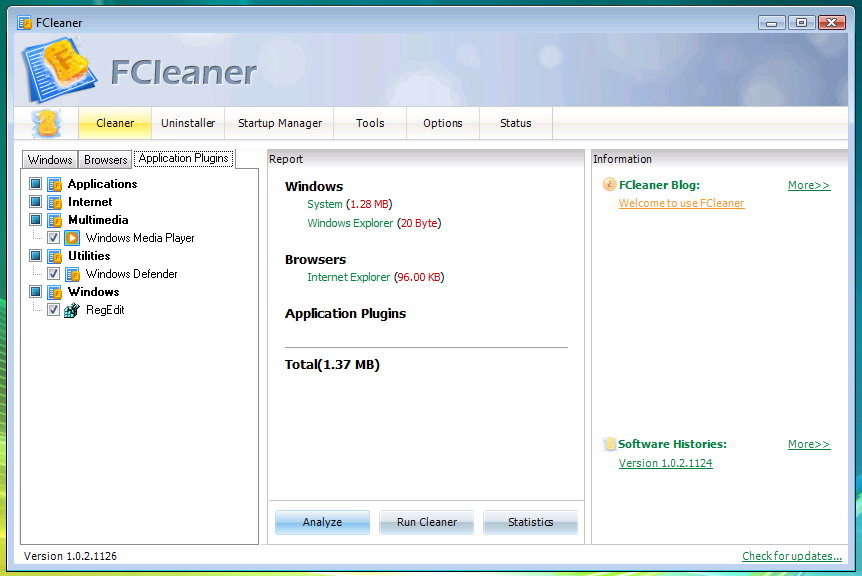
FCleaner is a freeware all-in-one Windows cleaning and optimization tool. It removes unused files that are eating up your disk space and slowing your system down, tweaks your system and allows your Windows to run faster. It can also protect your privacy such as Internet History, the Cookies that websites leave behind. You can erase all the traces of your online activities in just one click with the help of FCleaner. NO Experience Or Computer Skills Necessary! FCleaner is free, but it does not contain any Spyware or Adware.
Latest Reviews

boaz reviewed v1.3.1.621 on Feb 3, 2012
This was a pretty good program. But it looks like it died, last updated in 2010. Too bad, it worked pretty well.

Input Overload reviewed v1.3.1.621 on Jul 12, 2010
A nice piece of software, almost on a par with CCleaner. and BTW 'Morningdove' you can choose if you want it to start with Windows or not (just as with CCleaner!) - this perhaps shows how diligently you reviewed it. I'm keeping the program on & recommending it. A year or so ago CCleaner wasn't the best piece of software out there but it evolved, as will this program.
Negativity seems to be the order of the day when reviewing software on this forum, I often wonder if people actually review programs or just write what comes in their head at the time. 7 stars
P.S. after intensive trials on this & other PC's I will go as far as saying this software exceeds CCleaner which in itself is an excellent program,.

beelzebub360 reviewed v1.3.0.427 on Apr 30, 2010
Does what it says it will do, I like it, seems to work well, easy to understand and have had no problems with it at all..
is getting better & better & can compete with others[eg:cc cleaner]
Good Work & Kudos to the Developer

elitegangsta reviewed v1.2.3.801 on Aug 4, 2009
It's ok.
doesn't show me anything that hasn't been done before, so in my opinion, this is just a copycat program from better more reputable apps such as ccleaner.
I suppose it does what it advertises, is useful of course, but why bring this to the table when its already been released by others and this does nothing better?
Waste of time IMHO.

vikashxxx reviewed v1.2.1.630 on Jun 30, 2009
Toooooooooo Goood

gsteele reviewed v1.1.5.227 on Mar 2, 2009
Very poorly written.

Morningdove reviewed v1.1.4.129 on Feb 3, 2009
I don't see anything in this version that changes my review of version 1.1.2. It still frustratingly defaults to starting with windows. It must take an egotistical programmer to think that his crap cleaner belongs in the starting lineup by default. Furthermore, this program takes a back seat to both CCleaner and KCleaner (in manual mode).
Though the uninstaller is it's best feature, it doesn't compete with REVO.
Morningdove reviewed v1.1.2.102 on Jan 10, 2009
Overall, FCleaner is a disappointment compared to some other cleaners available on the market.
-- It doesn't list the files being deleted, which I find very helpful.
-- It doesn't have a registry cleaner; very useful when uninstalling.
-- The provided tools are unrelated to the program's purpose.
-- Accessing the internet and updating a blog is of negative value.
-- The program is set to start with Windows by default.
-- The GUI is awkward to use and very "busy".
-- Items are listed to clean that are not on your computer.
-- The choice of items to clean is limited compared to CCleaner.
Note: the winapp2.ini file available on the CCleaner website greatly expands the applications available to be cleaned.
The best feature of this program is the Uninstaller. It's functions and information are very complete.

LakotaElf reviewed v1.1.0.1215 on Dec 19, 2008
Does what it says it will do, I like it, seems to work well, easy to understand and have had no problems with it at all..

boaz reviewed v1.3.1.621 on Feb 3, 2012
This was a pretty good program. But it looks like it died, last updated in 2010. Too bad, it worked pretty well.
Input Overload reviewed v1.3.1.621 on Jul 12, 2010
A nice piece of software, almost on a par with CCleaner. and BTW 'Morningdove' you can choose if you want it to start with Windows or not (just as with CCleaner!) - this perhaps shows how diligently you reviewed it. I'm keeping the program on & recommending it. A year or so ago CCleaner wasn't the best piece of software out there but it evolved, as will this program.
Negativity seems to be the order of the day when reviewing software on this forum, I often wonder if people actually review programs or just write what comes in their head at the time. 7 stars
P.S. after intensive trials on this & other PC's I will go as far as saying this software exceeds CCleaner which in itself is an excellent program,.
beelzebub360 reviewed v1.3.0.427 on Apr 30, 2010
Does what it says it will do, I like it, seems to work well, easy to understand and have had no problems with it at all..
is getting better & better & can compete with others[eg:cc cleaner]
Good Work & Kudos to the Developer
elitegangsta reviewed v1.2.3.801 on Aug 4, 2009
It's ok.
doesn't show me anything that hasn't been done before, so in my opinion, this is just a copycat program from better more reputable apps such as ccleaner.
I suppose it does what it advertises, is useful of course, but why bring this to the table when its already been released by others and this does nothing better?
Waste of time IMHO.
vikashxxx reviewed v1.2.1.630 on Jun 30, 2009
Toooooooooo Goood
gsteele reviewed v1.1.5.227 on Mar 2, 2009
Very poorly written.
Morningdove reviewed v1.1.4.129 on Feb 3, 2009
I don't see anything in this version that changes my review of version 1.1.2. It still frustratingly defaults to starting with windows. It must take an egotistical programmer to think that his crap cleaner belongs in the starting lineup by default. Furthermore, this program takes a back seat to both CCleaner and KCleaner (in manual mode).
Though the uninstaller is it's best feature, it doesn't compete with REVO.
Morningdove reviewed v1.1.2.102 on Jan 10, 2009
Overall, FCleaner is a disappointment compared to some other cleaners available on the market.
-- It doesn't list the files being deleted, which I find very helpful.
-- It doesn't have a registry cleaner; very useful when uninstalling.
-- The provided tools are unrelated to the program's purpose.
-- Accessing the internet and updating a blog is of negative value.
-- The program is set to start with Windows by default.
-- The GUI is awkward to use and very "busy".
-- Items are listed to clean that are not on your computer.
-- The choice of items to clean is limited compared to CCleaner.
Note: the winapp2.ini file available on the CCleaner website greatly expands the applications available to be cleaned.
The best feature of this program is the Uninstaller. It's functions and information are very complete.
LakotaElf reviewed v1.1.0.1215 on Dec 19, 2008
Does what it says it will do, I like it, seems to work well, easy to understand and have had no problems with it at all..