
File Details |
|
| File Size | 6.4 MB |
|---|---|
| License | Freeware |
| Operating System | Windows (All) |
| Date Added | March 31, 2022 |
| Total Downloads | 198,219 |
| Publisher | FastStone Soft |
| Homepage | FastStone Image Viewer |
Publisher's Description
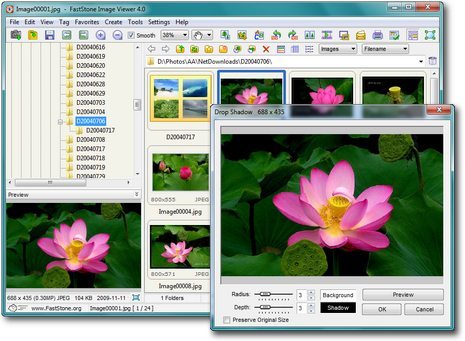
FastStone Image Viewer is an image browser, viewer, converter and editor with an easy to use interface and a nice array of features that include resizing, renaming, cropping, color adjustments, watermarks and more. It also includes an intuitive full-screen mode that provides quick access to EXIF information and thumbnail browser via hidden toolbars that emerge when you touch the edge of your screen with the mouse. Other features include a high quality magnifier and built-in slideshow with 60+ transitional effects, as well as lossless JPEG transitions, drop shadow effects, image frames, scanner support, histogram and much more. It supports all major graphic formats including BMP, JPEG, JPEG 2000, GIF, PNG, PCX, TIFF, WMF, ICO and TGA.
Latest Reviews

Someone reviewed v7.6 on May 31, 2023
jpeg-artifacts

estaf1001 reviewed v7.6 on Jan 2, 2023
There used to be a good program. Now there's no place to even ask what's wrong and what's become wrong with it.
There is no forum on the off-site.

ColinK2 reviewed v7.5 on Mar 9, 2022
No replies after multiple emails to support@faststone.org or faststone@gmail.com
Disappointed that developer is unwilling to support paying customers

Picasso reviewed v6.2 on Feb 20, 2017
Still the best of its kind!

Music4Ever reviewed v5.9 on Sep 15, 2016
Great program, cant fault it. Worth anyone with photos installing it.
Picasso reviewed v5.7 on Jun 8, 2016
This is one of the first programs I install after installing Windows.
It's a marvellous program!

FatBastard reviewed v5.4 on Aug 10, 2015
This is one of the best programs I've ever used!!

-1 reviewed v5.2 on Oct 5, 2014
Hilbert, I think rating FSIV down for such a relatively silly feature is not sensible. But what's worse is that FSIV does have this feature. Hold Ctrl, use the mouse to select the desired rectangular area, then click inside that area. FSIV crops the image to the selection and zooms into it. I'm not sure if this feature was added after your review, but I think it has been there all along.
FatBastard reviewed v5.0 on Mar 3, 2014
I totally agree with uberfly.

uberfly reviewed v5.0 on Mar 3, 2014
Insanely great, especially for free. Glad it's still being improved.
Someone reviewed v7.6 on May 31, 2023
Pros: Hello everyone! I just came across this great site that talks about how to remove those pesky remove jpeg artifacts https://imageupscaler.com/jpeg-artifacts-removing/ from our images. You know those annoying pixels and blurring that ruin the quality of our photos? Well, this site has some great tips and techniques to help us get rid of them. I can't wait to try them out and see if I can improve the clarity of my photos!
Cons: jpeg-artifacts
Bottom Line: jpeg-artifacts
estaf1001 reviewed v7.6 on Jan 2, 2023
Pros: Everything would be fine if not for the program freezes for a minute when you switch the program from viewer mode to browser mode.
Playback is easy.
1. open the file from windows explorer with the program.
2. Double click on the image in the program - the program switches to browser mode.
3. Proffit. It starts to think on nothing. Thinks for a minute and nothing can be done in it at this point. You can delete its profile with all its settings and database given and open it as if from scratch - no chance.
The problem started with the 7.x version.
Cons: Cons. I don't know what "cons" is.
Bottom Line: There used to be a good program. Now there's no place to even ask what's wrong and what's become wrong with it.
There is no forum on the off-site.
ColinK2 reviewed v7.5 on Mar 9, 2022
Pros: I have Faststone Image Viewer and other purchased Faststone software.
I like and use them all.
Cons: No replies after multiple emails to support@faststone.org or faststone@gmail.com
Disappointed that developer is unwilling to support paying customers
Bottom Line: No replies after multiple emails to support@faststone.org or faststone@gmail.com
Disappointed that developer is unwilling to support paying customers
Picasso reviewed v6.2 on Feb 20, 2017
Still the best of its kind!
Music4Ever reviewed v5.9 on Sep 15, 2016
Great program, cant fault it. Worth anyone with photos installing it.
Picasso reviewed v5.7 on Jun 8, 2016
This is one of the first programs I install after installing Windows.
It's a marvellous program!
FatBastard reviewed v5.4 on Aug 10, 2015
This is one of the best programs I've ever used!!
-1 reviewed v5.2 on Oct 5, 2014
Hilbert, I think rating FSIV down for such a relatively silly feature is not sensible. But what's worse is that FSIV does have this feature. Hold Ctrl, use the mouse to select the desired rectangular area, then click inside that area. FSIV crops the image to the selection and zooms into it. I'm not sure if this feature was added after your review, but I think it has been there all along.
FatBastard reviewed v5.0 on Mar 3, 2014
I totally agree with uberfly.
uberfly reviewed v5.0 on Mar 3, 2014
Insanely great, especially for free. Glad it's still being improved.

Hilbert reviewed v4.9 on Nov 14, 2013
I rather like FastStone Image Viewer, it progressively gets better every time I come to review it. It has many useful features such as histograms, an excellent tree / file view with images, thumbnails or details mode and such which are quite on par with XnView.
Furthermore, it has basic image editing which is fine for quick touch-ups. It even has a scaled-down version of my very favorite Photoshop adjustment tool: Shadow/Highlight but unfortunately which doesn't stretch to having tonal width, radius and midtone contrast adjustments a la PS.
However, unfortunately, I don't use FastStone Image Viewer for one very simple reason, that being the clumsy awkward way it scales images to view, essentially you cannot select a portion of an image to view as an enlargement.
The 'Rolls Royce' viewer in that regard was always Hamrick's now-defunct VuePrint Pro*. With the mouse, you'd just map out/make a square of the section of the image you want enlarged then release the mouse key and voilà that area would fill the screen--a most invaluable feature for highly detailed/hi-res images.
The next in line for the throne is IrfanView, its difference from VuePrint is that after you map out the square you have to click on the square for it to enlarge/fill the screen--essentially it's an extra step, albeit a small one.
Why FastStone doesn't have this feature is truly perplexing. Instead, when one clicks on the image it simply fills the screen but without providing some way of zooming into a section of special interest. Frankly, it's most annoying.
When one sees an obviously good program but with such a glaring defect as FastStone Image Viewer has, the first question that comes to mind is how does the author/programmer use the program. Does he use it in a heavy-duty extensive way or does he just tinker with it. One can't help that FastStone's programmer just tinkers.
Pity really, this limitation kills FastStone Image Viewer for many, (and it's a key reason why IrfanView is so very popular).
___
* Since I started writing this I thought I'd check to see if VuePrint was still available and it is, what's more Hamrick (of VueScan fame) has made it free (although he not updating it):
http://www.hamrick.com/upg.html.
Note: this isn't a replacement for FastStone or IrfanView, it is however about the fastest viewer out there, complete with the best viewer feature available.

serendipityguy reviewed v4.9 on Nov 13, 2013
This is a wonderful windows app with great continued development that should be included with every windows computer. Comes with loads and loads of features that will not disappoint. Wish that would be developed for Mac. I have emailed the developer and he has not replied. It there a Mac application that can do these types tasks? I love the skin changer, very nice

guru_v reviewed v4.8 on Apr 6, 2013
This continues to be the best freeware picture viewer available. IrfanView is very capable, but the interface of FastStone is much better, easier to navigate with a mouse only, and more intuitive.
With each update, more small annoyances of what I wished the program would do are removed, as the author[s] seems to have my thoughts in mind with the changes.
I have used several paid applications [for viewing alone], and none worked any better.