File Details |
|
| File Size | 0.3 MB |
|---|---|
| License | Freeware |
| Operating System | Windows 9x/NT/Server 2003/Vista/XP |
| Date Added | August 31, 2007 |
| Total Downloads | 4,521 |
| Publisher | Jacek Pazera |
| Homepage | Free Uninstaller |
Publisher's Description
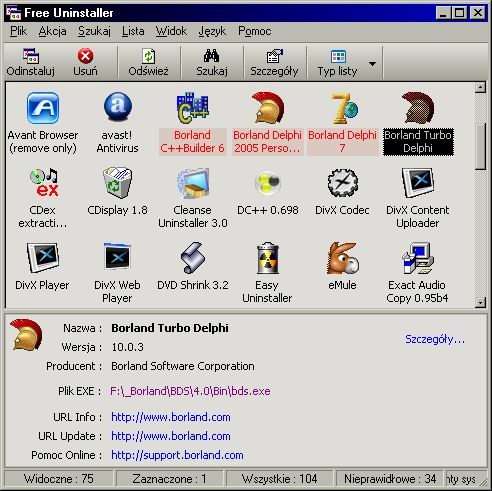
Free Uninstaller is the freeware uninstall tool - replacement for Add/Remove program. It starts up slightly faster than system applet and contain some additional features. The main task of the program is removing applications installed with Windows system and removing invalid entries from uninstall list.
Latest Reviews

uberfly reviewed v1.0 on Jul 11, 2007
Very nice app. Well written and very intuitive. I love these slim, hightly-focused applications that set out to accomplish one task and do it well. Thanks to the author for a very nice relacement for the bare-mimimum native tool.

Administraighter reviewed v1.0 on Jul 11, 2007
If you are talking about just invalid uninstall entries, yes, Free Uninstaller not only can remove them, it flags them for you. If you are referring to miscellaneous registry keys/values associated with previously-installed software, then no, Free Uninstaller does not handle that.
Actually, the name "Free Uninstaller" is kind of a misnomer--it's really just a more fully-featured replacement for the Control Panel Add/Remove applet, and not an "uninstaller".
But I see that not knowing what Free Uninstaller could do didn't stop you from rating it. I think you should make your way over to the anti-spyware section, and give out some poor ratings for the programs that don't also defragment your hard drive or play music. Or better yet, give them bad ratings for features they do have.

radiomaffia reviewed v1.0 on Jul 11, 2007
Smartest Uninstaller Pro does the job for me now and also has a languagepack and will search for registrykeys and folders that are left behind after uninstralling and is getting ride of it. Does Free uninstaller also have all these features?

comeoffit reviewed v1.0 on Jul 10, 2007
There are a slew of this type of utility out there. I've tried many of them, and 99.9% of them are crap. I was pleasantly surprised to find that this one not only worked properly, it had a nice feature set and usability features.
For example, the toolbar can be customized to an extent. Also, when an entry is double clicked, a details window opens, that shows all applicable information (including ARP cache info!). When you select an "Uninstall" option, Free Uninstaller prompts you to confirm--which is very nice, since some uninstallers DO NOT prompt you themselves. When you click a registry key, it opens Regedit at that key.
My only gripe is that columns cannot (completely) be hidden. (If you make them 0-width, they will not stay that way after restarting the application.)

uberfly reviewed v1.0 on Jul 11, 2007
Very nice app. Well written and very intuitive. I love these slim, hightly-focused applications that set out to accomplish one task and do it well. Thanks to the author for a very nice relacement for the bare-mimimum native tool.
Administraighter reviewed v1.0 on Jul 11, 2007
If you are talking about just invalid uninstall entries, yes, Free Uninstaller not only can remove them, it flags them for you. If you are referring to miscellaneous registry keys/values associated with previously-installed software, then no, Free Uninstaller does not handle that.
Actually, the name "Free Uninstaller" is kind of a misnomer--it's really just a more fully-featured replacement for the Control Panel Add/Remove applet, and not an "uninstaller".
But I see that not knowing what Free Uninstaller could do didn't stop you from rating it. I think you should make your way over to the anti-spyware section, and give out some poor ratings for the programs that don't also defragment your hard drive or play music. Or better yet, give them bad ratings for features they do have.
radiomaffia reviewed v1.0 on Jul 11, 2007
Smartest Uninstaller Pro does the job for me now and also has a languagepack and will search for registrykeys and folders that are left behind after uninstralling and is getting ride of it. Does Free uninstaller also have all these features?
comeoffit reviewed v1.0 on Jul 10, 2007
There are a slew of this type of utility out there. I've tried many of them, and 99.9% of them are crap. I was pleasantly surprised to find that this one not only worked properly, it had a nice feature set and usability features.
For example, the toolbar can be customized to an extent. Also, when an entry is double clicked, a details window opens, that shows all applicable information (including ARP cache info!). When you select an "Uninstall" option, Free Uninstaller prompts you to confirm--which is very nice, since some uninstallers DO NOT prompt you themselves. When you click a registry key, it opens Regedit at that key.
My only gripe is that columns cannot (completely) be hidden. (If you make them 0-width, they will not stay that way after restarting the application.)