File Details |
|
| File Size | 1.6 MB |
|---|---|
| License | Shareware, $27.00 |
| Operating System | Windows 2000/9x/Server 2003/XP |
| Date Added | November 19, 2008 |
| Total Downloads | 2,054 |
| Publisher | SMAN Development |
| Homepage | FreshOutline |
Publisher's Description
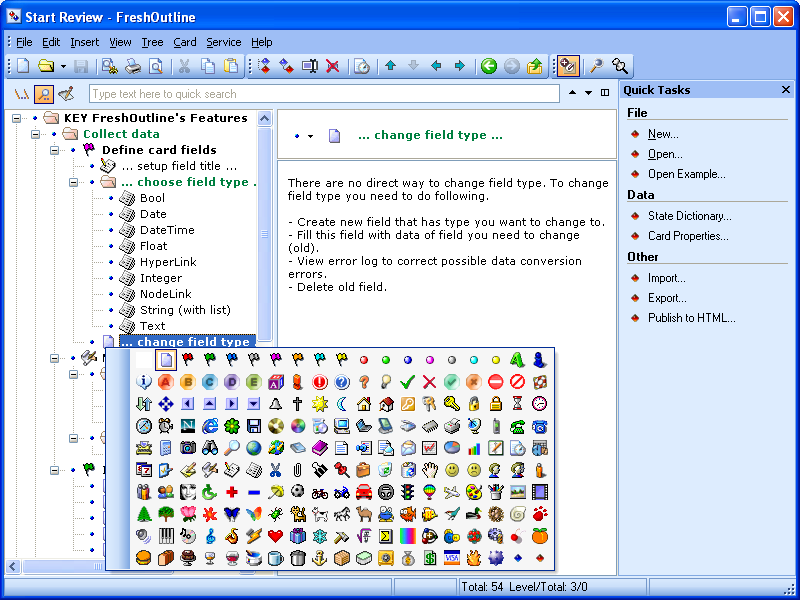
FreshOutline is a useful data manager that helps you to organize your data in tree-like style. You can define your own data structure for each tree and store notes, genealogical trees, to-do lists, contact data, etc. The advanced features are state dictionary, search utility, WYSIWYG print/preview of tree and data, and more.
Latest Reviews

rd@cotswold-it.co.uk reviewed v2.1.0.19 Beta on Mar 5, 2008
I'm sorry to see it still can't export text easily. I also once lost data to a corrupt FreshOutline database, so I'll go on using ActionOutline instead.

zridling reviewed v1.3 Build 143 Beta on Jul 5, 2005
Some excellent new features and easier navigational options make this a great upgrade. Wow!

thehunger reviewed v1.22 on Jun 2, 2005
Good start!
For an outliner to be really useful, data entry must be really really easy. That means import of existing data (say, from XML, Vault, Treepad, images), export, mouse/ keyboard shortcuts to minimize the number of dialogs, and of course also sensible defaults.
- User should be able to define default type for new item (ie. Text)
- New items should optionally be date/time stamped
- hotkeys for date/time stamp
- Sorting of entries within a branch
- Favorites or bookmarks
- links should be hot links
The way I use a hierarchical note taker is every time something happens - a customer calls, I make a call, a decision is made, whatever - I add a log entry.
Since most hierarchical note takers make it cumbersome to add new entries quickly, I usually just have one entry per month:
Logs
Jan05
Feb05
Mar05
etc and just add text for each month. Ideally, I would like to add separate entries for every call, note I make etc. but it has to be easy.
Global shortcuts that work everywhere would be nice.
Also, we are getting to a point where hierarchical note takers need to be cross platform: I want to access those same notes whether I boot into Linux or Windows. I know not everybody uses Linux, but the number increases and notes are just too important to not have access to in one of my environments...

Abdhul reviewed v1.2 Beta 3 Build 84 on Nov 22, 2004
This program does what it is designed to do very well, although I have to say I agree with the other review, a program like this should have some kind of compatibility built-in.
I will give it a 4 because of that.

Stingray57 reviewed v1.2 Build 46 Beta on Oct 21, 2004
I like the 'idea' of this program and I tried the previous versions, but I will not use it.. If I put data into it, I can't get it out the way I want.
I do tech support and the idea I could use this to help me with keeping my notes and tasks and special adendums is great, but the author doesn't allow it to be ported to notepad, Wordpad, Word... something other than his own proproetary format and it's not worth my time..
I wouldn't want to have all this information there and then decide to switch to something better and can't get it out because this program can't export to a text file.
It's my information and I want to be able to get it and use it the way I want to.

rd@cotswold-it.co.uk reviewed v2.1.0.19 Beta on Mar 5, 2008
I'm sorry to see it still can't export text easily. I also once lost data to a corrupt FreshOutline database, so I'll go on using ActionOutline instead.
zridling reviewed v1.3 Build 143 Beta on Jul 5, 2005
Some excellent new features and easier navigational options make this a great upgrade. Wow!
thehunger reviewed v1.22 on Jun 2, 2005
Good start!
For an outliner to be really useful, data entry must be really really easy. That means import of existing data (say, from XML, Vault, Treepad, images), export, mouse/ keyboard shortcuts to minimize the number of dialogs, and of course also sensible defaults.
- User should be able to define default type for new item (ie. Text)
- New items should optionally be date/time stamped
- hotkeys for date/time stamp
- Sorting of entries within a branch
- Favorites or bookmarks
- links should be hot links
The way I use a hierarchical note taker is every time something happens - a customer calls, I make a call, a decision is made, whatever - I add a log entry.
Since most hierarchical note takers make it cumbersome to add new entries quickly, I usually just have one entry per month:
Logs
Jan05
Feb05
Mar05
etc and just add text for each month. Ideally, I would like to add separate entries for every call, note I make etc. but it has to be easy.
Global shortcuts that work everywhere would be nice.
Also, we are getting to a point where hierarchical note takers need to be cross platform: I want to access those same notes whether I boot into Linux or Windows. I know not everybody uses Linux, but the number increases and notes are just too important to not have access to in one of my environments...
Abdhul reviewed v1.2 Beta 3 Build 84 on Nov 22, 2004
This program does what it is designed to do very well, although I have to say I agree with the other review, a program like this should have some kind of compatibility built-in.
I will give it a 4 because of that.
Stingray57 reviewed v1.2 Build 46 Beta on Oct 21, 2004
I like the 'idea' of this program and I tried the previous versions, but I will not use it.. If I put data into it, I can't get it out the way I want.
I do tech support and the idea I could use this to help me with keeping my notes and tasks and special adendums is great, but the author doesn't allow it to be ported to notepad, Wordpad, Word... something other than his own proproetary format and it's not worth my time..
I wouldn't want to have all this information there and then decide to switch to something better and can't get it out because this program can't export to a text file.
It's my information and I want to be able to get it and use it the way I want to.