
File Details |
|
| File Size | 3.9 MB |
|---|---|
| License | Freeware |
| Operating System | Windows (All) |
| Date Added | September 9, 2021 |
| Total Downloads | 5,120 |
| Publisher | KC Softwares |
| Homepage | Ignition |
Publisher's Description
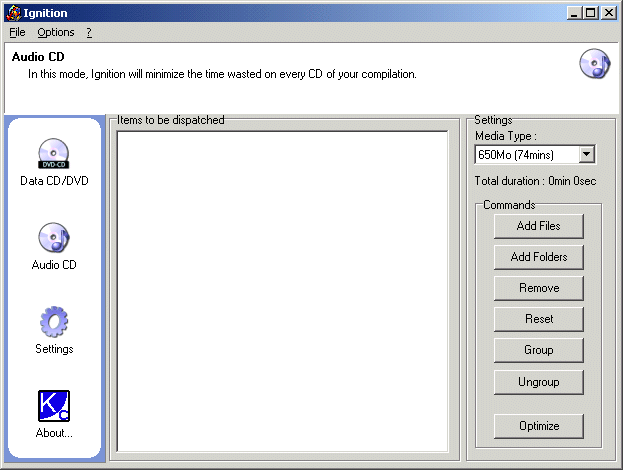
Ignition is a CD burning tool to save your life if you're tired of burning Gigabytes of archives and finally get 10Mb to burn on the last CD of your set. It is a space optimizer that will dispatch the files on the minimal number of CDs.
Latest Reviews

Aegis69 reviewed v2.24.0.72 on May 8, 2018
like, who burns things anymore? lol its 2018 not 1997

krgood reviewed v2.23.0.70 on Nov 16, 2017
There are better alternative out there that are 100% free and works well. Shame on the author for being deceptive

rat2000 reviewed v2.9.1.51 on Mar 25, 2005
I've been looking for an app that does this for quite some time. It does what it's suppose to do. The interface could be a lot better but once you understand how things work, it's not too bad. Specially if I compare it to a similar application I've tested (can't rember the name, open source app).
Would give it a 4 if making groups could be done in a more drag-and-drop way.

Aires reviewed v2.0.0.16 Beta 3 on Jul 22, 2003
Glad to see you're using Inno Setup - nice touch (although I'm suprised you haven't customised the install text to make it more of a 'yours' install). I'm gald to see you replaced those big Corp lettering with a nice cartoon style bmp. The option of having a Quick Launch icon and a Desktop icon would be nice though. I know I said I didn't want an link to your homepage on the desktop, but one in the Ignition folder would be nice LOL But I'd still like to be able to produce the results to a text file to save &/or once the files have been optimised, create & move them to a folder. Other than that, it seems to work fine and it does the job. Still 4 stars though until you sort out the text &/or folder stuff.

supermimai reviewed v2.0.14 Beta 2 on Jul 11, 2003
better and better, version after version. Dvd optimisation was a big step. burning is fast and easy. great job.
Aires reviewed v2.0.14 Beta 2 on Jul 9, 2003
*(I feel it's a little unfair of you to have reviewed this DJKarmaD2, when you haven't even downloaded it). First of all, while it's damned irraitating for you to have put the name of your corp before the program name in the install setup, it is understandable. I do not however want a shortcut to your website placed on my desktop! I hope you sort that out?! The GUI looks a helluva lot better and I'm glad to see it now supports DVD optimisation (do we have to be reminded of the name of your corp in the GUI insuch big letters?). I would like to see the default folder set to My Documents rather than the program folder, but I'm glad to see there are no crashes when adding many files now. I like the Optomize function, but I would like to see the file size of the disc I'm gonna burn in the Results. I also like the Burn button and it's great that it works with your DVD burning software - but how about adding support for the majors, such as Easy CD & Nero? I think that'd be a *HUGE* plus for your software. It seems to work well but I can't for the life of me figure out how to reproduce the optimisation results to a text file. I also don't see how you're able to actually make a folder on your hdd of the optimised files. But I guess you don't think either is necessary at this point and I guess that's fair enough. I was going to give it 4 stars because this really has improved - a lot! But I have to give it 5 stars, if only to offset the idiot below.

DJKarmaD2 reviewed v2.0.14 Beta 2 on Jul 9, 2003
Well with such reviews as seen below, I don't even have to install it to know it's going to be a big letdown. Especially since you apparently need to buy something else to make this half-cooked app work. Might I suggest something better that has been free and open source for a few years now: http://bttb.sourceforge.net/ Burn To The Brim. Enjoy :)
Aires reviewed v2.0 Beta on Jul 4, 2003
This is a fantastic idea in theory. I have been looking for s tool or utility that does this for a long time. As a previous reviewer had suggested, I even thought about tackling it myself. So I'm glad to see someone's making an effort. But unfortunately, that's all this is - an effort. It only provides the ability to maximise 650mb & 700mb CDs. What about 800mb CDs? And now DVD burning is becoming so popular, where is the support for DVDs? I realise this is a Beta, but there aren't even any version history notes. However, despite being an excellent idea, it has one fatal flaw - it crashes if you add more than about a dozen files at once, regardless of their size. And at the moment, that has to be a fatal flaw. I hope the developers keep working on this tool, as the idea is excellent in theory. In practice though, it's very imperfect.

sirkevinthegeek reviewed v2.0 Beta on Jul 3, 2003
It's definitely a good idea... I actually thought about making a similar program recently, and I was upset that someone else already had the idea. But, then I tried Ignition!, and I had no luck getting it to work as a standalone program. Also, the program locked when I tried to ungroup a file.

HailRazer reviewed v2.0 Beta on Jul 3, 2003
The Good: It's easy to install and run and I like the pop up info on folders (amount of data in each folder)and it would be easy to use.
The Bad: This program requires their CopytoDVD Program to actually burn cd's see the home page http://www.katarncorp.com/index.php?ignition
The GUI looks nothing like the screen shot
and adding more than 200 megs of files to be sorted at one
time caused the program to use 100% of my cpu and crash, This could be because I do not have CopyToDVD ($30 USD) installed.
IMHO: They should tell you that you need their Other software in order to use their FREEware before you download
it to try it out.

Aegis69 reviewed v2.24.0.72 on May 8, 2018
Pros: lol
Cons: lol
Bottom Line: like, who burns things anymore? lol its 2018 not 1997
krgood reviewed v2.23.0.70 on Nov 16, 2017
Pros: None that I found
Cons: Requires a purchase of a $30.00 additional program to work.
Bottom Line: There are better alternative out there that are 100% free and works well. Shame on the author for being deceptive
rat2000 reviewed v2.9.1.51 on Mar 25, 2005
I've been looking for an app that does this for quite some time. It does what it's suppose to do. The interface could be a lot better but once you understand how things work, it's not too bad. Specially if I compare it to a similar application I've tested (can't rember the name, open source app).
Would give it a 4 if making groups could be done in a more drag-and-drop way.
Aires reviewed v2.0.0.16 Beta 3 on Jul 22, 2003
Glad to see you're using Inno Setup - nice touch (although I'm suprised you haven't customised the install text to make it more of a 'yours' install). I'm gald to see you replaced those big Corp lettering with a nice cartoon style bmp. The option of having a Quick Launch icon and a Desktop icon would be nice though. I know I said I didn't want an link to your homepage on the desktop, but one in the Ignition folder would be nice LOL But I'd still like to be able to produce the results to a text file to save &/or once the files have been optimised, create & move them to a folder. Other than that, it seems to work fine and it does the job. Still 4 stars though until you sort out the text &/or folder stuff.
supermimai reviewed v2.0.14 Beta 2 on Jul 11, 2003
better and better, version after version. Dvd optimisation was a big step. burning is fast and easy. great job.
Aires reviewed v2.0.14 Beta 2 on Jul 9, 2003
*(I feel it's a little unfair of you to have reviewed this DJKarmaD2, when you haven't even downloaded it). First of all, while it's damned irraitating for you to have put the name of your corp before the program name in the install setup, it is understandable. I do not however want a shortcut to your website placed on my desktop! I hope you sort that out?! The GUI looks a helluva lot better and I'm glad to see it now supports DVD optimisation (do we have to be reminded of the name of your corp in the GUI insuch big letters?). I would like to see the default folder set to My Documents rather than the program folder, but I'm glad to see there are no crashes when adding many files now. I like the Optomize function, but I would like to see the file size of the disc I'm gonna burn in the Results. I also like the Burn button and it's great that it works with your DVD burning software - but how about adding support for the majors, such as Easy CD & Nero? I think that'd be a *HUGE* plus for your software. It seems to work well but I can't for the life of me figure out how to reproduce the optimisation results to a text file. I also don't see how you're able to actually make a folder on your hdd of the optimised files. But I guess you don't think either is necessary at this point and I guess that's fair enough. I was going to give it 4 stars because this really has improved - a lot! But I have to give it 5 stars, if only to offset the idiot below.
DJKarmaD2 reviewed v2.0.14 Beta 2 on Jul 9, 2003
Well with such reviews as seen below, I don't even have to install it to know it's going to be a big letdown. Especially since you apparently need to buy something else to make this half-cooked app work. Might I suggest something better that has been free and open source for a few years now: http://bttb.sourceforge.net/ Burn To The Brim. Enjoy :)
Aires reviewed v2.0 Beta on Jul 4, 2003
This is a fantastic idea in theory. I have been looking for s tool or utility that does this for a long time. As a previous reviewer had suggested, I even thought about tackling it myself. So I'm glad to see someone's making an effort. But unfortunately, that's all this is - an effort. It only provides the ability to maximise 650mb & 700mb CDs. What about 800mb CDs? And now DVD burning is becoming so popular, where is the support for DVDs? I realise this is a Beta, but there aren't even any version history notes. However, despite being an excellent idea, it has one fatal flaw - it crashes if you add more than about a dozen files at once, regardless of their size. And at the moment, that has to be a fatal flaw. I hope the developers keep working on this tool, as the idea is excellent in theory. In practice though, it's very imperfect.
sirkevinthegeek reviewed v2.0 Beta on Jul 3, 2003
It's definitely a good idea... I actually thought about making a similar program recently, and I was upset that someone else already had the idea. But, then I tried Ignition!, and I had no luck getting it to work as a standalone program. Also, the program locked when I tried to ungroup a file.
HailRazer reviewed v2.0 Beta on Jul 3, 2003
The Good: It's easy to install and run and I like the pop up info on folders (amount of data in each folder)and it would be easy to use.
The Bad: This program requires their CopytoDVD Program to actually burn cd's see the home page http://www.katarncorp.com/index.php?ignition
The GUI looks nothing like the screen shot
and adding more than 200 megs of files to be sorted at one
time caused the program to use 100% of my cpu and crash, This could be because I do not have CopyToDVD ($30 USD) installed.
IMHO: They should tell you that you need their Other software in order to use their FREEware before you download
it to try it out.