
File Details |
|
| File Size | 3.0 MB |
|---|---|
| License | Freeware |
| Operating System | Windows (All) |
| Date Added | June 17, 2013 |
| Total Downloads | 30,983,335 |
| Publisher | LIGHTNING UK! |
| Homepage | ImgBurn |
Publisher's Description
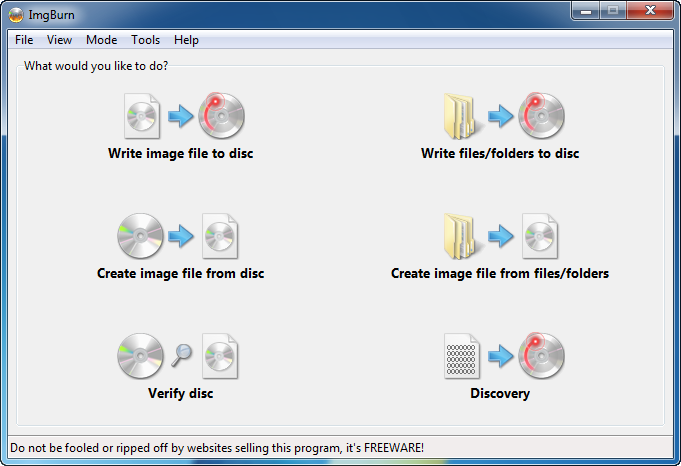
ImgBurn is a free tool that enables you to burn CD/DVD images with ease. All the latest drives are supported (including booktype / bitsetting on many of the major ones). Advanced functionality can be found in the ImgBurn context menus.
CLEAN INSTALL! No OpenCandy bundled.
Latest Reviews

DheerajKumar reviewed v2.5.8.0 on Jul 14, 2023
Awesome.

rogelioingram reviewed v2.5.8.0 on Apr 24, 2022
good

DavidMapes reviewed v2.5.8.0 on Nov 22, 2021
This is one of my favorite tools!
I recommend everyone to use it.Easy and perfect.Thank you

helenika reviewed v2.5.8.0 on Oct 3, 2013
great, just take care of avoiding the toolbars and crap during installation.

PCB reviewed v2.5.8.0 on Aug 1, 2013
This app is awesome ... then they added junk-ware to it in v2.5.8.0 ... I got my older version back at oldapps.com ... hope this helps.

MeanE reviewed v2.5.8.0 on Jun 18, 2013
Be warned that 2.5.8.0 has a whole bunch of crapware that gets installed with it.
Otherwise a great program until this release.

dubstepmaker reviewed v2.5.7.0 on Feb 14, 2013
great burner program.

finnlayer reviewed v2.5.7.0 on Dec 29, 2012
Some laptops with burners, have had the yellow icon in the system tray,
it was the upper and lower filets that needed be deleted, system reboot and the burners were working.
That's why this is such a good burner program, it also helps to find bios updates and change region + more options are available to the user.
Interface looks a little dull, never the less its as solid as a rock.

616h8 reviewed v2.5.7.0 on Aug 20, 2012
I had the unfortenate Error of Lead Out not completing in Nero, Roxio, Windows, BurnerXP & so on & so forth 25X!!!
Murfy's LAW: ImgBurn was the last App I tried & have been smiling ever since!!!
Xcilent work guyz!!!
KEEP IT UP!!!

SineWave reviewed v2.5.7.0 on Aug 3, 2012
I love this program and use it for years now. It's VERY reliable regarding burning CD/DVDs. The only time, so far, that it failed to burn a DVD, was when my burner went to burner holy land. ;) In I don't really know how many years, the program itself never failed me. However, there is still a very annoying bug that makes it crash, and it happens *quite often* when I'm in a "Build" mode and dragging files from the Explorer into it. It just goes "poof" and gives me the "application crashed" screen. So you have to "build" the project all over again... and it can still crash on you again. :-/ So sometimes, when I have a bigger "build" to make, I save the project after every drag and drop addition... for just in case. I still give it 5 stars for reliability when you press the "burn button". ;)
Also, I find it so convenient that I can install it so easily and burn CD/DVDs in a matter of seconds! Just use 7-zip to unpack it. All you need to make it work is actually just the main exe file and nothing else.
Well deserved five stars! I'll give it 10 stars when they resolve the drag and drop crashes! :)
DheerajKumar reviewed v2.5.8.0 on Jul 14, 2023
Pros: Really It's appreciated this product.
Cons: Thanks for sharing this product in our life
Bottom Line: Awesome.

DavidMapes reviewed v2.5.8.0 on Nov 22, 2021
Pros: This is one of my favorite tools!
I recommend everyone to use it.Easy and perfect.Thank you
Cons: This is one of my favorite tools!
I recommend everyone to use it.Easy and perfect.Thank you
Bottom Line: This is one of my favorite tools!
I recommend everyone to use it.Easy and perfect.Thank you
helenika reviewed v2.5.8.0 on Oct 3, 2013
great, just take care of avoiding the toolbars and crap during installation.
PCB reviewed v2.5.8.0 on Aug 1, 2013
This app is awesome ... then they added junk-ware to it in v2.5.8.0 ... I got my older version back at oldapps.com ... hope this helps.
MeanE reviewed v2.5.8.0 on Jun 18, 2013
Be warned that 2.5.8.0 has a whole bunch of crapware that gets installed with it.
Otherwise a great program until this release.
dubstepmaker reviewed v2.5.7.0 on Feb 14, 2013
great burner program.
finnlayer reviewed v2.5.7.0 on Dec 29, 2012
Some laptops with burners, have had the yellow icon in the system tray,
it was the upper and lower filets that needed be deleted, system reboot and the burners were working.
That's why this is such a good burner program, it also helps to find bios updates and change region + more options are available to the user.
Interface looks a little dull, never the less its as solid as a rock.
616h8 reviewed v2.5.7.0 on Aug 20, 2012
I had the unfortenate Error of Lead Out not completing in Nero, Roxio, Windows, BurnerXP & so on & so forth 25X!!!
Murfy's LAW: ImgBurn was the last App I tried & have been smiling ever since!!!
Xcilent work guyz!!!
KEEP IT UP!!!
SineWave reviewed v2.5.7.0 on Aug 3, 2012
I love this program and use it for years now. It's VERY reliable regarding burning CD/DVDs. The only time, so far, that it failed to burn a DVD, was when my burner went to burner holy land. ;) In I don't really know how many years, the program itself never failed me. However, there is still a very annoying bug that makes it crash, and it happens *quite often* when I'm in a "Build" mode and dragging files from the Explorer into it. It just goes "poof" and gives me the "application crashed" screen. So you have to "build" the project all over again... and it can still crash on you again. :-/ So sometimes, when I have a bigger "build" to make, I save the project after every drag and drop addition... for just in case. I still give it 5 stars for reliability when you press the "burn button". ;)
Also, I find it so convenient that I can install it so easily and burn CD/DVDs in a matter of seconds! Just use 7-zip to unpack it. All you need to make it work is actually just the main exe file and nothing else.
Well deserved five stars! I'll give it 10 stars when they resolve the drag and drop crashes! :)

alejandro2708 reviewed v2.5.7.0 on Aug 1, 2012
muy bueno

fgjtgcjyghcjtghfc reviewed v2.5.7.0 on May 12, 2012
Still a good piece of software,except for the added ASK TOOLBAR!
The ASK tool bar INI file is set to 1 (yes please)as standard ,as if you and everyone would always give consent from the beginning without being asked.(which is nonsense behaviour of advertisers and all the other companies that want to mine data ,otherwise they would not get many people wanting their crap added extra's installed )
An easy way to bypass the ASK.com data miner from going anywhere !Just download 7zip and when it's installed (7zip) just right click the setupimg exe and choose 7-zip ,then choose extract to "setupimgburn"
Now this will extract the contents of the imgburn exe to a folder,now you can open that folder and start imiage burn just by clicking the imgburn exe.The programme will start straight up into image burn without you being bugged for installing the ASK toolbar data miner ,as this method bypasses all the guff .
You could also go into the same folder and into the $PLUGINSDIR folder and delete both the apnstub exe and the apntoolbarinstaller exe just to further prevent any trickery.
Simples !!!!!

some guy reviewed v2.5.7.0 on Mar 30, 2012
great stuff has not failed me yet free non bloat. The only one i use