File Details |
|
| File Size | 1.9 MB |
|---|---|
| License | Shareware, $39.95 |
| Operating System | Windows 2000/Server 2003/Server 2008/Vista/XP |
| Date Added | March 12, 2012 |
| Total Downloads | 2,599 |
| Publisher | TorchSoft |
| Homepage | Malware Defender |
Publisher's Description
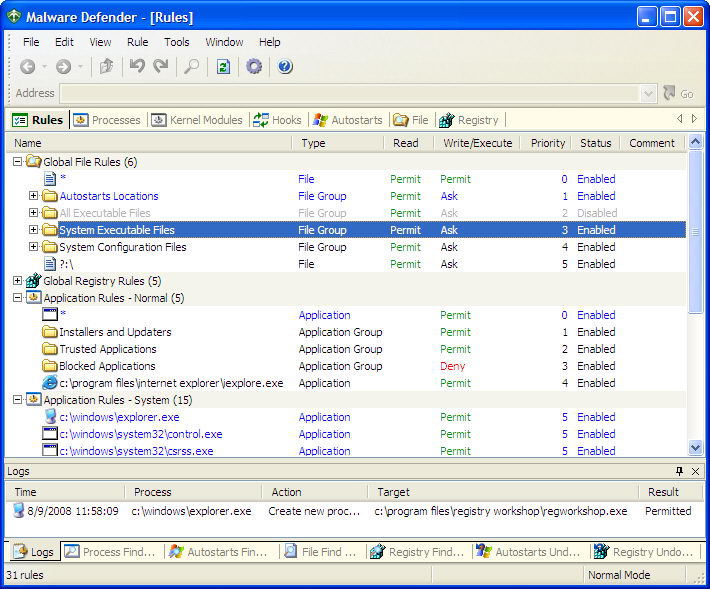
Malware Defender is a HIPS (Host Intrusion Prevention System) with low resource usage and latency. It is effective to protect your computer system from all forms of malware (viruses, worms, Trojans, adware, spyware, keyloggers, rootkits, etc.). It is also an advanced rootkit detector. It provides many useful tools that can be used to detect and remove already installed malware.
Latest Reviews

emanresU deriseD reviewed v2.5.0 on Feb 5, 2010
I took a chance on this application again, now that a couple new versions have been released.
Mistake.
This time, I left all protection components enabled. I was looking the application over, becoming very impressed with the interface and all the features. Until I made the mistake of trying to view user hooks, that is. When I did that, a "Scanning for hooks..." dialog appeared, and before long, it made my system essentially freeze. Not the preferable kind of freeze where it's simply totally frozen and you know you have to hit the reset button, so you just go right ahead and do so. No, this was the kind of near-freeze where the mouse cursor will move at an agonizingly slow pace, and you can see consistent disk activity. Yet you cannot really do anything with the system. So, you wait and wait, trying to avoid doing a hard reset.
The waiting was pointless, since the system never came back. I removed Malicious Descender and will NEVER install it again.

dhry reviewed v2.4.4 on Nov 28, 2009
Hah! I'm sure it wasn't a cracked version - I'm reasonably confident I got it either from the link here or from Softpedia. However, I just installed it again a little while ago and it looks like it's working fine now. I was actually surprised the first time round because Registry Workshop was such a cool program. Haven't tested this all the way yet, I'll throw in three stars for now and possibly upgrade once I've given it a run through.
emanresU deriseD reviewed v2.3.0 on Jul 25, 2009
Hah, dihrty gets caught trying to steal software, by the author!
I think the name of this program is a bit odd; normally, if you call yourself "X Defender", that means you defend "X" (rather than defending AGAINST "X"). So "Malware Defender" at first sight seems like it's intended to defend malware, rather than defend your system against malware. OK, whatever.
I installed it, and enabled ONLY the network protection. I also enabled "Learning Mode". Yet the program still prevented some of my software from working. Programs like KatMouse and AltMove, which rely on global hooks, were dead in the water. There was nothing in the logs. Hooks were not supposed to be blocked in the first place.
At least it has the appearance of a great application.

torchsoft reviewed v2.0.5 on Mar 7, 2009
To dhry:
Where did you download the trail version? It seems only the cracked version have such problems.

wat0114 reviewed v2.0.5 on Feb 17, 2009
Check the logs; if you see any deny entries on legitimate actions, right-click the entry and select "create permit rule". Done! Also, you should re-boot a few times and log into all accounts while in learning mode. You may also have a conflict with other security software. I'd suggest to anyone report problems here: http://www.torchsoft.com/en/support.html This is excellent software that has gotten better with the addition of network protection, affording control of both inbound and outbound connections. The author has resolved other bugs and continues to respond to issues in a timely manner.
Contrary to what the person below might think, this is highly deserving of 5 stars.
dhry reviewed v2.0.5 on Feb 15, 2009
Run it for at least a day before moving to normal mode or lockups may occur? You have GOT to be kidding me. What sort of logic is that? I installed it, ran it in learning mode for maybe 20 mins. Switched to normal mode. As expected, I saw a couple of alert windows asking whether I should trust a particular app I just ran or not. I said yes. So far, so good. Ran my email program. Quit out of it and sure as crap the system locked up. Braindead. Had to hard reboot. Second time round, left it it learning mode for a while, maybe an hour. Switched to normal mode - locked up immediately. Absolute rubbish. No consistency in functionality, no popup windows, your entire system gets jacked up to buggery and the only escape is a hard reboot and the accompanying risk of drive corruption. If I could give this less than one star I would. Avoid like the plague.
Updated 20090223: NOT. It CRASHES your computer. DEALBREAKER. One star.
wat0114 reviewed v1.2.2 on Dec 8, 2008
This is an outstanding HIPS. In the right hands it will provide rock solid protection for your pc against unknown threats, with very minimal impact on system performance. It is important, however, to run it in learning mode for at least a day before locking it down in Normal mode, otherwise lockups may occur. So far, the developer has been active in the product's support and its continual development, ironing out bugs as well as improving upon and adding new features.

emanresU deriseD reviewed v2.5.0 on Feb 5, 2010
I took a chance on this application again, now that a couple new versions have been released.
Mistake.
This time, I left all protection components enabled. I was looking the application over, becoming very impressed with the interface and all the features. Until I made the mistake of trying to view user hooks, that is. When I did that, a "Scanning for hooks..." dialog appeared, and before long, it made my system essentially freeze. Not the preferable kind of freeze where it's simply totally frozen and you know you have to hit the reset button, so you just go right ahead and do so. No, this was the kind of near-freeze where the mouse cursor will move at an agonizingly slow pace, and you can see consistent disk activity. Yet you cannot really do anything with the system. So, you wait and wait, trying to avoid doing a hard reset.
The waiting was pointless, since the system never came back. I removed Malicious Descender and will NEVER install it again.
dhry reviewed v2.4.4 on Nov 28, 2009
Hah! I'm sure it wasn't a cracked version - I'm reasonably confident I got it either from the link here or from Softpedia. However, I just installed it again a little while ago and it looks like it's working fine now. I was actually surprised the first time round because Registry Workshop was such a cool program. Haven't tested this all the way yet, I'll throw in three stars for now and possibly upgrade once I've given it a run through.
emanresU deriseD reviewed v2.3.0 on Jul 25, 2009
Hah, dihrty gets caught trying to steal software, by the author!
I think the name of this program is a bit odd; normally, if you call yourself "X Defender", that means you defend "X" (rather than defending AGAINST "X"). So "Malware Defender" at first sight seems like it's intended to defend malware, rather than defend your system against malware. OK, whatever.
I installed it, and enabled ONLY the network protection. I also enabled "Learning Mode". Yet the program still prevented some of my software from working. Programs like KatMouse and AltMove, which rely on global hooks, were dead in the water. There was nothing in the logs. Hooks were not supposed to be blocked in the first place.
At least it has the appearance of a great application.
torchsoft reviewed v2.0.5 on Mar 7, 2009
To dhry:
Where did you download the trail version? It seems only the cracked version have such problems.
wat0114 reviewed v2.0.5 on Feb 17, 2009
Check the logs; if you see any deny entries on legitimate actions, right-click the entry and select "create permit rule". Done! Also, you should re-boot a few times and log into all accounts while in learning mode. You may also have a conflict with other security software. I'd suggest to anyone report problems here: http://www.torchsoft.com/en/support.html This is excellent software that has gotten better with the addition of network protection, affording control of both inbound and outbound connections. The author has resolved other bugs and continues to respond to issues in a timely manner.
Contrary to what the person below might think, this is highly deserving of 5 stars.
dhry reviewed v2.0.5 on Feb 15, 2009
Run it for at least a day before moving to normal mode or lockups may occur? You have GOT to be kidding me. What sort of logic is that? I installed it, ran it in learning mode for maybe 20 mins. Switched to normal mode. As expected, I saw a couple of alert windows asking whether I should trust a particular app I just ran or not. I said yes. So far, so good. Ran my email program. Quit out of it and sure as crap the system locked up. Braindead. Had to hard reboot. Second time round, left it it learning mode for a while, maybe an hour. Switched to normal mode - locked up immediately. Absolute rubbish. No consistency in functionality, no popup windows, your entire system gets jacked up to buggery and the only escape is a hard reboot and the accompanying risk of drive corruption. If I could give this less than one star I would. Avoid like the plague.
Updated 20090223: NOT. It CRASHES your computer. DEALBREAKER. One star.
wat0114 reviewed v1.2.2 on Dec 8, 2008
This is an outstanding HIPS. In the right hands it will provide rock solid protection for your pc against unknown threats, with very minimal impact on system performance. It is important, however, to run it in learning mode for at least a day before locking it down in Normal mode, otherwise lockups may occur. So far, the developer has been active in the product's support and its continual development, ironing out bugs as well as improving upon and adding new features.