
File Details |
|
| File Size | 114.3 MB |
|---|---|
| License | Subscription, $39.00 |
| Operating System | Windows 7/8/10/11 |
| Date Added | July 14, 2022 |
| Total Downloads | 9,079 |
| Publisher | ManyCam ULC |
| Homepage | ManyCam |
Publisher's Description
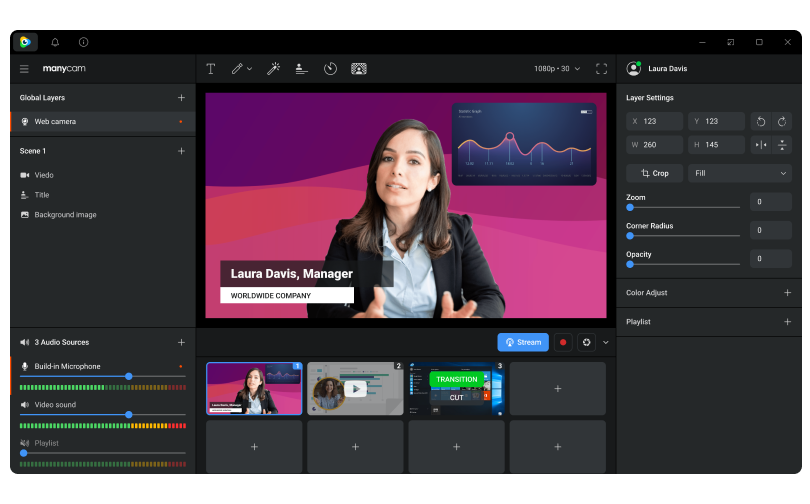
ManyCam is an easy-to-use virtual camera and live streaming software that helps you deliver professional live videos on streaming platforms, video conferencing apps, and remote learning tools. Several feature enhancements are included within ManyCam to produce a professional quality live video production. It can connect a desktop, smartphone, tablet and live stream to multiple social media platforms and streaming services simultaneously. It provides innovative solutions to video chatters, gamers, broadcasters, and professionals.
Latest Reviews

tim_tester reviewed v5.6 on Dec 14, 2016
after the install run Adwcleaner this installs 3rd party crap

tickleonthetum reviewed v3.1.41 on Jan 28, 2013
Always sad to see a great freeware program turn into a crippled shareware/pa one :-(
tickleonthetum reviewed v2.4.63 on Mar 9, 2012
ManyCam has sold out and it has become a shareware program. The new version 3 (which is what will download) is crippled compared to the old 2.6.x line. You now have to pay to remove the watermark, preview video effects, etc, oh and many of the downloadable effects now cost money!
A real shame, I will be sticking to the old 2.6.x line...

boosalisis12 reviewed v2.4.63 on Feb 28, 2011
A few days ago I downloaded ManyCam, then I got a problem, my PC slows down. When I deleted the program everything works fine. I was advised a similar program called SplitCam. Now everything works without problems. If anyone is need this program http://fileforum.betanew...l/SplitCam/1141067369/1 . It's free

chacha989 reviewed v2.4.63 on May 11, 2010
manycam is ok. I think it could have improvment. to make effects for the rograam, they should have a link on their homepage that lees the guest to a download. The download should be a program that allows you to make and design your own custom effects. also, they should allow you to have more than three effects at once. By doing this, it would improve the manycam program itself, and more people would use it. if any1 has any idea or a glitch to have more than three effects on at once, please tell me!! thankyou,chacha

some guy reviewed v2.4.63 on May 8, 2010
even when you check not to install the Ask tool bar it still installs other then that not a bad program even tough it will not detect my camcorder through haupage Tv tuner card
tickleonthetum reviewed v2.4.39 on Dec 29, 2009
Absolutely fantastic free program!!
Despite what others say, it has a great & powerful User Interface, and is packed full of features. You can also download a lot of extra backrounds, Effects, etc. from their site.
Best of all, it's free whereas the others suggested by people are not!

wise.bear reviewed v2.3.21 on Feb 27, 2009
Manycam's UI is ugly and lake of effects. I find magic camera and think it is better for adding webcam effects. http://www.shiningmorning.com/

rotjong reviewed v2.1 on Jul 5, 2007
The download link is wrong. It points to 2.0 build 7089. Go to the website and then follow the download link which will take you to Download.com and then you'll actually get ManyCam 2.1.

yablows reviewed v2.0 on Feb 11, 2007
Does what it says on the Tin! works very well, adds a virtual connector for most programs to connect to, so MSN, Yahoo etc can all be acessing the cam at the same time. The additonal "fun" bits like faces, eyes, horns etc work well ish - depending on the environment your cams in (ie it doesn't like changes of lighting etc) apart from that - well done - looking forward to the extras!

tim_tester reviewed v5.6 on Dec 14, 2016
after the install run Adwcleaner this installs 3rd party crap
tickleonthetum reviewed v3.1.41 on Jan 28, 2013
Always sad to see a great freeware program turn into a crippled shareware/pa one :-(
tickleonthetum reviewed v2.4.63 on Mar 9, 2012
ManyCam has sold out and it has become a shareware program. The new version 3 (which is what will download) is crippled compared to the old 2.6.x line. You now have to pay to remove the watermark, preview video effects, etc, oh and many of the downloadable effects now cost money!
A real shame, I will be sticking to the old 2.6.x line...
boosalisis12 reviewed v2.4.63 on Feb 28, 2011
A few days ago I downloaded ManyCam, then I got a problem, my PC slows down. When I deleted the program everything works fine. I was advised a similar program called SplitCam. Now everything works without problems. If anyone is need this program http://fileforum.betanew...l/SplitCam/1141067369/1 . It's free
chacha989 reviewed v2.4.63 on May 11, 2010
manycam is ok. I think it could have improvment. to make effects for the rograam, they should have a link on their homepage that lees the guest to a download. The download should be a program that allows you to make and design your own custom effects. also, they should allow you to have more than three effects at once. By doing this, it would improve the manycam program itself, and more people would use it. if any1 has any idea or a glitch to have more than three effects on at once, please tell me!! thankyou,chacha
some guy reviewed v2.4.63 on May 8, 2010
even when you check not to install the Ask tool bar it still installs other then that not a bad program even tough it will not detect my camcorder through haupage Tv tuner card
tickleonthetum reviewed v2.4.39 on Dec 29, 2009
Absolutely fantastic free program!!
Despite what others say, it has a great & powerful User Interface, and is packed full of features. You can also download a lot of extra backrounds, Effects, etc. from their site.
Best of all, it's free whereas the others suggested by people are not!
wise.bear reviewed v2.3.21 on Feb 27, 2009
Manycam's UI is ugly and lake of effects. I find magic camera and think it is better for adding webcam effects. http://www.shiningmorning.com/
rotjong reviewed v2.1 on Jul 5, 2007
The download link is wrong. It points to 2.0 build 7089. Go to the website and then follow the download link which will take you to Download.com and then you'll actually get ManyCam 2.1.
yablows reviewed v2.0 on Feb 11, 2007
Does what it says on the Tin! works very well, adds a virtual connector for most programs to connect to, so MSN, Yahoo etc can all be acessing the cam at the same time. The additonal "fun" bits like faces, eyes, horns etc work well ish - depending on the environment your cams in (ie it doesn't like changes of lighting etc) apart from that - well done - looking forward to the extras!