File Details |
|
| File Size | 11.8 MB |
|---|---|
| License | Freeware |
| Operating System | Windows Vista |
| Date Added | June 6, 2007 |
| Total Downloads | 51,298 |
| Publisher | Microsoft Corp. |
| Homepage | Microsoft Windows Mobile Device Center |
Publisher's Description
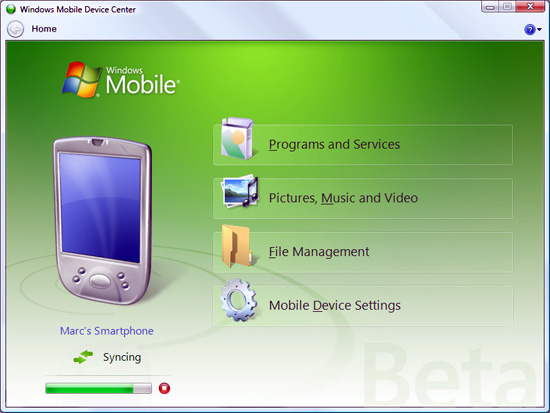
Windows Mobile Device Center enables you to set up new partnerships, synchronize content and manage music, pictures and video with Windows Mobile powered devices (Windows Mobile 2003 or later). The Windows Mobile Device Center combines an efficient business-data synchronization platform with a compelling user experience. The Windows Mobile Device Center helps you to quickly set up new partnerships, synchronize business-critical information such as e-mail, contacts and calendar appointments, easily manage your synchronization settings, and transfer business documents between your device and PC.
Latest Reviews

smartbob reviewed v6.1 on May 14, 2009
do NOT install wmdc 6.1. It has a high problem rate and adds no new features. Stick with wmdc 6.0. If you have already installed 6.1 and now your phone doesn't sync, use this guide to revert back to 6.0
http://www.neatanswers.c...ws-mobile-device-center/

robjuniorx reviewed v6.1 on Jun 12, 2007
Uma surpresa! O programa funciona increivelmente bem e é ótimo no Vista. Além do Visual Estonteante.
Amazing!!!

AnthonyB reviewed v6.1 on Jun 8, 2007
Works perfectly.
For those that slammed it because it doesn't work with XP, well, please do more research... it can't. Period. No matter how much you believe it should. Primary reason is that it hooks into Vista's Sync Center rather than acting as an entirely stand-alone app like ActiveSync.

dpritchett reviewed v6.1 on Jun 7, 2007
Works like a charm in Vista, which is the only place WMDC is supposed to work.
Activesync 4.5 is available and works in XP, but not Vista. Same is true of lot's of software because Vista is different.

iamtux reviewed v6.1 on Jun 7, 2007
Easy to use. Does what it's supposed to do.

godzila reviewed v1.0 on Feb 1, 2007
fire up vista vista rulez bill gates rulez

Corbit reviewed vBeta 3 on Oct 9, 2006
Has a lot of nice features. The three rating is for not making this compatible with XP. Afterall, this should be viewed as an update to mobile device software, NOT operating software. When I buy a Windows compatible mobile device, there is an assumption that updates to the software I use to connect it to Windows won't render my operating system obsolete. When Microsoft drops support for older operating systems (and please have no doubt that you're witnessing that here) to drive an upgrade cycle, it makes one wonder if the upgrade, in this case Vista, can stand on its own merits or is just a revenue grab. Forgive the rant.

perrywilson78 reviewed vBeta 3 on Oct 9, 2006
No XP support! Works ok on Vista

smartbob reviewed v6.1 on May 14, 2009
do NOT install wmdc 6.1. It has a high problem rate and adds no new features. Stick with wmdc 6.0. If you have already installed 6.1 and now your phone doesn't sync, use this guide to revert back to 6.0
http://www.neatanswers.c...ws-mobile-device-center/
robjuniorx reviewed v6.1 on Jun 12, 2007
Uma surpresa! O programa funciona increivelmente bem e é ótimo no Vista. Além do Visual Estonteante.
Amazing!!!
AnthonyB reviewed v6.1 on Jun 8, 2007
Works perfectly.
For those that slammed it because it doesn't work with XP, well, please do more research... it can't. Period. No matter how much you believe it should. Primary reason is that it hooks into Vista's Sync Center rather than acting as an entirely stand-alone app like ActiveSync.
dpritchett reviewed v6.1 on Jun 7, 2007
Works like a charm in Vista, which is the only place WMDC is supposed to work.
Activesync 4.5 is available and works in XP, but not Vista. Same is true of lot's of software because Vista is different.
iamtux reviewed v6.1 on Jun 7, 2007
Easy to use. Does what it's supposed to do.
godzila reviewed v1.0 on Feb 1, 2007
fire up vista vista rulez bill gates rulez
Corbit reviewed vBeta 3 on Oct 9, 2006
Has a lot of nice features. The three rating is for not making this compatible with XP. Afterall, this should be viewed as an update to mobile device software, NOT operating software. When I buy a Windows compatible mobile device, there is an assumption that updates to the software I use to connect it to Windows won't render my operating system obsolete. When Microsoft drops support for older operating systems (and please have no doubt that you're witnessing that here) to drive an upgrade cycle, it makes one wonder if the upgrade, in this case Vista, can stand on its own merits or is just a revenue grab. Forgive the rant.
perrywilson78 reviewed vBeta 3 on Oct 9, 2006
No XP support! Works ok on Vista