File Details |
|
| File Size | 1.1 MB |
|---|---|
| License | Shareware, $29.00 |
| Operating System | Windows XP |
| Date Added | September 27, 2006 |
| Total Downloads | 1,001 |
| Publisher | Castle Peak Software |
| Homepage | My SmartFolders |
Publisher's Description
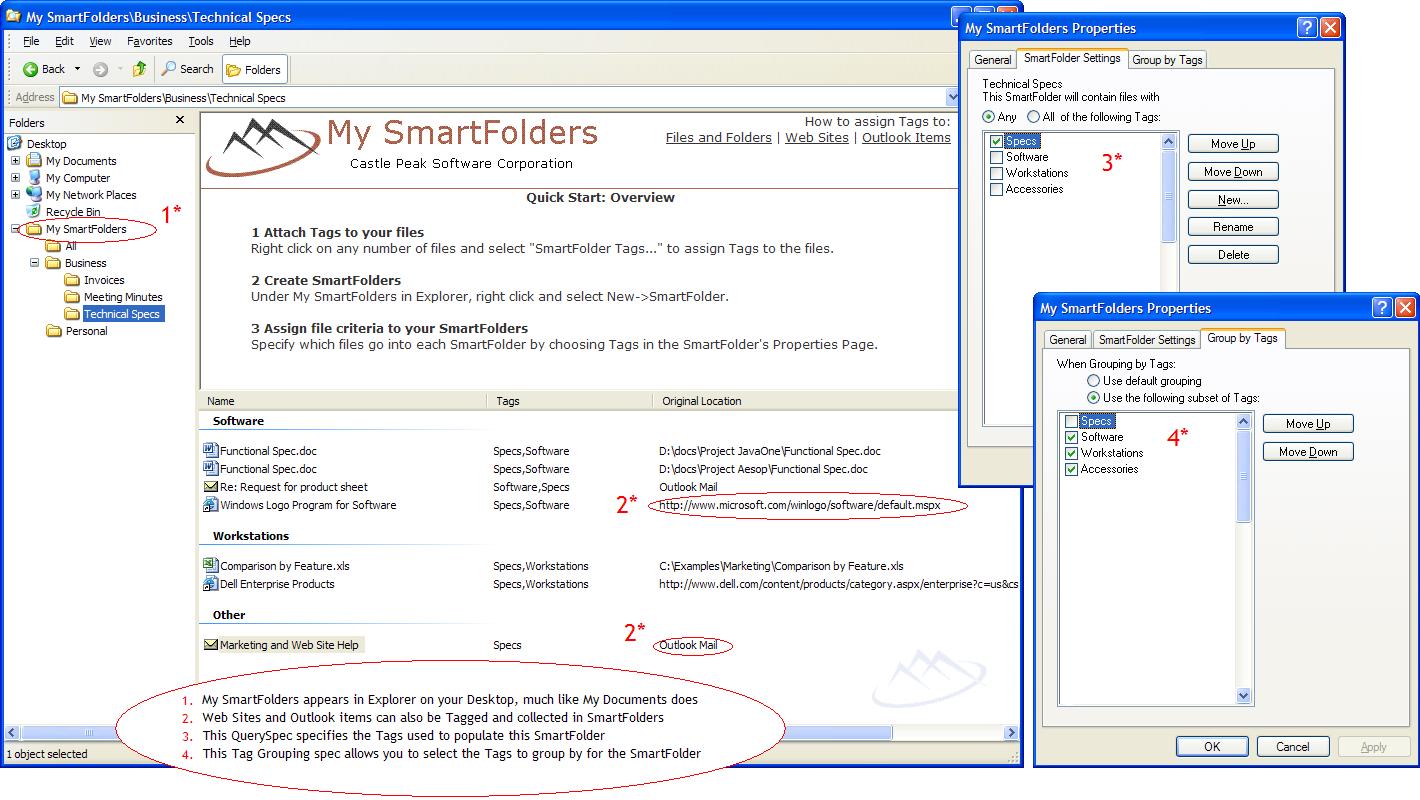
My SmartFolders organizes your files, web links and Outlook items, grouping them based on their relationships. The basic concept is that you attach tags to your files, web sites and Outlook items and then they appear in your SmartFolders according those tags. It’s a simple concept, yet it’s very powerful. You can apply this concept to any aspect of your work, for any business and for any kind of data that you store on your computer or over the network.
Latest Reviews

Jim reviewed vBeta Build 1861 on Aug 17, 2006
Perhaps you missed the news, that was about the very first feature to be officaly droped from vista, before m$ dropped the project entirely. RIP WinFS.
http://www.theregister.co.uk/2006/06/26/winfs_axed/

extremely well reviewed vBeta 0.1748 on Aug 10, 2006
This is a concept which has to be implemented deep at the OS-level to be powerful enough to be useful. And indeed, Windows Vista will have that. So thanks, but I think I'll pass.

guitardave78 reviewed vBeta Build 1619 on Jul 4, 2006
A very interesting concept and quite well executed.
I must admit that I would find little use for it though to be honest.
I prefered the method that BlinX used (as the seem to have stopped doing smart folders now) where you had a folder that had a search term and was populated shortcuts to files that matched that term.
Keep it up though, this has a lot of potential.

Jim reviewed vBeta Build 1861 on Aug 17, 2006
Perhaps you missed the news, that was about the very first feature to be officaly droped from vista, before m$ dropped the project entirely. RIP WinFS.
http://www.theregister.co.uk/2006/06/26/winfs_axed/
extremely well reviewed vBeta 0.1748 on Aug 10, 2006
This is a concept which has to be implemented deep at the OS-level to be powerful enough to be useful. And indeed, Windows Vista will have that. So thanks, but I think I'll pass.
guitardave78 reviewed vBeta Build 1619 on Jul 4, 2006
A very interesting concept and quite well executed.
I must admit that I would find little use for it though to be honest.
I prefered the method that BlinX used (as the seem to have stopped doing smart folders now) where you had a folder that had a search term and was populated shortcuts to files that matched that term.
Keep it up though, this has a lot of potential.