File Details |
|
| File Size | 40.3 MB |
|---|---|
| License | Freeware |
| Operating System | Windows Vista/XP |
| Date Added | November 6, 2007 |
| Total Downloads | 33,013 |
| Publisher | NVIDIA Corp. |
| Homepage | NVIDIA nTune |
Publisher's Description
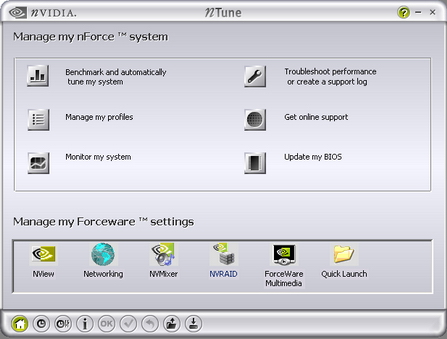
NVIDIA nTune is the ultimate utility for accessing, monitoring, and adjusting your system components, including temperature and voltages with clear, user-friendly control panels. Overclock your system for highest performance or underclock it for near silent operation. All changes are performed within the Microsoft Windows interface â?? enabling full functionality without the need to make changes in the BIOS and reboot your system.
Latest Reviews

blahman2005 reviewed v5.05.54.00 on Nov 6, 2007
My BIOS does not support overclocking my dual core processor. I have tried *ALL* other software to overclock it. Nothing works with it except this software. It allows me to overclock my cores from 2Ghz to 2.5Ghz, causing a significant boost in performance which is very useful for me.

Dsfargeg reviewed v5.05.47.00 on Jul 15, 2007
This is utter crap.
It didn't make my PC faster, in the very opposite! Startup e.g. took a huge deal longer with this installed.
Don't use this crap, use RivaTuner or similar apps which not only have a lot more functionality, but also don't bog your system down.

smarterthanyou reviewed v5.05.47.00 on Jul 13, 2007
Very horrible program. Even though it is very successful at making your computer run faster, nTune constantly nags you whenever it changes profiles automatically by popping up a warning message. This happens even when you tell nTune NOT to pop up a warning message.

_Shorty-dammit reviewed v5.05.47.00 on Jul 13, 2007
http://www.nvidia.com/object/ntune_5.05.47.00.html
Supported OSes:
Windows XP (32-bit),
Windows XP x64 Edition
Windows Vista (32-bit)
Windows Vista x64 Edition
Version: 5.05.47.00
Release Date: July 12, 2007

davidtb reviewed v5.05.47.00 on Jul 13, 2007
Did anyone notice on NVidia's page that VISTA is NOT mentioned.

mickrussom reviewed v5.05.47.00 on Jul 13, 2007
This app sucks. I wish the old control panel would come back. Splitting driver from this was dumb. mixing video card stuff with motherboard stuff is dumb. This application sucks so bad its even hard to setup simple temp monitoring. Riva Tuner. End.

photonboy reviewed v5.05.38.00 on May 1, 2007
*Beware of creating an unstable system, especially if you tweak your system too close to its maximum. If the background temperature goes up you might start crashing or corrupt data (depending on what you tweak.)
Since the video card is by far the most important hardware component to tweak, I wouldn't waste my time tweaking other components (and it takes a LONG time to do your system.) DX10 is going to be even MORE dependent on the video card (or LESS dependent on the CPU) so the extra Frames Per Second will come mostly towards an over-clocked video card.
Underclocking?
While GPU's and VRAM can be overclocked I'd like to see UNDERCLOCKING. This really needs to be hardware supported so it's not a fault of this software, but I'd like to point out here that in the future I hope to see GPU's, VRAM, CPU's and system RAM that all clock to ONLY the needed frequencies and voltages. Why should a video card use 100 Watts just to show a picture file. Let's all scream for LESS POWER.
Finally, I think NVIdia's headed in the right direction but you might wish to use another tweaking utility that just does your video card like "Rivatuner."

normr reviewed v5.05.38.00 on Apr 28, 2007
Is now uninstalled!

Cris3 reviewed v5.05.38.00 on Apr 27, 2007
I've been using this program for over a year and it works great with my ASUS motherboard and nVidia 7800 GT graphics card. I use the auto tune (fine tune) feature, set it going at night and its all finished when I get up in the morning. I save the settings and bingo it's done. That works for me.

ray56_32223 reviewed v5.05.38.00 on Apr 27, 2007
I have an asus MB with a nvidia 6600 and lots of their chips, it aborted everytime I tried to run it.

blahman2005 reviewed v5.05.54.00 on Nov 6, 2007
My BIOS does not support overclocking my dual core processor. I have tried *ALL* other software to overclock it. Nothing works with it except this software. It allows me to overclock my cores from 2Ghz to 2.5Ghz, causing a significant boost in performance which is very useful for me.
Dsfargeg reviewed v5.05.47.00 on Jul 15, 2007
This is utter crap.
It didn't make my PC faster, in the very opposite! Startup e.g. took a huge deal longer with this installed.
Don't use this crap, use RivaTuner or similar apps which not only have a lot more functionality, but also don't bog your system down.
smarterthanyou reviewed v5.05.47.00 on Jul 13, 2007
Very horrible program. Even though it is very successful at making your computer run faster, nTune constantly nags you whenever it changes profiles automatically by popping up a warning message. This happens even when you tell nTune NOT to pop up a warning message.
_Shorty-dammit reviewed v5.05.47.00 on Jul 13, 2007
http://www.nvidia.com/object/ntune_5.05.47.00.html
Supported OSes:
Windows XP (32-bit),
Windows XP x64 Edition
Windows Vista (32-bit)
Windows Vista x64 Edition
Version: 5.05.47.00
Release Date: July 12, 2007
davidtb reviewed v5.05.47.00 on Jul 13, 2007
Did anyone notice on NVidia's page that VISTA is NOT mentioned.
mickrussom reviewed v5.05.47.00 on Jul 13, 2007
This app sucks. I wish the old control panel would come back. Splitting driver from this was dumb. mixing video card stuff with motherboard stuff is dumb. This application sucks so bad its even hard to setup simple temp monitoring. Riva Tuner. End.
photonboy reviewed v5.05.38.00 on May 1, 2007
*Beware of creating an unstable system, especially if you tweak your system too close to its maximum. If the background temperature goes up you might start crashing or corrupt data (depending on what you tweak.)
Since the video card is by far the most important hardware component to tweak, I wouldn't waste my time tweaking other components (and it takes a LONG time to do your system.) DX10 is going to be even MORE dependent on the video card (or LESS dependent on the CPU) so the extra Frames Per Second will come mostly towards an over-clocked video card.
Underclocking?
While GPU's and VRAM can be overclocked I'd like to see UNDERCLOCKING. This really needs to be hardware supported so it's not a fault of this software, but I'd like to point out here that in the future I hope to see GPU's, VRAM, CPU's and system RAM that all clock to ONLY the needed frequencies and voltages. Why should a video card use 100 Watts just to show a picture file. Let's all scream for LESS POWER.
Finally, I think NVIdia's headed in the right direction but you might wish to use another tweaking utility that just does your video card like "Rivatuner."
normr reviewed v5.05.38.00 on Apr 28, 2007
Is now uninstalled!
Cris3 reviewed v5.05.38.00 on Apr 27, 2007
I've been using this program for over a year and it works great with my ASUS motherboard and nVidia 7800 GT graphics card. I use the auto tune (fine tune) feature, set it going at night and its all finished when I get up in the morning. I save the settings and bingo it's done. That works for me.
ray56_32223 reviewed v5.05.38.00 on Apr 27, 2007
I have an asus MB with a nvidia 6600 and lots of their chips, it aborted everytime I tried to run it.

Zarggg reviewed v5.05.18.00 on Nov 10, 2006
From the website:
Supported products:
* nForce 220, nForce 220D, nForce 415 and nForce 420D
* nForce2 and nForce2 400
* nForce2 Ultra and nForce2 Ultra 400
* nForce2 400R and nForce2 Ultra 400Gb
* nForce3 150 and nForce3 PRO 150
* nForce3 250, nForce3 250Gb and nForce3 PRO 250
* nForce4 Pro 2200, nForce4 Ultra, and nForce4 SLI
* nForce 590 SLI, nForce 570 SLI, nForce 570 Ultra, nForce 550

ballyhairs reviewed v5.05.18.00 on Nov 10, 2006
Is this for nvidia motherboards only or what?

burfadel reviewed v5.05.18.00 on Nov 9, 2006
So many people have problems with this programme, but I think its great! I am now using this version 5.05.18.00 but was running the previous release version of this before that. The picture shown is not Ntune 5, its the older Ntune programme which didn't work for me.
I am current running an Nforce 570 Intel edition motherboard - I know the 570 isn't that good but it was over $100 cheaper than the Intel equivalent and good enough to hold me over until the Nforce 680 comes out (I was originally awaiting the second version of 590)
Anyways, it has always run rock solid on my computer. A few points to note though:
- Be realistic with overclocks. Any overclock programme will freeze if you run the FSB (or clock in the case of the AMD) too high. Do not set the memory timings too low. Sure all of us would love to run CAS 1.5 but no programme can run miracles unless you have RAM to support it! (oh and CAS should be set under the bios as its notorious to freeze the computer).
- The programme is best run straight after a reboot. If the computer has been on for an extended time it can freeze when trying to apply settings that may work fine when your computer has just had a fresh restard. THIS IS COMMON with other progrmmes as well. On my old Athlon 64 system (different CPU, chipset (Nforce 3 250), different RAM, different brand motherboard), the Gigabyte tuning programme had the exact same result - that is, freeze when applying settings if the computer has been on an extended time.
- The autotune feature is fine but the computer needs to be constantly checked as the computer will restart occasionally. The settings found by autotune may work in the short term but may freeze in the long term. Its best to knock the FSB back a couple of MHZ from what autotune finds for stability.

kronix2 reviewed v5.05.18.00 on Nov 9, 2006
I have an nForce 3 motherboard, and this causes my system to freeze for about 0.5 seconds every ten seconds. Terrible.

mjm01010101 reviewed v5.05.18.00 on Nov 9, 2006
"Best when run at 1024x768 16-bit color"
Wow. I think 1995 was the last time I allowed an application tell *me* what resolution to run my system at.
They can't be serious.

edwerz reviewed v5.00.11.06 on Sep 4, 2006
I saw many were having problems with this as I would have before reading this and other info available at --> www.tweakguides.com/NVFORCE_1.html

Perezoso reviewed v5.00.11.06 on Aug 31, 2006
Horrible bloatware.

whitedragon reviewed v5.00.11.06 on Aug 30, 2006
What CRAP! It locked up my system immediately. And no uninstaller? Please!

tommyb709 reviewed v5.00.11.06 on Aug 30, 2006
The NTune monitor shows my CPU temperature at 248C or 478F. It shows my CPU fan at 31,889 rpm.
If you can't trust something as simple as monitoring a temperature sensor or speed sensor, would you trust it to "tune" your computer?
I uninstalled after checking the monitor settings...
mjm01010101 reviewed v5.00.11.06 on Aug 30, 2006
God, STILL! It's been YEARS now!

nefarious1 reviewed v5.00.11.06 on Aug 30, 2006
I hate applications that don't work with 120 DPI. Why the hell can't developers test this? Not everyone runs 640x480 and crappy old 96 DPI.
As far as nTune's functionality goes, it's always my first choice when I have a hankering for hard system freezes.
mjm01010101 reviewed v5.00.08.06 on Jul 14, 2006
Still, years later, doesn't support on industry standard 120 dpi fonts.
mjm01010101 reviewed v5.00.06.06 on Jun 23, 2006
First 3 minutes of use:
1. ntune does nothing when I click on it from my Nforce2 based shuttle board.
2. The performance app "monitorview" doesn't display properly on displays with large DPI fonts.
mjm01010101 reviewed v5.00.04.06 Beta on May 23, 2006
Nvidia has promised features since Nforce 2 that have never come to delivery, years later. While in general I applaud Nvidia's efforts, (and market speil is amongst the best) they too quickly abandon their older products support wise and driver/feature wise.
Also, 40 freakin' megs for a performance tuning app? Bordering on Ahead's products here...

yokozuna reviewed v2.05.15.08 on Oct 6, 2005
Maybe it is good but not compatible with my Gigabyte GA-K8NS-939-Pro. The BIOS is one of the most standard, and made by Award. The chipset of the mobo: nForce 3. 3rd party tools work with flying colours.
mjm01010101 reviewed v2.05.15.08 on Oct 5, 2005
When using large system fonts, you can't see entire window display.
mjm01010101 reviewed v2.0 on Dec 8, 2004
Decent.

computershack reviewed v2.0 on Dec 8, 2004
Standard tool to increase memory FSB and timing/AGP speed on the fly. Simple interface to use interface.
Downside is that it detects my Shuttle SN45G is running the RAM at 333MHz when its actually running at 400MHz.