
File Details |
|
| File Size | 4.5 MB |
|---|---|
| License | Open Source |
| Operating System | Windows (All) |
| Date Added | February 21, 2024 |
| Total Downloads | 146,413 |
| Publisher | Don Ho |
| Homepage | Notepad++ |
Publisher's Description
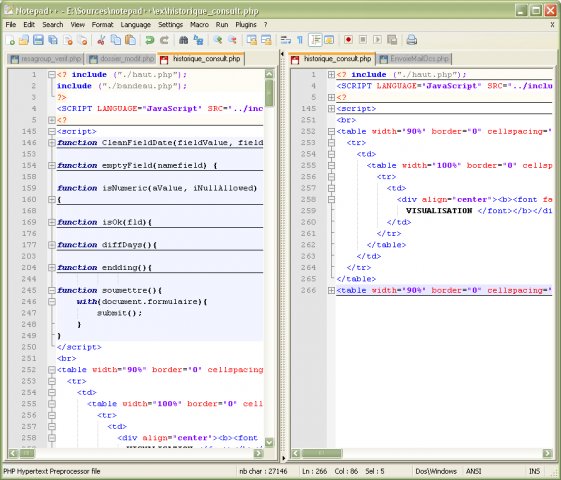
Notepad++ is a free source editor with the syntax highlighting and syntax folding. It also gives the extra functionality to define a user's own language for the syntax folding and syntax highlighting. You can print your source code in color. It allows a user to edit the different document in the same time, and even to edit the same document synchronizely in 2 different views. It supports full drag and drop.
Latest Reviews

JamesSprag reviewed v8.2 on Jan 10, 2022
When I taught the programming language, javascript, my first editor was this software.

priyachaudhary reviewed v8.2 on Jan 5, 2022
Finally, it can work fine with the Windows 11

some guy reviewed v8.1.9.2 on Nov 30, 2021
this is a must have I can't live with out it so handy

elopez172365 reviewed v8.1.9 on Oct 22, 2021
Notepad++ 8.1.9 Work perfectly with Windows 11 now lifeforum send directly to the developer page to download the app. Thanks, fileforum to listen to us. Great job guy's

fred81 reviewed v8.1.8 on Oct 19, 2021
If you download the installer from the developers website the previous and latest version of NotePad++ works completely fine with Windows 11.
elopez172365 reviewed v8.1.8 on Oct 19, 2021
Notepad++ 8.1.8 this version works with Windows 11 only if you download from the developer page not from fileforum I have to said Thanks to "red81"

helo reviewed v8.1.7 on Oct 16, 2021
Maybe the next update will work.
elopez172365 reviewed v8.1.7 on Oct 15, 2021
Back to the drawing board, this one won't work with Windows 11
elopez172365 reviewed v8.1.1 on Jul 7, 2021
The new upgrade version of 8.1.1 now works with Windows 11

uninggo reviewed v7.8.6 on Apr 21, 2020
text editor i always used

JamesSprag reviewed v8.2 on Jan 10, 2022
Pros: When I taught the programming language, javascript, my first editor was this software.
Cons: When I taught the programming language, javascript, my first editor was this software.
Bottom Line: When I taught the programming language, javascript, my first editor was this software.
priyachaudhary reviewed v8.2 on Jan 5, 2022
Pros: Now smotth with the windows 11
Cons: none
Bottom Line: Finally, it can work fine with the Windows 11
some guy reviewed v8.1.9.2 on Nov 30, 2021
Pros: to much to list the best hands down works fine win 10 and 11
Cons: none
Bottom Line: this is a must have I can't live with out it so handy
elopez172365 reviewed v8.1.9 on Oct 22, 2021
Pros: One of the best
Cons: None that I found
Bottom Line: Notepad++ 8.1.9 Work perfectly with Windows 11 now lifeforum send directly to the developer page to download the app. Thanks, fileforum to listen to us. Great job guy's
fred81 reviewed v8.1.8 on Oct 19, 2021
Pros: The Best!
Cons: None
Bottom Line: If you download the installer from the developers website the previous and latest version of NotePad++ works completely fine with Windows 11.
elopez172365 reviewed v8.1.8 on Oct 19, 2021
Pros: Fallowing the recommendation from "red81" discover Notepad++ 8.1.8 WORKS with windows 11
Cons: fileforum programs have issues
Bottom Line: Notepad++ 8.1.8 this version works with Windows 11 only if you download from the developer page not from fileforum I have to said Thanks to "red81"
helo reviewed v8.1.7 on Oct 16, 2021
Pros: It worked before.
Cons: This is the first one that does not work with Windows 10 for me.
Bottom Line: Maybe the next update will work.
elopez172365 reviewed v8.1.7 on Oct 15, 2021
Pros: Notepad++ 8.1.7 is blocked by Windows 11 build 22000.258
Cons: Don't work with Windows 11
Bottom Line: Back to the drawing board, this one won't work with Windows 11
elopez172365 reviewed v8.1.1 on Jul 7, 2021
Pros: Good program better than Windows Notepad
Cons: This version now runs in Windows 11
Bottom Line: The new upgrade version of 8.1.1 now works with Windows 11
uninggo reviewed v7.8.6 on Apr 21, 2020
Pros: text editor i always used
Cons: text editor i always used
Bottom Line: text editor i always used

cyberguy reviewed v7.5 on Aug 17, 2017
Pros: free
lots of features
better than notepad or wordpad
Cons: clumsy large file handling
Bottom Line: A decent editor when you consider what you are paying for it. It has most of the functions the average user will need for quick & dirty editing work.
For more features consider some of the shareware/commercial offerings.
You can't get much better for free.

Picasso reviewed v7.4.1 on May 18, 2017
Very good app!
cyberguy reviewed v7.2 on Nov 4, 2016
It is good to see a 64-bit version of this editor come out without having to build my own (messy). Max file size has always been a hard NP++ limitation. File size is really the only beef I have had with this editor. Now it is perfect for a free editor.