File Details |
|
| File Size | 1.3 MB |
|---|---|
| License | Shareware, $24.95 |
| Operating System | Windows (All) |
| Date Added | February 15, 2016 |
| Total Downloads | 1,428 |
| Publisher | PS Soft Lab |
| Homepage | PS Tray Factory |
Publisher's Description
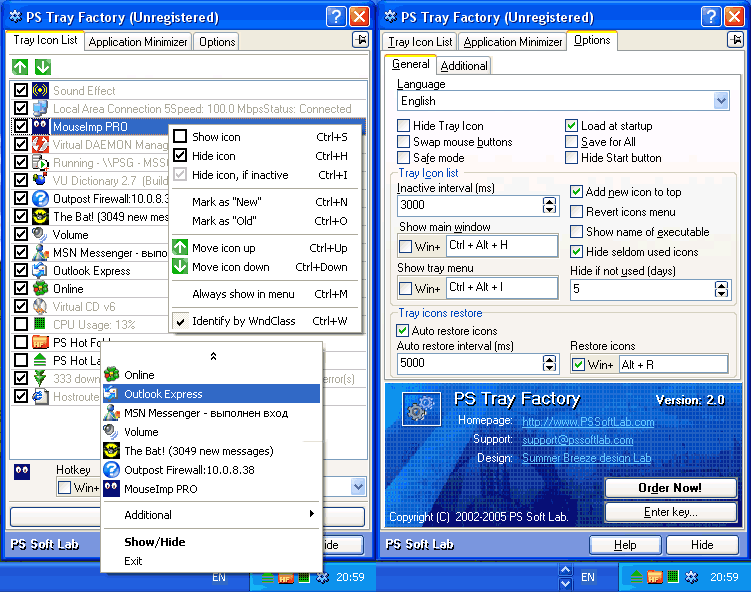
PS Tray Factory is a powerful and handy tool meant to flexibly control all the other icons in the system tray of the taskbar. PS Tray Factory will help you to manage all the applications that place their icons in the taskbar tray. When you have installed PS Tray Factory, you will forget about the problem of lack of space in the system tray, and will also get an easy, fast and handy tool to handle those applications. In short, ALL Windows users will get this handy and powerful tool at their disposal, whereas only Windows XP users have an idea of it. For the latter, we have made a nice surprise, as the features of PS Tray Factory exceed the standard built-in ones of this OS.
Latest Reviews

CyberDoc999 reviewed v3.3 on Feb 26, 2016
way over priced

Nighted reviewed v3.3 on Feb 25, 2016
This worked ok on XP but since Windows 7 it has been worthless.
Tried this 3.3 version today and removed it after 5 minutes. Don't waste your time like I did.

gate1975mlm reviewed v3.0 on Jul 29, 2010
Latest PS Tray Factory version is 3.2.
I am very disappointed with this software! :(
First of all the tech support is non existent! I have sent them so many E mails and not one is ever replied back. NOT ONE!!!
Also I run Windows 7 the latest OS from Microsoft and there are a few unfixed issues with PS Tray Factory when running on Windows 7.
Below are 2 example of things that need to be fixed!
"Hide Start Menu button" does not work at all!
When hiding then unhiding the Windows icons for Volume,Network and Action center you end up getting 2 of each icon displayed in the system tray!
My advice to the maker of PS Tray Factory is if you can not fix these 2 issues then how about just removing them from PS Tray Factory altogether? Or at the least released a new version of PS Tray Factory for only Windows 7!
But again its very sad how their tech support or Sales never ever reply back to me e mail :(
The last version was released in April of 2010 so I know the maker of this software is not dead or something lol :)
All I can say is if you are running Windows 7 or really even Vista then expect some of the features in PS Tray Factory not to work 100% the way it should!
However if you are running XP then by all means use PS Tray Factory because it works perfect for XP!
My Rating
PS Tray Factory For Windows 7 (3)
PS Tray Factory For Windows XP (5)
MY OVERALL RATING FOR HOW I FEEL ABOUT THIS SOFTWARE CURRENTLY (1)

emanresU deriseD reviewed v3.0 on Mar 25, 2009
Usually, software gets a major version increase when... Ummm... NEW FEATURES are added.
I configured this thing to hide certain tray icons. It does so at first, but if Explorer crashes, it doesn't rehide those icons.
The PeerGuardian tray icon gets restored, but it also becomes nonfunctional; it cannot be used to show the PeerGuardian window, or actually, used at all.
This software does something really screwy with my "Local Area Connection" tray icon--instead of showing the proper icon, it continually and dynamically replaces it with a random icon from some other application that is running. I mean that exactly as written--it will (for example) use my anti-virus utility's icon, then switch it to the KeePass Password Safe icon, and so on.
In short, buggy crapware to be avoided.
emanresU deriseD reviewed v2.5 on Mar 1, 2009
Nice features, but few of them actually WORK. Very buggy. Good luck getting the author to reply to you. I tried MULTIPLE times and was soundly ignored.

Metshrine reviewed v2.5 on Nov 14, 2006
As I said below, this is one of the few EXTREMELY useful utilities installed on my pc. This is one I use daily.
The new options dialog is beautiful. I only wish they would fix the crash on WinXP MCE SP2 when exiting the application. But, since I dont exit PS Tray often enough, its not a huge bug, so...5/5
gate1975mlm reviewed v2.5 on Nov 14, 2006
Great tool to have! But I wish it remembered my minimized windows.
Metshrine reviewed v2.1 on Feb 4, 2006
I installed this yesterday morning, 12 hours later, I purchased it. I was using SysTrayX but this blows it and every other tray manager out of the water. Top notch program. If only all apps were as fun to use as this

more10s reviewed v2.1 on Jan 21, 2006
Great program. Does what its supposed to do; hides and orders icons to your liking.
Recovers all the tray icons after a explorer crash nicely.

thomthowolf reviewed v2.1 on Jan 14, 2006
I formerly used PC magazine's Tray commander, but this is a completely superior product. I have been using it for a couple of months, and it is completely stable and works as advertised. I am one of those software junkies who have a LOT of things running in the tray, and this proram gives me back control. I especially love the ability to reorder the icons as well as hiding them.

CyberDoc999 reviewed v3.3 on Feb 26, 2016
way over priced
Nighted reviewed v3.3 on Feb 25, 2016
This worked ok on XP but since Windows 7 it has been worthless.
Tried this 3.3 version today and removed it after 5 minutes. Don't waste your time like I did.
gate1975mlm reviewed v3.0 on Jul 29, 2010
Latest PS Tray Factory version is 3.2.
I am very disappointed with this software! :(
First of all the tech support is non existent! I have sent them so many E mails and not one is ever replied back. NOT ONE!!!
Also I run Windows 7 the latest OS from Microsoft and there are a few unfixed issues with PS Tray Factory when running on Windows 7.
Below are 2 example of things that need to be fixed!
"Hide Start Menu button" does not work at all!
When hiding then unhiding the Windows icons for Volume,Network and Action center you end up getting 2 of each icon displayed in the system tray!
My advice to the maker of PS Tray Factory is if you can not fix these 2 issues then how about just removing them from PS Tray Factory altogether? Or at the least released a new version of PS Tray Factory for only Windows 7!
But again its very sad how their tech support or Sales never ever reply back to me e mail :(
The last version was released in April of 2010 so I know the maker of this software is not dead or something lol :)
All I can say is if you are running Windows 7 or really even Vista then expect some of the features in PS Tray Factory not to work 100% the way it should!
However if you are running XP then by all means use PS Tray Factory because it works perfect for XP!
My Rating
PS Tray Factory For Windows 7 (3)
PS Tray Factory For Windows XP (5)
MY OVERALL RATING FOR HOW I FEEL ABOUT THIS SOFTWARE CURRENTLY (1)
emanresU deriseD reviewed v3.0 on Mar 25, 2009
Usually, software gets a major version increase when... Ummm... NEW FEATURES are added.
I configured this thing to hide certain tray icons. It does so at first, but if Explorer crashes, it doesn't rehide those icons.
The PeerGuardian tray icon gets restored, but it also becomes nonfunctional; it cannot be used to show the PeerGuardian window, or actually, used at all.
This software does something really screwy with my "Local Area Connection" tray icon--instead of showing the proper icon, it continually and dynamically replaces it with a random icon from some other application that is running. I mean that exactly as written--it will (for example) use my anti-virus utility's icon, then switch it to the KeePass Password Safe icon, and so on.
In short, buggy crapware to be avoided.
emanresU deriseD reviewed v2.5 on Mar 1, 2009
Nice features, but few of them actually WORK. Very buggy. Good luck getting the author to reply to you. I tried MULTIPLE times and was soundly ignored.
Metshrine reviewed v2.5 on Nov 14, 2006
As I said below, this is one of the few EXTREMELY useful utilities installed on my pc. This is one I use daily.
The new options dialog is beautiful. I only wish they would fix the crash on WinXP MCE SP2 when exiting the application. But, since I dont exit PS Tray often enough, its not a huge bug, so...5/5
gate1975mlm reviewed v2.5 on Nov 14, 2006
Great tool to have! But I wish it remembered my minimized windows.
Metshrine reviewed v2.1 on Feb 4, 2006
I installed this yesterday morning, 12 hours later, I purchased it. I was using SysTrayX but this blows it and every other tray manager out of the water. Top notch program. If only all apps were as fun to use as this
more10s reviewed v2.1 on Jan 21, 2006
Great program. Does what its supposed to do; hides and orders icons to your liking.
Recovers all the tray icons after a explorer crash nicely.
thomthowolf reviewed v2.1 on Jan 14, 2006
I formerly used PC magazine's Tray commander, but this is a completely superior product. I have been using it for a couple of months, and it is completely stable and works as advertised. I am one of those software junkies who have a LOT of things running in the tray, and this proram gives me back control. I especially love the ability to reorder the icons as well as hiding them.

otis_klt reviewed v2.0 on Apr 26, 2005
Uhm did you use this?
XP does not give you an option to reorder the system tray items. This does and therefore is useful in any version of windows. Its pretty well aimed at the more anal retentive person.

XGaSpAcHo reviewed v1.0 on Sep 18, 2002
the moron below me doesn't realize...not everyone has xp. especialy busineses which still use 2000 because it's the same exact thing. so this would be a very handy program for a lot of people without xp.

Damador reviewed v1.0 on Sep 18, 2002
lol shareware - XP have all function of this program built in system - IT SHOULD be freeeeeeee