File Details |
|
| File Size | 1.3 MB |
|---|---|
| License | Shareware, $29.95 |
| Operating System | Windows 2000/9x/Server 2003/XP |
| Date Added | June 14, 2012 |
| Total Downloads | 99,724 |
| Publisher | EnTech Taiwan |
| Homepage | PowerStrip |
Publisher's Description
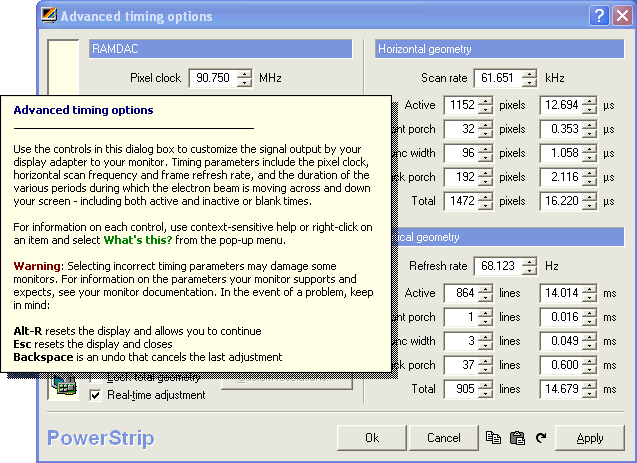
PowerStrip provides advanced, multi-monitor, programmable hardware support to a wide range of graphics cards - from the venerable Matrox Millennium I to the latest ATI X1950 Crossfire and NVidia Quad-SLI 7900. It is in fact the only program of its type to support multiple graphics cards from multiple chipset vendors, simultaneously, under every Windows operating system from Windows 95 to the x64-bit edition of Vista. A simple menu that pops up from the system tray provides access to some 500 controls over your display hardware, including sophisticated color correction tools, period level adjustments over screen geometry, and driver independent clock controls.
Latest Reviews

Ryusennin reviewed v3.89.672 on Jan 19, 2011
Used to be great on CRT to create your own custom resolutions, especially for vintage emus. Nowadays it's pretty much useless on LCD.
Ryusennin reviewed v3.82.632 on Aug 28, 2008
Clumsy interface but excellent tool to properly create your own custom resolutions (priceless feature for advanced retrogamers).

Young Boys Bern reviewed v3.80.625 on Jul 10, 2008
This tool is completely unneeded with the latest card and drivers.
Anyway, who would want to register this program if there's nowhere to find if your card is supported anyway.

darthbeads reviewed v3.65.560 Beta on May 21, 2006
@lswinney:
Then please stop trolling around BETAnews and ne'er return. What, honestly, is the point of your "review"?
PowerStrip is, in my experience, the most powerful graphics card tweaker. Great UI, regularly updated, and just plain works.
That said, I run NVidia cards, so I generally just use NVHardPage.

Adrian79 reviewed v3.64.551 Beta on Mar 29, 2006
since Vista and ATI do not support my old "ati radeon 9000pro 64mb" card with the new drivers....this will/should fix my prob of my screen being sOoo dark with no way to fix it :-)
yay!

fatray reviewed v3.64.541 Beta on Jan 27, 2006
With this I was able to get my Mitsubishi HTDV at a proper 1200x666 resolution. Now the desktop is perfectly shown on TV at 720p.

bangbang023 reviewed v3.63 on Dec 13, 2005
After leaving ATI for nvidia, I realized I missed the Catalysts' ability to automatically change color profile for the desktop and 3d gaming. Powerstrip solved this issue for me with it's application profile options. For this alone, I love it.

LordNikon reviewed v3.62 on Oct 4, 2005
My ATI Radeon 9700 burnt out. so I was forced to My Diamond Stealth S220 Video card. This Application has now help me properly calibrate my monitor. Woot!!!

Dwarden reviewed v3.55.484 on Dec 7, 2004
One of rare software products which works w/o dependence on drivers and supports almost any card on market ... great pice

fedorafreak reviewed v3.54.476 on Oct 30, 2004
I can even OC my intergrated grafics card love it im gonna have fun with this on my gamein pc X800 pro baby

Ryusennin reviewed v3.89.672 on Jan 19, 2011
Used to be great on CRT to create your own custom resolutions, especially for vintage emus. Nowadays it's pretty much useless on LCD.
Ryusennin reviewed v3.82.632 on Aug 28, 2008
Clumsy interface but excellent tool to properly create your own custom resolutions (priceless feature for advanced retrogamers).
Young Boys Bern reviewed v3.80.625 on Jul 10, 2008
This tool is completely unneeded with the latest card and drivers.
Anyway, who would want to register this program if there's nowhere to find if your card is supported anyway.
darthbeads reviewed v3.65.560 Beta on May 21, 2006
@lswinney:
Then please stop trolling around BETAnews and ne'er return. What, honestly, is the point of your "review"?
PowerStrip is, in my experience, the most powerful graphics card tweaker. Great UI, regularly updated, and just plain works.
That said, I run NVidia cards, so I generally just use NVHardPage.
Adrian79 reviewed v3.64.551 Beta on Mar 29, 2006
since Vista and ATI do not support my old "ati radeon 9000pro 64mb" card with the new drivers....this will/should fix my prob of my screen being sOoo dark with no way to fix it :-)
yay!
fatray reviewed v3.64.541 Beta on Jan 27, 2006
With this I was able to get my Mitsubishi HTDV at a proper 1200x666 resolution. Now the desktop is perfectly shown on TV at 720p.
bangbang023 reviewed v3.63 on Dec 13, 2005
After leaving ATI for nvidia, I realized I missed the Catalysts' ability to automatically change color profile for the desktop and 3d gaming. Powerstrip solved this issue for me with it's application profile options. For this alone, I love it.
LordNikon reviewed v3.62 on Oct 4, 2005
My ATI Radeon 9700 burnt out. so I was forced to My Diamond Stealth S220 Video card. This Application has now help me properly calibrate my monitor. Woot!!!
Dwarden reviewed v3.55.484 on Dec 7, 2004
One of rare software products which works w/o dependence on drivers and supports almost any card on market ... great pice
fedorafreak reviewed v3.54.476 on Oct 30, 2004
I can even OC my intergrated grafics card love it im gonna have fun with this on my gamein pc X800 pro baby

akecake reviewed v3.52 on Aug 2, 2004
CAn't live without this tool if you want to tweak overclock you graphic card you get it if you've dark screen you get it it has too many good things

GeneralLeoFF reviewed v3.50 on Jul 24, 2004
I have been using this program for some time now (about 2 years) and it has been relaible and very good at geting accurate timing for use on an HTPC. However I am an nVidia card user and nVidia now includes an advanced timer feature in the latest drivers that puts Power Strip to shame. It has .001 accuracy without having to tweak the settings like crazy to get it. If you want 59.940 you just set it to 59.940. If you use nVidia cards yer better of with the latest drivers. If you use anything else good ole relible Power Strip is always there. 5 stars.

BloodRayne reviewed v3.50 on Jul 17, 2004
Perfect!!

AustinKnight reviewed v3.50 on Jun 30, 2004
Powerstrip is the only app that will work perfect for users of HTPC's, Thanks Powerstrip.
1200 X 700
Jason Austin
www.falconvision.com
Dwarden reviewed v3.46 on Oct 14, 2003
With silent install he probably mean that "Options > Online services > Live Update" feature :) but to be operationable also for beta releases :) ... anyway PowerStrip is TopClass product especially if You want utilize Your display devices to maximum and beyond :)

deliriumlb reviewed v3.46 on Oct 11, 2003
I've used this for years. Very reccomendable. Lets me set otherwise impossible refresh rates and resolutions (eg 1400x1050 @ 89hz). Plus you can save multiple overclocked profiles and restore them whenever you like (great for ocing your card while playing a game). Simply the best program for anyone who likes to get the most out of their card.

lushmonster reviewed v3.43 Build 405 Beta on Jul 30, 2003
This Programme rules.. whats a "add a "Silent Install" what THE.. this progy is basicaly best in its class. so stop being crazy and rate it right

sezz reviewed v3.41 Beta Build 390 on May 27, 2003
When will they add a "Silent Install"-feature to their installer (for end-users)...

Alex T. reviewed v3.41 Beta Build 390 on May 27, 2003
Changelog?

phrentec reviewed v3.40 Beta Build 388 on Apr 30, 2003
great program for making a custom resolution of 960x740. It would also be good to know what's new or what has changed with every build.
Alex T. reviewed v3.40 Beta Build 388 on Apr 29, 2003
what changed in this build? As always, awesome program that just works.
Alex T. reviewed v3.40 Build 385 on Apr 8, 2003
Anyone for a change log?

Tegel reviewed v3.30 Build 368 on Jan 14, 2003
The best I have had yet :D

WRFan reviewed v3.30 Beta Build 353 on Oct 29, 2002
bug disappeared in 3.30.353, everything works again, so here are 5 stars 4 u
WRFan reviewed v3.30 Beta Build 352 on Oct 21, 2002
something is wrong with builds 50 and 52 - when the installation is over, the installation window simply doesn't disappear - I have to force the closure by crashing it in the task manager. but after that it works fine, so 4 stars till this bug is fixed

kempokaraterulz reviewed v3.30 Beta Build 348 on Oct 19, 2002
well i think it is a very good piece of software. It works wonderfully with my xpert128 card, really godd software.
BTW MM performance on win3.1?! give me a break

eviljolly reviewed v3.30 Beta Build 345 on Oct 12, 2002
You want video performance in windows 3.1? lol Give the guy a break, I give it a 5 just to offset such an unfair vote.

aberas reviewed v3.29 Beta Build 344 on Oct 10, 2002
Didn´t work on your windows 3.1? how about your Sinclair Spectrum? came on! give us a break! what are you, a neanderthal?

zulugrid reviewed v3.29 Beta Build 343 on Oct 5, 2002
"... under every Windows operating system."
it didn't work on my Windows 3.1 box. also, I hate nag-ware.
WRFan reviewed v3.26 Build 328 on Aug 31, 2002
I love this programme. Somehow my pc always crashes when I start 3d applications (graphic demos, games) if graphic card ram is set to 300 MHz. If I reduce it to 285-288, it works fine. I used to do that using Blaster control by creative labs, but this option isn't there in the newest creative labs drivers for win98 and winxp, so Powerstrip is the only programme I know which is able to slow my card down. works fine, never crashes, does what I want. in today's internet world, where so much useless crap is released, it's really nice to find a programme which works perfectly.

Palomino reviewed v3.16 Beta Build 280 on May 15, 2002
The author of this program needs to put ALL the information on ONE window with tabs so you can view and change what you want without constantly going to the system tray.

Richard30ky reviewed v3.12 on Dec 23, 2001
its good but one thing its hungry and want your memory,
Palomino reviewed v3.02 on Sep 27, 2001
Not a bad program if you don't mind being harrassed during the trial period. After only a week, it took 45 seconds for the intro to close. Also, the program closes other programs that are running and you can't stop it. I can't recommend this program to anybody. RivaTuner works just fine and it's free.

CyberDoc999 reviewed v3.02 Beta Build 195 on Sep 7, 2001
I had too many problems with this program
I locks up my Windows 2000 system

nook reviewed v3.02 Beta Build 195 on Sep 5, 2001
Not a bad program, but NVMax works better for me.

XionZ reviewed v3.0 on Jul 29, 2001
If 2.7x worked for you, you probably won't need 3.0, but Powerstrip hasn't been beaten by any other utility yet...
Dwarden reviewed v3.0 Beta Build 167 on Jul 8, 2001
for PowerStrip 3.0 beta build 168 and PowerStrip 2.78:
I sometimes got problem with PS, but Ashley (author) was able respond within 3 days and when needed he made new build...
this util beating 95% of all other videoutils with excelent support...
you can change what you want and as you want in harware limits only ...
my rating is 5 of 5!

mrzootsuit reviewed v3.0 Beta Build 167 on Jul 8, 2001
It gets four stars because it almost always finds what I'm looking for (Morpheus) and I don't have to wait in queues to download. The client still hass its quirks though. It's nowhere near as solid as Napster but it gets the job done. And Jay_, you should check out www.r3mix.net concerning high quality mp3's. You may change your mind about 96kbit sounding the same as the original CD. I don't even download anything less than 196 unless I have to.

Jay_ reviewed v3.0 Beta Build 167 on Jul 7, 2001
Works like a charm. I don't understand why people are complaining about a 128bit rate, because they sound just the same as the higher ones. I personally rip my CD's at 96 bit, and can't tell a difference. Maybe my hearing just sucks.

mrbee reviewed v3.0 Beta Build 167 on Jul 7, 2001
Disappointing. It's still fine for movies and software, but if you download mp3s your better off with Morpheus, which logs on to the same network only allows you to download higher quality music (Kazaa still blocks mp3s with bitrates greater than 128 kbs).

comphacker reviewed v3.0 Beta Build 128 on May 7, 2001
Those who rated this program badly (especially that guy named AlphaRage, who really doesn't know s*** about this tool) must try this program out thoroughly. The program can be strange to start off because it has a set of default functions, which screws the screen quite a bit. Once you configure this and load this at your startup, everything works out well when everytime you turn on the computer. One thing I don't like about this program is it takes up too many resources, especially running in Windows ME (perhaps I should upgrade to 256 MB of RAM). It sometimes crashes my computer when running PowerStrip and intense 3D games together too long. Overall, it's an excellent program, but improvement is necessary for this tool.

Miln@Y reviewed v2.75 Repost on Sep 23, 2000
Well i have to agree with you guy's on this one.When i first ran the program my screen went mental.It was like it changed to 640 x 2000!!.When i finally got my screen back to normal it went *BANG* B.S.o.D. So my first impression was NOT a good one.It's a pity though as there is some really good feature's.I might check it out again after another couple of release's?.

Lestrade reviewed v2.75 on Sep 21, 2000
This is a really nice utility. The interface can be a little strange at first, and I've had it crash a few times under Win2K, but it has some features that I've seen nowhere else. I really like the gamma adjustment via hotkeys for game playing. It allows you to quickly change the brightness in Half-Life online games without having to quit and come back in. That alone makes it worthwhile. So says this "amature" that works in software development.

APOCMAN reviewed v2.72 on Jul 31, 2000
This product has never gave me a problem!!!!!!
It has to be the best Video utility ever!!!!!!
And im running it on Win2K!!!!!!!!!!

edpope reviewed v2.66 on May 19, 2000
I use this on Windows 95/98/NT and 2000 No problems to report except for the excellent features that that program comes with.
I especially like its hotkey support for quick switching between video settings. And Support for monitors that even windows doesn't support.
PakkMann reviewed v2.65.04 on May 8, 2000
Agreed with rhughes this program NEVER crashes, I've been using it for over a year now. And it comes in handy for various things. So I rate it at 5.

rhughes reviewed v2.55 on Dec 15, 1999
I don't know what people's problems running this are. I've been running it on everything from Win95, build 950 to the 2194 build of Win2k. This is easily one of the handiest utilities I've ever owned doing everything from RAM recovery to overclocking my video card. 5 stars and 2 snaps up ;)

Poostick reviewed v2.55 on Dec 15, 1999
For dark games like Unreal Tournament and the like nothing works better than a quick keyboard shortcut to increase my gamma and brightness while playing followed by another shortcut to switch it back to normal afterwards.