File Details |
|
| File Size | 3.2 MB |
|---|---|
| License | Freeware |
| Operating System | Windows 2000/XP |
| Date Added | November 12, 2008 |
| Total Downloads | 2,449 |
| Publisher | .rodi.dk |
| Homepage | ProgramLaunch |
Publisher's Description
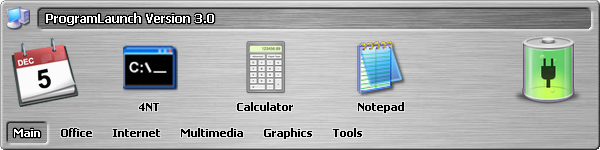
ProgramLaunch is a simple and easy to use application launchbar for the Windows operating systems. Initially made as a tool to circumvent the anoying start menu, this third generation is completely redesigned from scratch to improve flexibility and performance and make everyday use of the launcher as comfortable as possible. Managing the launchpad is simple and intuitive. Programs are added either through a dialog or by dragging links from Windows onto the launchpad. Organizing the programs is also done easily by dragging the icons and groups arround. Assign one or more shortcuts for each icon. These are used for launching a program by one simple keystroke. If a shortcut key combination is assigned to multiple icons, a list is shown for selecting the which program needs launching.
Latest Reviews

dhry reviewed v3.33 on Jun 21, 2009
Rubbish. Makes a gigantic dock with icons ten feet tall. Configure this down, resize the dock and it cuts off the bottom of the icons (doesn't automatically recognize max icon height and prevent resizing to not cut them off). Drag a program into the dock and it doesn't pull the icon out of the exe correctly either. Complete waste of space. Get ObjectDock or RocketDock instead.

Absturzius reviewed v3.2 on Apr 17, 2006
This is a clean, quick, easy, neat-looking launcher. I´m not a fan of bells and whistles and the only launcher I used for any lenght of time was H-menu.
I have this configured at the mo for over 70 shortcuts under 11 catagories, all accessable within at the most 2 mouse clicks and all visible within 1.
Highly recommended.
Only fault so far (installed yesterday) is that it freezes when applying "deactivate" the recycle bin module.

jensrodi reviewed v3.2 on Apr 10, 2006
The issues mentioned in the post below should all have been resolved. If not, please give some more precise feedback on the ProgramLaunch site.

bobad reviewed v3.0 on Dec 19, 2005
Good possibilities, but needs serious work. I like the way it handles groups. The program needs the option to "auto hide", because tray icons are small and tedious. I couldn't even run this release. All it did way give me an "out of bounds" error.

dhry reviewed v3.33 on Jun 21, 2009
Rubbish. Makes a gigantic dock with icons ten feet tall. Configure this down, resize the dock and it cuts off the bottom of the icons (doesn't automatically recognize max icon height and prevent resizing to not cut them off). Drag a program into the dock and it doesn't pull the icon out of the exe correctly either. Complete waste of space. Get ObjectDock or RocketDock instead.
Absturzius reviewed v3.2 on Apr 17, 2006
This is a clean, quick, easy, neat-looking launcher. I´m not a fan of bells and whistles and the only launcher I used for any lenght of time was H-menu.
I have this configured at the mo for over 70 shortcuts under 11 catagories, all accessable within at the most 2 mouse clicks and all visible within 1.
Highly recommended.
Only fault so far (installed yesterday) is that it freezes when applying "deactivate" the recycle bin module.
jensrodi reviewed v3.2 on Apr 10, 2006
The issues mentioned in the post below should all have been resolved. If not, please give some more precise feedback on the ProgramLaunch site.
bobad reviewed v3.0 on Dec 19, 2005
Good possibilities, but needs serious work. I like the way it handles groups. The program needs the option to "auto hide", because tray icons are small and tedious. I couldn't even run this release. All it did way give me an "out of bounds" error.