File Details |
|
| File Size | 2.0 MB |
|---|---|
| License | Freeware |
| Operating System | Windows 2000/Server 2003/Server 2008/Vista/XP |
| Date Added | March 4, 2009 |
| Total Downloads | 3,050 |
| Publisher | MeVeNSoft |
| Homepage | Resize My Pictures |
Publisher's Description
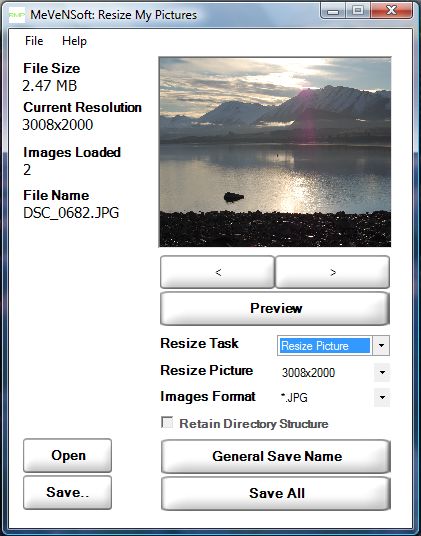
Resize My Pictures lets users resize one or more pictures into different formats with ease.
Latest Reviews

belanova reviewed v1.0.1.1 Beta on Mar 8, 2009
i been using jpeg resizer 2.1 for many years.
1 exe 670kb
http://www.brothersoft.com/jpeg-resizer-3357.html

frankwick reviewed v1.0.0.9a Beta on Feb 9, 2009
Works as stated, but if you simply need a batch resizer use the XP Power toy from Microsoft. It it is free, simple, small, and incredibly efficient with two click batch resizing. It does NOT work with Vista, but there is a clone on Soucreforge.
Microsoft Powertoy: http://www.microsoft.com...ertoys/Xppowertoys.mspx
PowerToy clone for Vista: http://www.bowlesonline....izer-powertoy-for-vista
These two utilities will not convert to other formats, but are great at resizing.

DudeBoyz reviewed v1.0.0.8A Beta on Oct 26, 2008
Cute little app and it does things nicely. If you don't need all the stuff you get from FastStone or Irfanview, this thing is worth a look.
That said, I am also one of the people who do not like the DOT NET stuff.
They are inefficient, bloated libraries, far worse the the Visual Basic Runtime.
Microsoft may have an interest in providing a framework that is substantially slower than their own and perhaps undocumented API libraries.
I wish there were more up-to-date alternatives that relied on C, C++ or even Assembly so you could make the calls to the library and actually end up with a fast performing rapid development environment instead of playing second fiddle on the DOT NET slow-train.
I applaud the people that put time and effort into this program. I just wish they had a better set of built-in programming libraries that were as efficient as what Microsoft actually uses.

alphatrigon reviewed v1.0.0.7a Beta on Oct 14, 2008
first let me say, the goobers who complain about the .net requirements...goobers, totally worthless and pointless negativity
that said, app works as intended and works well. Simple and easy to understand. I give it a 4 because it's a little buggy because I understand it's a BETA (strange to have people who understand right?). Sometimes outputs as tifs...need to nail the bug down so I can report what is what (I think if it's a tif and you try and save as something else, the extension remains tif, but is actually the new format, ie., png)

wernst reviewed v1.0.0.7a Beta on Oct 12, 2008
OK, it does what it says is does very very well. Grab a folder full of photo files, drag them to the progam window, pick a new file size and format from the pop-up menus, and click Save All. They get converted to the new size and format all at once and quickly.
The need for a 60MB download, in the form of the dotNet 3.5 distributable, is somewhat disturbing. Anyone have and leads for a similarly simple and free program that doesn't require such a large extra download?

betasun reviewed v1.0.0.7a Beta on Sep 24, 2008
net framework ? to resize photos ? no !

terminalx reviewed v1.0.0.7a Beta on Sep 23, 2008
So you give it a bad review because the requirements tell you need framework 3.5?
Before you install, if you look right below it says
requirements :framework 3.5
That aside, the program does what it says it resizes your photos

democlees reviewed v1.0.0.7a Beta on Sep 23, 2008
didnt get to use it because although its only 1.5 mb it wants you to download .netframeworks 3.5 which is 60 mb

belanova reviewed v1.0.1.1 Beta on Mar 8, 2009
i been using jpeg resizer 2.1 for many years.
1 exe 670kb
http://www.brothersoft.com/jpeg-resizer-3357.html
frankwick reviewed v1.0.0.9a Beta on Feb 9, 2009
Works as stated, but if you simply need a batch resizer use the XP Power toy from Microsoft. It it is free, simple, small, and incredibly efficient with two click batch resizing. It does NOT work with Vista, but there is a clone on Soucreforge.
Microsoft Powertoy: http://www.microsoft.com...ertoys/Xppowertoys.mspx
PowerToy clone for Vista: http://www.bowlesonline....izer-powertoy-for-vista
These two utilities will not convert to other formats, but are great at resizing.
DudeBoyz reviewed v1.0.0.8A Beta on Oct 26, 2008
Cute little app and it does things nicely. If you don't need all the stuff you get from FastStone or Irfanview, this thing is worth a look.
That said, I am also one of the people who do not like the DOT NET stuff.
They are inefficient, bloated libraries, far worse the the Visual Basic Runtime.
Microsoft may have an interest in providing a framework that is substantially slower than their own and perhaps undocumented API libraries.
I wish there were more up-to-date alternatives that relied on C, C++ or even Assembly so you could make the calls to the library and actually end up with a fast performing rapid development environment instead of playing second fiddle on the DOT NET slow-train.
I applaud the people that put time and effort into this program. I just wish they had a better set of built-in programming libraries that were as efficient as what Microsoft actually uses.
alphatrigon reviewed v1.0.0.7a Beta on Oct 14, 2008
first let me say, the goobers who complain about the .net requirements...goobers, totally worthless and pointless negativity
that said, app works as intended and works well. Simple and easy to understand. I give it a 4 because it's a little buggy because I understand it's a BETA (strange to have people who understand right?). Sometimes outputs as tifs...need to nail the bug down so I can report what is what (I think if it's a tif and you try and save as something else, the extension remains tif, but is actually the new format, ie., png)
wernst reviewed v1.0.0.7a Beta on Oct 12, 2008
OK, it does what it says is does very very well. Grab a folder full of photo files, drag them to the progam window, pick a new file size and format from the pop-up menus, and click Save All. They get converted to the new size and format all at once and quickly.
The need for a 60MB download, in the form of the dotNet 3.5 distributable, is somewhat disturbing. Anyone have and leads for a similarly simple and free program that doesn't require such a large extra download?
betasun reviewed v1.0.0.7a Beta on Sep 24, 2008
net framework ? to resize photos ? no !
terminalx reviewed v1.0.0.7a Beta on Sep 23, 2008
So you give it a bad review because the requirements tell you need framework 3.5?
Before you install, if you look right below it says
requirements :framework 3.5
That aside, the program does what it says it resizes your photos
democlees reviewed v1.0.0.7a Beta on Sep 23, 2008
didnt get to use it because although its only 1.5 mb it wants you to download .netframeworks 3.5 which is 60 mb