
File Details |
|
| File Size | 7.2 MB |
|---|---|
| License | Freeware |
| Operating System | Windows 7/8/10/11/Vista/XP |
| Date Added | January 25, 2022 |
| Total Downloads | 39,562 |
| Publisher | VS Revo Group |
| Homepage | Revo Uninstaller |
Publisher's Description
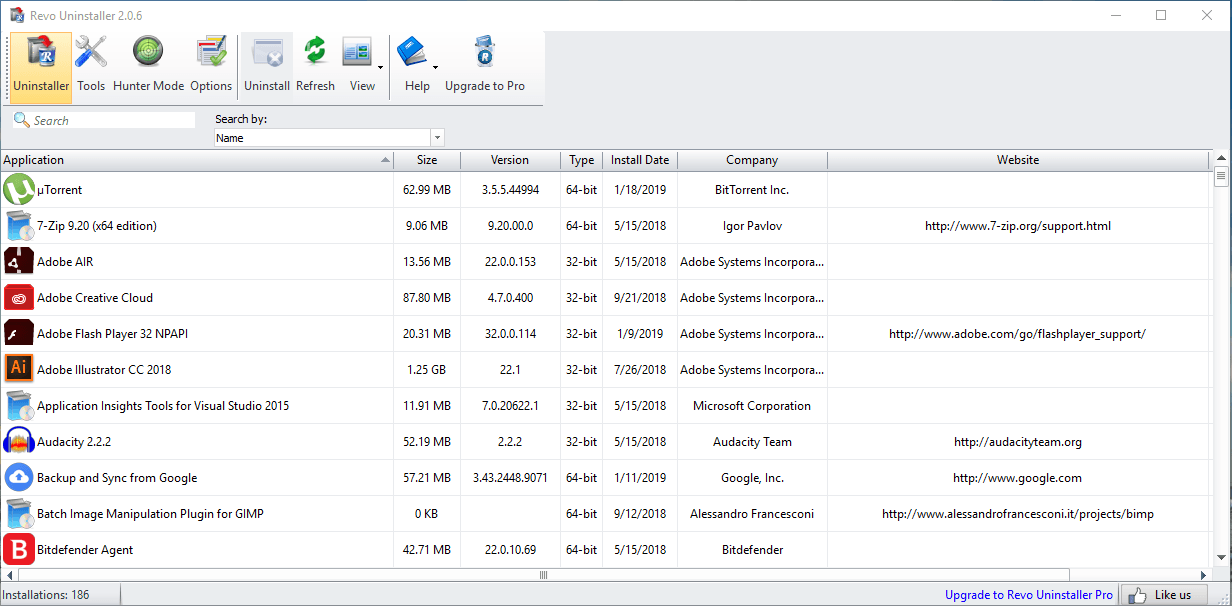
Revo Uninstaller helps you to uninstall software and remove unwanted programs easily. The Uninstaller module is Revo Uninstaller's primary feature for situations when a program won't uninstall normally or when you have some doubts that a program has not been uninstalled completely. This program acts as both a replacement and a supplement to the built-in functionality in Windows by first running the built-in uninstaller for the program, and then scanning for leftover data afterwards, making it your best choice when it comes to completely remove stubborn programs, temporary files, and other unnecessary program data that is left behind after the standard uninstall process.
Hunter Mode is an innovative feature that allows you to select in a more flexible way the program to uninstall or manage. When you activate Hunter Mode, Revo Uninstaller's main window will disappear, and a new targeting icon will appear instead. Simply drag and drop that icon over the opened window, System Tray icon, or Desktop icon of the program you wish to control, and Revo Uninstaller will display any available options in a convenient menu.
Latest Reviews

some guy reviewed v2.1.7 on Jul 22, 2020
better then the rest Iobit is to bloated this one is the best

asaenz reviewed v2.0.3 on Apr 4, 2017
Wasn't able to find version history at main web site so if there then not easy to find :(

BANDIT- reviewed v2.0.2 on Dec 15, 2016
I have Never Used this App,, So Call this Post "Off Topic" Perhaps..!!
However.. I Live in a Very Close Community. My Very Good Friend
Has Installed this App on All his Families Systems... And 3 Systems
In this Vicinity.. He Swears by It, As Do All the Recipients.
Not My Cuppa.. But Hey.. If ya aint Easy with Systems..... ^_^
5* on Behalf.

guru_v reviewed v2.0.1 on Sep 20, 2016
Only minimally better than the 2.00 freeware version. Has the drawback of no longer allowing the user to specify where the program is installed - presumably because the programmers are just lazy. Not a good thing. i'll be hanging on to revision 2.0.0 until such time as they return to allowing choice of install directory.
some guy reviewed v2.0.0 on Aug 4, 2016
fantastic tool gets what the other left behind digs deep !

Pfurri reviewed v2.0.0 on Aug 4, 2016
The one and only !!!
By far the best of all uninstallers !
And you can believe me, because i tried them all !
Absolutely no chance for all the others !

crosseyedlemon reviewed v1.95 on Aug 18, 2013
Revo is generally regarded as the top uninstaller among most tech review sites but there is room for improvement. For some reason Windows 7 prevents me from pinning Revo to my start menu or taskbar and with programs that you will be using frequently you need to be able to do that.

egg83 reviewed v1.95 on Jul 5, 2013
This program is one of the best uninstallers I have used. Have tried many, but this one is the benchmark. Can search deeply to remove all traces of the uninstalled program that normal uninstallers may leave behind. Fine bit of kit this is!
asaenz reviewed v1.93 on Nov 15, 2011
Pro version repeated crashed when I tried installing a simple calendar under real-time monitor mode.

SilentStar reviewed v1.91 on Jan 10, 2011
@Vivek Kowshik
The full version fully supports 64bit Windows and lists every 64bit program.

some guy reviewed v2.1.7 on Jul 22, 2020
Pros: my favorite hands down
Cons: none
Bottom Line: better then the rest Iobit is to bloated this one is the best
asaenz reviewed v2.0.3 on Apr 4, 2017
Wasn't able to find version history at main web site so if there then not easy to find :(
BANDIT- reviewed v2.0.2 on Dec 15, 2016
I have Never Used this App,, So Call this Post "Off Topic" Perhaps..!!
However.. I Live in a Very Close Community. My Very Good Friend
Has Installed this App on All his Families Systems... And 3 Systems
In this Vicinity.. He Swears by It, As Do All the Recipients.
Not My Cuppa.. But Hey.. If ya aint Easy with Systems..... ^_^
5* on Behalf.
guru_v reviewed v2.0.1 on Sep 20, 2016
Only minimally better than the 2.00 freeware version. Has the drawback of no longer allowing the user to specify where the program is installed - presumably because the programmers are just lazy. Not a good thing. i'll be hanging on to revision 2.0.0 until such time as they return to allowing choice of install directory.
some guy reviewed v2.0.0 on Aug 4, 2016
fantastic tool gets what the other left behind digs deep !
Pfurri reviewed v2.0.0 on Aug 4, 2016
The one and only !!!
By far the best of all uninstallers !
And you can believe me, because i tried them all !
Absolutely no chance for all the others !
crosseyedlemon reviewed v1.95 on Aug 18, 2013
Revo is generally regarded as the top uninstaller among most tech review sites but there is room for improvement. For some reason Windows 7 prevents me from pinning Revo to my start menu or taskbar and with programs that you will be using frequently you need to be able to do that.
egg83 reviewed v1.95 on Jul 5, 2013
This program is one of the best uninstallers I have used. Have tried many, but this one is the benchmark. Can search deeply to remove all traces of the uninstalled program that normal uninstallers may leave behind. Fine bit of kit this is!
asaenz reviewed v1.93 on Nov 15, 2011
Pro version repeated crashed when I tried installing a simple calendar under real-time monitor mode.
SilentStar reviewed v1.91 on Jan 10, 2011
@Vivek Kowshik
The full version fully supports 64bit Windows and lists every 64bit program.

Vivek Kowshik reviewed v1.91 on Dec 31, 2010
Does not list Win7 or Win7x64 in the OSes supported by this program. I have used an earlier version of Revo with XP and found it very thorough in cleaning up the remnants of uninstalled programs. But this staunch refusal to support the OS of today, unless you get the paid version is most surprising.
For those who want something for Win7x32 or x64, get ioBit Uninstaller or ioBit Toolbox which has a complete suite of tools to clean out every bit of junk, both files and registry entries. I have found it just as good. But I strongly suggest that anyone using such tools must have a disk image made of their drive that contains Windows, just in case.

rfithen reviewed v1.90 on Dec 22, 2010
Whats odd is that Revo Uninstaller shows up in its own list. Kinda thought VS Revo Group would've left that one out. Can you actually uninstall Revo using Revo? lol. Its like Googling Google.

1MichaelB45 reviewed v1.90 on Dec 2, 2010
I have spent a couple of years testing uninstallers and have not been overwhelmed or even "whelmed" by what was available for free or for fee. No matter what I experimented with, there was always trash left behind, either in registry entries or files or folders. In installed Revo and played with it in virtual mode and was surpirsed by what I didn't find. I made the move to a regular install and went at it again. I still liked what I was seeing. The only hitch I found turned out to be a problem with my system and not Revo Uninstaller. I liked the idea of tracking an installation so I sprang for the fee and tried it again. I tried it again with two versions fo the same program in the same directory which would leave overlap in some of the dll files. Using the Uninstall function in conjunction with the traced install, I played and uninstalled and reinstalled the two versions. Never did it bark at me or leave an unexpected result. I still like the free version but have found the Fee version to be outstanding and 100% trustworthy. With al the work I do and being the perpetual tinkerer, it has been worth every penny. Thanks Revo!