File Details |
|
| File Size | 0.6 MB |
|---|---|
| License | Freeware |
| Operating System | Windows 2000/Server 2003/XP |
| Date Added | February 29, 2008 |
| Total Downloads | 17,614 |
| Publisher | RightMark Gathering |
| Homepage | RightMark CPU Clock Utility |
Publisher's Description
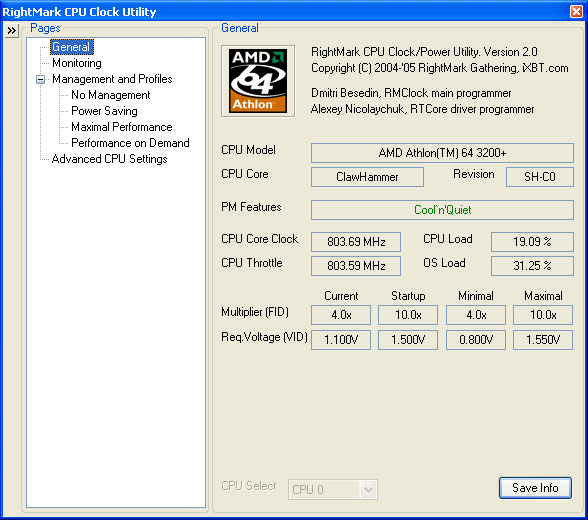
RightMark CPU Clock Utility (RMClock) is a small GUI application designed for real-time CPU frequency, throttling and load level monitoring and on-the-fly adjustment of the CPU performance level on supported CPU models via processor's power management model-specific registers (MSRs). In automatic management mode it continuously monitors the CPU usage level and dynamically adjusts the CPU frequency, throttle and/or voltage level as needed, realizing the "Performance on Demand" concept.
Latest Reviews

bigspud reviewed v2.35 on Sep 5, 2008
works okay for older cpu and chipsets,but does not work on newer ones,rightmark is very slow with updates.

HeyBlinkin reviewed v2.35 on Mar 3, 2008
Best stand-alone CPU monitoring software available!
HLT command when idle = necessary feature for centrinos to remove high-pitch noise due to speedstep feature. I can't speak for any other CPU monitoring software, but RightMark CPU Clock Utility has it!

stisev reviewed v2.30.1 on Jan 17, 2008
2.35 beta2 is out with SuperLFM and IDA support HOORAY!!!

photonboy reviewed v2.30.1 on Sep 30, 2007
As a computer geek I was interested in this. Even though I have the same CPU used in an online example (AMD X2 4800+), it didn't work properly at first.
I finally got it working but I couldn't find any noticeable difference between this utility and the normal Cool 'n Quiet solution. I did several benchmarks including the "Halo Time Demo" (don't lock FPS), 3DMark2001/03 etc.
I've looked for real-life numbers comparing this to the regular set-up and I just can't find them. If you hit "CTRL-ALT-DEL" and look in the Windows Task Manager under "Performance" you can monitor your CPU core(s). The ONLY way you could get more performance out of your CPU is if multi-tasking somehow prevented the full use of both cores. Guess what? I tried many different combinations of programs with at least one encoding or stress program and I could ALWAYS GET 100% out of my CPU cores. This means that, short of overclocking you can NOT get any more out of the CPU. Cut and dry. No. Possible. Way.
Idle mode should be identical in both solutions. It's possible I've missed something but I've read the literature, benchmarked both setups and have a pretty advanced knowledge of computer architecture.
Perhaps some small argument can be made for tweaking the voltages to save a small amount of power. This can often be done in BIOS as well and the potential for system instability exists increases the more you deviate from the recommended value. (My AMD X2 4800+ uses about 9 Watts in idle mode and some new high-end graphics cards idle at 160Watts so you can compare. CPU's are very efficient at idling and Intel expects to break the 1Watt barrier very soon.)
Again, show me the comparison charts. I looked everywhere and I've just found a lot of diatribe.

burfadel reviewed v2.25 on Apr 6, 2007
Excellent programme! Every computer user shouldn't be without it. The ONLY thing to keep in mind is that there is some minimal setup required for each processor. Its impossible for them to have the settings out of the box due to people's overclocking etc!

TwinsDad reviewed v2.25 on Apr 5, 2007
I've been using the earlier version, 2.3 beta 2 since it came out, and the previous version before that. On my core 2 duo T7600 it has become an indispencable tools for forcing every last drop of gaming performance out of my laptop.
stisev reviewed v2.2 on Dec 12, 2006
Frikken AWESOME. 10 star is available!

hondaman reviewed v2.2 on Nov 28, 2006
What a cool utility! I like it.

IoN_PuLse reviewed v2.15 on Aug 22, 2006
Great tool for laptops, and even for desktops if you want to control how your CPU scaling is regulated. Scaling down = less power usage = less heat = lower energy costs, extended battery lifetime, etc :)

ravemanson reviewed v2.15 on Aug 22, 2006
Ultimate utility to control Cool'n'Quite and lower voltage on laptops, thereby extending battery life and preventing overheating!

bigspud reviewed v2.35 on Sep 5, 2008
works okay for older cpu and chipsets,but does not work on newer ones,rightmark is very slow with updates.
HeyBlinkin reviewed v2.35 on Mar 3, 2008
Best stand-alone CPU monitoring software available!
HLT command when idle = necessary feature for centrinos to remove high-pitch noise due to speedstep feature. I can't speak for any other CPU monitoring software, but RightMark CPU Clock Utility has it!
stisev reviewed v2.30.1 on Jan 17, 2008
2.35 beta2 is out with SuperLFM and IDA support HOORAY!!!
photonboy reviewed v2.30.1 on Sep 30, 2007
As a computer geek I was interested in this. Even though I have the same CPU used in an online example (AMD X2 4800+), it didn't work properly at first.
I finally got it working but I couldn't find any noticeable difference between this utility and the normal Cool 'n Quiet solution. I did several benchmarks including the "Halo Time Demo" (don't lock FPS), 3DMark2001/03 etc.
I've looked for real-life numbers comparing this to the regular set-up and I just can't find them. If you hit "CTRL-ALT-DEL" and look in the Windows Task Manager under "Performance" you can monitor your CPU core(s). The ONLY way you could get more performance out of your CPU is if multi-tasking somehow prevented the full use of both cores. Guess what? I tried many different combinations of programs with at least one encoding or stress program and I could ALWAYS GET 100% out of my CPU cores. This means that, short of overclocking you can NOT get any more out of the CPU. Cut and dry. No. Possible. Way.
Idle mode should be identical in both solutions. It's possible I've missed something but I've read the literature, benchmarked both setups and have a pretty advanced knowledge of computer architecture.
Perhaps some small argument can be made for tweaking the voltages to save a small amount of power. This can often be done in BIOS as well and the potential for system instability exists increases the more you deviate from the recommended value. (My AMD X2 4800+ uses about 9 Watts in idle mode and some new high-end graphics cards idle at 160Watts so you can compare. CPU's are very efficient at idling and Intel expects to break the 1Watt barrier very soon.)
Again, show me the comparison charts. I looked everywhere and I've just found a lot of diatribe.
burfadel reviewed v2.25 on Apr 6, 2007
Excellent programme! Every computer user shouldn't be without it. The ONLY thing to keep in mind is that there is some minimal setup required for each processor. Its impossible for them to have the settings out of the box due to people's overclocking etc!
TwinsDad reviewed v2.25 on Apr 5, 2007
I've been using the earlier version, 2.3 beta 2 since it came out, and the previous version before that. On my core 2 duo T7600 it has become an indispencable tools for forcing every last drop of gaming performance out of my laptop.
stisev reviewed v2.2 on Dec 12, 2006
Frikken AWESOME. 10 star is available!
hondaman reviewed v2.2 on Nov 28, 2006
What a cool utility! I like it.
IoN_PuLse reviewed v2.15 on Aug 22, 2006
Great tool for laptops, and even for desktops if you want to control how your CPU scaling is regulated. Scaling down = less power usage = less heat = lower energy costs, extended battery lifetime, etc :)
ravemanson reviewed v2.15 on Aug 22, 2006
Ultimate utility to control Cool'n'Quite and lower voltage on laptops, thereby extending battery life and preventing overheating!