File Details |
|
| File Size | 4.7 MB |
|---|---|
| License | Freeware |
| Operating System | Windows 7/Server 2003/Server 2008/Vista |
| Date Added | July 4, 2011 |
| Total Downloads | 1,341 |
| Publisher | SkyDriveExplorer.com |
| Homepage | SDExplorer |
Publisher's Description
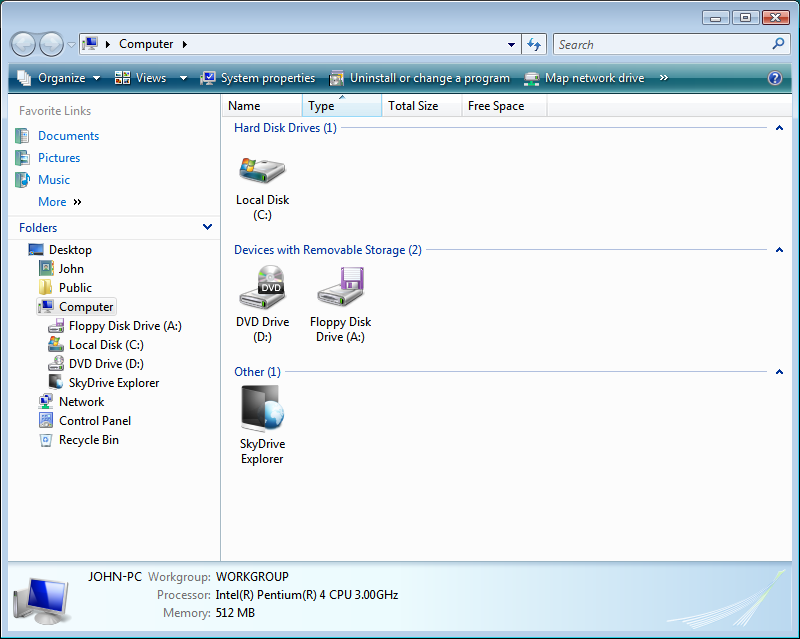
SDExplorer is a free, easy-to-use, but very powerful extension for Windows Explorer. With SDExplorer you can make any every-day operations with your documents from Microsoft Live SkyDrive service using Windows Explorer, as if they were on your computer. Moreover you don't need to install and configure any additional programs or ActiveX components. SDExplorer will organize the interaction with the online storage itself.
Latest Reviews

rk05 reviewed v3.5.0.501 Beta on Jul 10, 2011
I question the statement that this is cross platform. According to the web page, it only works in Windows, granted it work on different versions. That's hardly cross platform.

ricotipo reviewed v3.5.0.501 Beta on Jul 9, 2011
Freeware? Not free. It's a 5 days trial. It seems to work fine, but $20 bucks...

CyberDoc999 reviewed v3.5.0.501 Beta on Jul 9, 2011
makes my anti virus go off

alcvanamelsvoort reviewed v1.2.0.38 Beta on Nov 11, 2009
SkyDrive Explorer gives you access to your Windows Live SkyDrive within Windows Explorer, and it's easy to use. Just install it, double click on the icon created in Windows Explorer, sign in with your Windows Live ID, and start dragging and dropping. It isn't pretty, but it gets the job done.
There are two drawbacks: you cannot copy files to root (but this is a limitation of Windows Live SkyDrive, so no big loss there) and you cannot copy a folder over, only single files (the workaround is tedious but simple: Right Click --> New --> Folder --> Give it a name --> Copy over the files). Uploading and deleting more than one file works flawlessly. In short, with this plugin you can use SkyDrive without ever logging onto the Web version at skydrive.live.com.

rk05 reviewed v3.5.0.501 Beta on Jul 10, 2011
I question the statement that this is cross platform. According to the web page, it only works in Windows, granted it work on different versions. That's hardly cross platform.
ricotipo reviewed v3.5.0.501 Beta on Jul 9, 2011
Freeware? Not free. It's a 5 days trial. It seems to work fine, but $20 bucks...
CyberDoc999 reviewed v3.5.0.501 Beta on Jul 9, 2011
makes my anti virus go off
alcvanamelsvoort reviewed v1.2.0.38 Beta on Nov 11, 2009
SkyDrive Explorer gives you access to your Windows Live SkyDrive within Windows Explorer, and it's easy to use. Just install it, double click on the icon created in Windows Explorer, sign in with your Windows Live ID, and start dragging and dropping. It isn't pretty, but it gets the job done.
There are two drawbacks: you cannot copy files to root (but this is a limitation of Windows Live SkyDrive, so no big loss there) and you cannot copy a folder over, only single files (the workaround is tedious but simple: Right Click --> New --> Folder --> Give it a name --> Copy over the files). Uploading and deleting more than one file works flawlessly. In short, with this plugin you can use SkyDrive without ever logging onto the Web version at skydrive.live.com.