File Details |
|
| File Size | 2.2 MB |
|---|---|
| License | Freeware |
| Operating System | Windows 7/2000/Server 2003/Vista/XP |
| Date Added | June 13, 2010 |
| Total Downloads | 2,578 |
| Publisher | SE-SOFT.COM |
| Homepage | SE-Explorer |
Publisher's Description
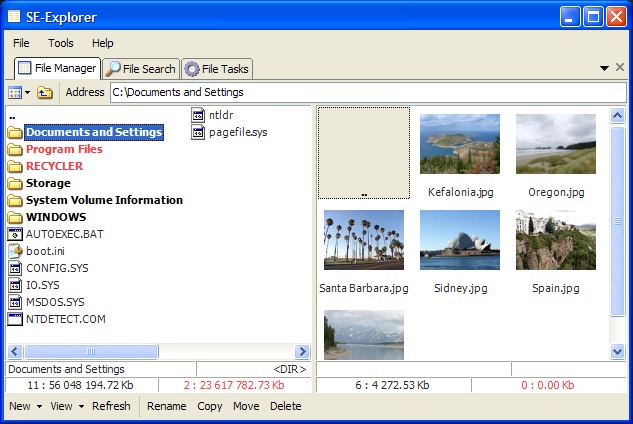
SE-Explorer is a free simple and powerful file manager for Windows with various view types. It's convenient dual-panel file browser with enhanced search function, tabbed interface and different built-in viewers. View pictures in most popular image file formats. Slideshow option is available now. View video and play audiofiles with SE-Media Player. Work with ZIP, MSI, RAR, 7Z, GZip, BZip, TAR, ARJ, LHA and CAB archives. SE-Explorer supports support protected ZIP archives. Size Scanner panel is added for quick search of large files by its type. View PDF, DjVu and Html Help (CHM) files. Browse resource for EXE, OCX and DLL files. View ICO, ICL and Thumbs.DB image libraries. Browse contex menu in Windows Explorer view. Created Temporary Panels section in File Manager. Now files listed in Temporary Panels can be copied, movied or deleted with two clicks. Edit text with syntax highlighting. Text searching capabilities to Text Viewer. View RTF files, XML structure, binary files in hex, swf flash and more. Various view types in File Manager - thumbnails/icons/details. SE-Explorer is small and easy tool which you can use everywhere - just copy .exe file to your USB flash drive and work with program on any PC.
Latest Reviews

seier reviewed v0.0.23.441 on Oct 7, 2008
Hi Developer,
Since you're obviously a newbie when it comes to Windows programming "File" the current name for that menu item should be "&File" that will make it keyboard accessible. All items beneath it should have a unique letter underlined:
&Copy
&Move
&Delete
In terms of the keyboard shortcuts have a look at Explorer and Notepad and the Windows help (Search for Keyboard shortcuts) system to figure out what the conventions are. For example f3=find and f2 =rename.
Cheers,
Christian

DudeBoyz reviewed v0.0.21.419 on Aug 14, 2008
It's always nice to see free programs, even if they do require anything DOT NET related, and this little app seems like it has a decent foudation from which to build. The score of 3 is not a complaint, but simply means "Hey, it's an average program at this point in the development."
As it is fleshed out, I would think higher scores will indeed be coming your way.
I would like to request/recommend that the text menus at the top of the program be expanded so as to include every feature available in the program.
As it is, various functions are spread out across the interface, and while I may eventually figure out where all the commands are to do what I want, like Details view for example, it would be very nice if all I had to do was go to the View menu and choose that option from the text menu structure. It took me some time to figure out that the little icon on the far left under the tabs was where that function would be.
Also, there are functions at the very bottom as well that I think would benefit from at least mirroring their functions in the text menu.
From the stand point of efficiency, it is certainly good to have all of your commands available in the same location so that you do not have to spend a lot of time moving the mouse from the top of the screen to the bottom of the screen, then to the far left of the screen, etc.
I also feel that it would be good to add keystroke shortcuts to that menu system so that a user can quickly and easily access the file, view and other menus and press a single letter or number to activate that function.
For example, I'd like to be able to press the standard ALT-F combination to open the file menu, then be able to press the C key if I wanted to close the app.
Also, by supporting left, right, up and down keystrokes, the user would be able to just start at ALT-F and quickly slide over to the View menu and type something like D to view in Details mode.
While mice are a great tool, I do think providing full support for the keyboard is something that is important.
All that said, I'll look forward to the next release. I like the simplicity and efficiency of the interface from a visual perspective, so that is way cool, and I like that it can be used as a dual-pane file manager should you choose.
While not as full featured as say Free Commander might be, it is something worth looking at if you prefer to have the option of using a less complicated and resource-demanding tool.
Sometimes users just don't need all that complexity and would like the option of a small, fast and functional program. The developers can include less in terms of features, but focus on making those functions that the app does have work as well as they can.
Apps like this one don't have to do everything, but by making sure that what it does do, it does as well or better than the competition, you will be serving your customers / users well.
Thank you for the effort and for making it free.
Best of luck with the coding.

seier reviewed v0.0.23.441 on Oct 7, 2008
Hi Developer,
Since you're obviously a newbie when it comes to Windows programming "File" the current name for that menu item should be "&File" that will make it keyboard accessible. All items beneath it should have a unique letter underlined:
&Copy
&Move
&Delete
In terms of the keyboard shortcuts have a look at Explorer and Notepad and the Windows help (Search for Keyboard shortcuts) system to figure out what the conventions are. For example f3=find and f2 =rename.
Cheers,
Christian
DudeBoyz reviewed v0.0.21.419 on Aug 14, 2008
It's always nice to see free programs, even if they do require anything DOT NET related, and this little app seems like it has a decent foudation from which to build. The score of 3 is not a complaint, but simply means "Hey, it's an average program at this point in the development."
As it is fleshed out, I would think higher scores will indeed be coming your way.
I would like to request/recommend that the text menus at the top of the program be expanded so as to include every feature available in the program.
As it is, various functions are spread out across the interface, and while I may eventually figure out where all the commands are to do what I want, like Details view for example, it would be very nice if all I had to do was go to the View menu and choose that option from the text menu structure. It took me some time to figure out that the little icon on the far left under the tabs was where that function would be.
Also, there are functions at the very bottom as well that I think would benefit from at least mirroring their functions in the text menu.
From the stand point of efficiency, it is certainly good to have all of your commands available in the same location so that you do not have to spend a lot of time moving the mouse from the top of the screen to the bottom of the screen, then to the far left of the screen, etc.
I also feel that it would be good to add keystroke shortcuts to that menu system so that a user can quickly and easily access the file, view and other menus and press a single letter or number to activate that function.
For example, I'd like to be able to press the standard ALT-F combination to open the file menu, then be able to press the C key if I wanted to close the app.
Also, by supporting left, right, up and down keystrokes, the user would be able to just start at ALT-F and quickly slide over to the View menu and type something like D to view in Details mode.
While mice are a great tool, I do think providing full support for the keyboard is something that is important.
All that said, I'll look forward to the next release. I like the simplicity and efficiency of the interface from a visual perspective, so that is way cool, and I like that it can be used as a dual-pane file manager should you choose.
While not as full featured as say Free Commander might be, it is something worth looking at if you prefer to have the option of using a less complicated and resource-demanding tool.
Sometimes users just don't need all that complexity and would like the option of a small, fast and functional program. The developers can include less in terms of features, but focus on making those functions that the app does have work as well as they can.
Apps like this one don't have to do everything, but by making sure that what it does do, it does as well or better than the competition, you will be serving your customers / users well.
Thank you for the effort and for making it free.
Best of luck with the coding.