File Details |
|
| File Size | 1.2 MB |
|---|---|
| License | Shareware, $24.95 |
| Operating System | Windows 2000/XP |
| Date Added | March 18, 2007 |
| Total Downloads | 687 |
| Publisher | SafelyRemove.com |
| Homepage | Safely Remove |
Publisher's Description
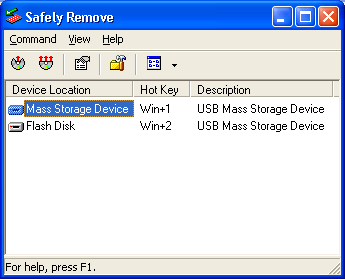
Safely Remove is a system utility designed for stopping USB Flash Drives connected to the computer. It allows you to view, edit and stop a connected USB Flash Drive. Supports keyboard shortcuts and system-wide hotkeys. Allows to define sounds on USB Flash Drive Stop\Load events.
Latest Reviews

Diam0nd reviewed v2.1 on Jul 9, 2008
Pretty excellent small utility, even tho price (20usd) might be a tad too high for what it does.

berserkchaos reviewed v2.1 on Mar 29, 2008
It is usefull... but the price is too high for such small utility.

phatman reviewed v2.1 on Dec 24, 2007
Latest Version 3.2 is actually extremely useful (price is also reduced to $20 or £10 in local change).
If like me you often get an error message indicating that a USB device is still in use (I use a lot of portable apps on flash drives), then Safely Remove will allow you to list any application or process that is still using the device.
The developer also has a roadmap with some very interesting developments on it including a portable version of the app (so it can be run from USB), Stopped devices reactivation (providing the device hasn't been unpluged), drive letter management (again a problem I have faced - would be useful for devices to always be assigned the same drive letter) and USB Power Management details (again some of the non powered hubs I use have a tendency to run out of puff).
None of these have been implemented yet - but I would find all / any of them useful.
I for one am quite happy to part with £10 for such a useful peice of software (it also allows autorun of programs on the USB Device when plugged in - fogot to mention that). I am using it with PStart for a complete USB Solution (providing a very slick user experience for any number of USB Flash / Disk Drives).
If you are constantly attaching and running USB Devices then give USB Safely Remove a try (you can download a trial version).
Also just incase the interface (screenshot above) puts you off - the inteface has been vastly improved and is now much more modern Vista ish design.

Stingray57 reviewed v2.1 on Mar 25, 2007
Interesting idea- focusing on a very small narrow market. Charging 25$ to add shortcuts for the disconnect of a USB drive; to save 4 clicks...
Double click USB devices icon, click to select the drive and click to stop the device.
Well you have to make money somehow.

Diam0nd reviewed v2.1 on Jul 9, 2008
Pretty excellent small utility, even tho price (20usd) might be a tad too high for what it does.
berserkchaos reviewed v2.1 on Mar 29, 2008
It is usefull... but the price is too high for such small utility.
phatman reviewed v2.1 on Dec 24, 2007
Latest Version 3.2 is actually extremely useful (price is also reduced to $20 or £10 in local change).
If like me you often get an error message indicating that a USB device is still in use (I use a lot of portable apps on flash drives), then Safely Remove will allow you to list any application or process that is still using the device.
The developer also has a roadmap with some very interesting developments on it including a portable version of the app (so it can be run from USB), Stopped devices reactivation (providing the device hasn't been unpluged), drive letter management (again a problem I have faced - would be useful for devices to always be assigned the same drive letter) and USB Power Management details (again some of the non powered hubs I use have a tendency to run out of puff).
None of these have been implemented yet - but I would find all / any of them useful.
I for one am quite happy to part with £10 for such a useful peice of software (it also allows autorun of programs on the USB Device when plugged in - fogot to mention that). I am using it with PStart for a complete USB Solution (providing a very slick user experience for any number of USB Flash / Disk Drives).
If you are constantly attaching and running USB Devices then give USB Safely Remove a try (you can download a trial version).
Also just incase the interface (screenshot above) puts you off - the inteface has been vastly improved and is now much more modern Vista ish design.
Stingray57 reviewed v2.1 on Mar 25, 2007
Interesting idea- focusing on a very small narrow market. Charging 25$ to add shortcuts for the disconnect of a USB drive; to save 4 clicks...
Double click USB devices icon, click to select the drive and click to stop the device.
Well you have to make money somehow.