File Details |
|
| File Size | 0.3 MB |
|---|---|
| License | Freeware |
| Operating System | Windows 2000/9x/Server 2003/XP |
| Date Added | September 17, 2008 |
| Total Downloads | 1,688 |
| Publisher | Badevlad |
| Homepage | ScreenSaver Commander |
Publisher's Description
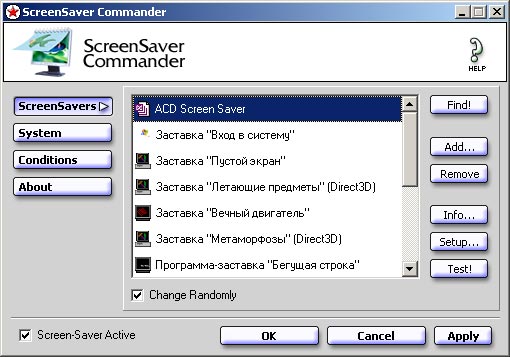
ScreenSaver Commander gives you the complete control over the Windows screen-saver - much more than the standard control panel allows. So, if you want to use several screen-savers instead of one, this makes it possible.
Latest Reviews

dikbozo reviewed v1.3 on Sep 21, 2008
As advertised, it will let you run multiple screen savers in a timed or randomly chosen way. Works well. Freeware, price is right. Does what it says and nothing else. No virus here, must be a glitch in Trend Micro. I have 15 savers and it detected all aand allows me to choose which ones are included. The interface for adding window titles to the condition list is a bit spartan and for the average user, a bit old school in that there is no clickety thingy. You have to type in the name of the window.

catchpole reviewed v1.3 on Sep 17, 2008
TrendMicro 8.700.0.1004 2008.09.17 PAK_Generic.001

hurzx reviewed v1.2 on Jul 20, 2007
Excellent. Does what it says.

ecarlson reviewed v1.1 on May 17, 2006
Update Feb 25, 2007:
There is a program that can run a different screen saver on each of your monitors, for people who "want to use several screen-savers instead of one" simultaneously:
http://www.realtimesoft....on/tour/screensaver.asp
Older text:
Looks like there is a program that can run (play) a screensaver on one monitor, while working on another: UltraMon Screen Saver Player (used with UltraMon). http://www.realtimesoft.com/ultramon/addons.asp
- Eric, http://www.InvisibleRobot.com/

CyberDoc999 reviewed v1.0 Beta on Feb 12, 2005
how very nice to see such a
well made program.
Eric L. Carlson needs to
pull his head out.
Eric L. Carlson has no real
understanding of how computers
work.
ecarlson reviewed v1.0 Beta on Feb 11, 2005
Who's Tom Dalton (tdalton at fastmail dot fm), and why did he send me an e-mail that said "you are a retard . . . stay off of Beta News"?
And I'm still dissapointed that even though I see "use several screen-savers instead of one", it won't allow me to simultaneously run different screen savers on each of my monitors, or run a screensaver on one while working on another - I've seen people request this capability, and I think it would be cool.
- Eric, http://www.InvisibleRobot.com/

R0bin|-|ood reviewed v1.0 Beta on Feb 11, 2005
Well this program is nice but who wants to take time to be away from their computer, but hey its a cool program no crashes nice and stable and you can tell it not to go to a ss if your on win media! So its cool but i dont spend that much time away from my computer!

dikbozo reviewed v1.3 on Sep 21, 2008
As advertised, it will let you run multiple screen savers in a timed or randomly chosen way. Works well. Freeware, price is right. Does what it says and nothing else. No virus here, must be a glitch in Trend Micro. I have 15 savers and it detected all aand allows me to choose which ones are included. The interface for adding window titles to the condition list is a bit spartan and for the average user, a bit old school in that there is no clickety thingy. You have to type in the name of the window.
catchpole reviewed v1.3 on Sep 17, 2008
TrendMicro 8.700.0.1004 2008.09.17 PAK_Generic.001
hurzx reviewed v1.2 on Jul 20, 2007
Excellent. Does what it says.
ecarlson reviewed v1.1 on May 17, 2006
Update Feb 25, 2007:
There is a program that can run a different screen saver on each of your monitors, for people who "want to use several screen-savers instead of one" simultaneously:
http://www.realtimesoft....on/tour/screensaver.asp
Older text:
Looks like there is a program that can run (play) a screensaver on one monitor, while working on another: UltraMon Screen Saver Player (used with UltraMon). http://www.realtimesoft.com/ultramon/addons.asp
- Eric, http://www.InvisibleRobot.com/
CyberDoc999 reviewed v1.0 Beta on Feb 12, 2005
how very nice to see such a
well made program.
Eric L. Carlson needs to
pull his head out.
Eric L. Carlson has no real
understanding of how computers
work.
ecarlson reviewed v1.0 Beta on Feb 11, 2005
Who's Tom Dalton (tdalton at fastmail dot fm), and why did he send me an e-mail that said "you are a retard . . . stay off of Beta News"?
And I'm still dissapointed that even though I see "use several screen-savers instead of one", it won't allow me to simultaneously run different screen savers on each of my monitors, or run a screensaver on one while working on another - I've seen people request this capability, and I think it would be cool.
- Eric, http://www.InvisibleRobot.com/
R0bin|-|ood reviewed v1.0 Beta on Feb 11, 2005
Well this program is nice but who wants to take time to be away from their computer, but hey its a cool program no crashes nice and stable and you can tell it not to go to a ss if your on win media! So its cool but i dont spend that much time away from my computer!