
File Details |
|
| File Size | 9.9 MB |
|---|---|
| License | Shareware, $29.95 |
| Operating System | Windows (All) |
| Date Added | November 21, 2022 |
| Total Downloads | 1,908 |
| Publisher | Carthago Software |
| Homepage | Twistpad |
Publisher's Description
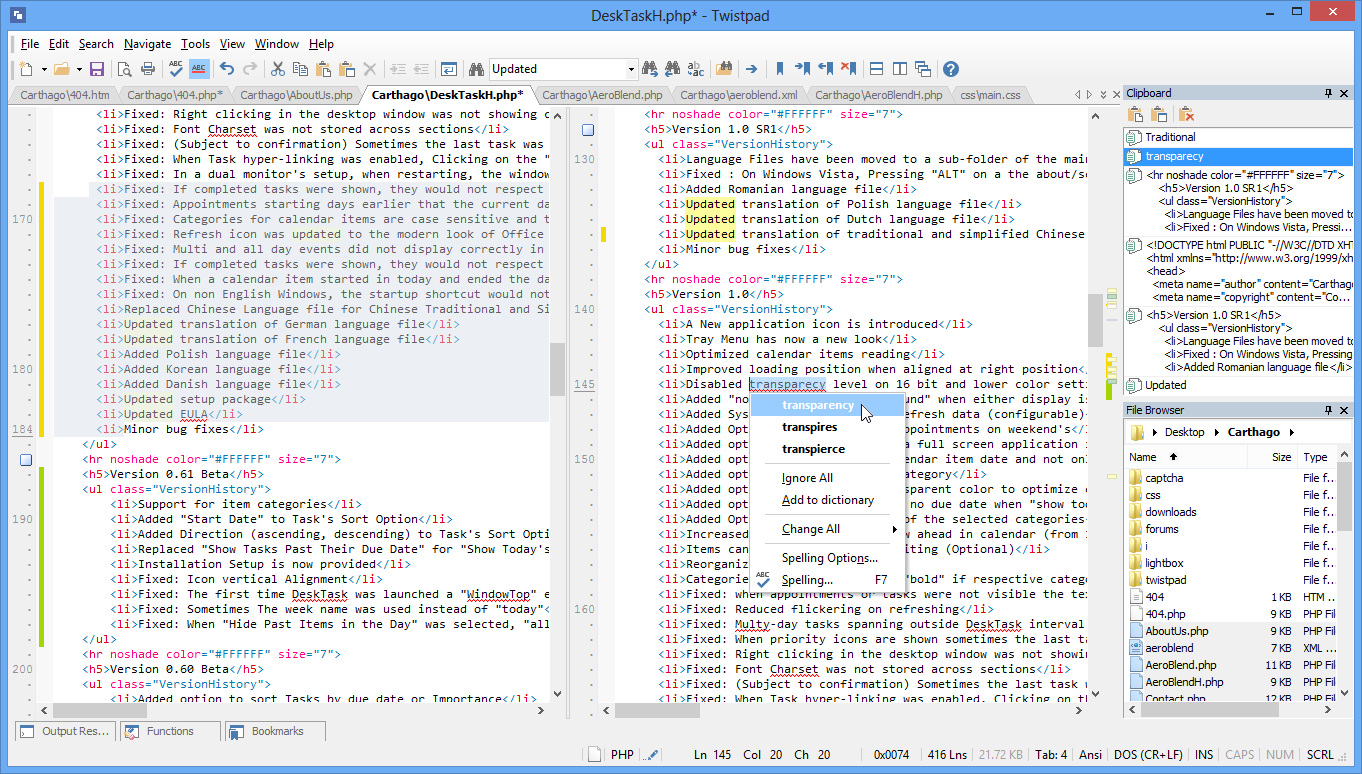
Twistpad is a fully featured text editor for Windows. It can be used as a simple notepad replacer, or an featured packed editor targeting web and software developers. Features include Easy to design syntax highlighting, find and replace in files, outline blocks of text and many more features.
Latest Reviews

pjafrombbay reviewed v2.2 on Aug 30, 2011
VERSION 2.2 REVIEWED
This is still a very good editor. But, alas, it has not replaced EditPlus. Its close! But not quite there. It is still worth a try and $20 is not much to buy a really good editor.
Regards,
Peter
pjafrombbay reviewed v2.1 on Nov 28, 2010
I use a text editor as a simple IDE and use it mainly for HTML/CSS/PHP/JavaScript (with a little bit of ooREXX thrown in). My editor needs to be light and easy to use and MUST have a clip text/code snippets feature that is easy to write and maintain. TwistPad does all these things well. In addition there was a snippets feature (no sorting pf snippets) that I suggested as an enhancement. Two days later Andre (the developer) had implemented the suggestion and released an upgrade.
I immediately paid the USD19.95 and am using it. Time will tell whether it replaces EditPlus (my long-time favorite text editor) but early impressions are good.
This is a very good text editor.
Regards,
Peter

dhry reviewed v1.61 SR1 on Oct 19, 2007
Nice try, but unfortunately there are freeware editors out there that are better than this. If you want quick, low resource usage and syntax highlighting, use Notepad2. If you want a fully-featured editor that does more or less everything this does, try PSPad. $19 simply isn't worth it.

Cure110 reviewed v1.61 on Oct 13, 2007
Actually quite impressive. With all the fantastic freeware notepad replacements around, it's nice to see an shareware alternative actually worth paying for.
Only thing missing would be the important "split editing window" mode, that most of the alternatives offers.
(Tile windows does _not_ count ;)
Still 5 stars from me.

otaku888 reviewed v1.59 on Aug 30, 2007
My Favourite editor of the moment, light, fast and well crafted. It also has some innovative twists to the features like file compare, replace and syntax editing. Also visually shows you what you have just changed or saved. The next version (1.60) promises to bring session restore and many other feature updates.

Arakiel reviewed v1.50.1 on Nov 17, 2006
this is actually quite nice. I really like this text editor. My original review stated that there was no way to do block select mode, this is in fact false...simply hold down ALT and your done :)

pjafrombbay reviewed v2.2 on Aug 30, 2011
VERSION 2.2 REVIEWED
This is still a very good editor. But, alas, it has not replaced EditPlus. Its close! But not quite there. It is still worth a try and $20 is not much to buy a really good editor.
Regards,
Peter
pjafrombbay reviewed v2.1 on Nov 28, 2010
I use a text editor as a simple IDE and use it mainly for HTML/CSS/PHP/JavaScript (with a little bit of ooREXX thrown in). My editor needs to be light and easy to use and MUST have a clip text/code snippets feature that is easy to write and maintain. TwistPad does all these things well. In addition there was a snippets feature (no sorting pf snippets) that I suggested as an enhancement. Two days later Andre (the developer) had implemented the suggestion and released an upgrade.
I immediately paid the USD19.95 and am using it. Time will tell whether it replaces EditPlus (my long-time favorite text editor) but early impressions are good.
This is a very good text editor.
Regards,
Peter
dhry reviewed v1.61 SR1 on Oct 19, 2007
Nice try, but unfortunately there are freeware editors out there that are better than this. If you want quick, low resource usage and syntax highlighting, use Notepad2. If you want a fully-featured editor that does more or less everything this does, try PSPad. $19 simply isn't worth it.
Cure110 reviewed v1.61 on Oct 13, 2007
Actually quite impressive. With all the fantastic freeware notepad replacements around, it's nice to see an shareware alternative actually worth paying for.
Only thing missing would be the important "split editing window" mode, that most of the alternatives offers.
(Tile windows does _not_ count ;)
Still 5 stars from me.
otaku888 reviewed v1.59 on Aug 30, 2007
My Favourite editor of the moment, light, fast and well crafted. It also has some innovative twists to the features like file compare, replace and syntax editing. Also visually shows you what you have just changed or saved. The next version (1.60) promises to bring session restore and many other feature updates.
Arakiel reviewed v1.50.1 on Nov 17, 2006
this is actually quite nice. I really like this text editor. My original review stated that there was no way to do block select mode, this is in fact false...simply hold down ALT and your done :)