File Details |
|
| File Size | 784.6 MB |
|---|---|
| License | Open Source |
| Operating System | Windows (All) |
| Date Added | September 1, 2020 |
| Total Downloads | 62,616 |
| Publisher | UltimateBootCD |
| Homepage | Ultimate Boot CD |
Publisher's Description
You need the Ultimate Boot CD if you want to Run floppy-based diagnostic tools from CDROM drives, Free yourself from the slow loading speed of the floppy drive, or Consolidate as many diagnostic tools as possible into one bootable CD.
The "Full" version of UBCD includes INSERT, a Linux distribution based on Knoppix.
Latest Reviews

some guy reviewed v5.2.9 on Mar 5, 2014
sweet a must have !

BANDIT- reviewed v5.2.8 on Dec 18, 2013
@Noobs .. A full list of Included Apps to Download as required. If you don't want the whole 560Mb pack. Read up on what these Apps do... & Take care .. ~_^
-http://ubcd.sourceforge.net/
You WILL need some CMD: knowledge... -http://ss64.com/nt/
Used by Myself as Standalones (If Req'd)... One of my favs is "TestDisk" ... ^_^
This is the Dogs .. 5* .. ANY day of the Week / Of the Year / Of 2k+

pressreleasenetwork reviewed v5.1.1 on Aug 9, 2011
I would say its awesome, I think now all the things are being run by remote control in coming future. what you think people??

stephenstud reviewed v5.1 Beta 1 on Jun 23, 2011
This is a great cd to have!

traumadoc reviewed v5.1 Alpha 2 on Apr 11, 2011
Don't complain what-so-ever that it is useless to you, your needs, or doesn't do what it's supposed to do!! Apparently you have no idea what the "beta" of betanews means, nor what "alpha" means regarding software releases!!

wiebelhaus reviewed v5.0.3 on Sep 4, 2010
Fantastic been stable and relevant for years now.

andy2004 reviewed v5.0.3 on Aug 26, 2010
useless for my needs, WesternDigital HDD software didnt run in version 5.02 of this because of a missing License.txt file so couldnt run that check on it, , spinrite didnt see the drive at all, drive is an usb external, WD MYBOOK, most of the programs are old outdated versions from running the few that i did actually run.

beelzebub360 reviewed v5.0.1 on May 25, 2010
Excellent set of utilities. Have been using Ultimatebootcd since version 1.0. Highly recommended for any PC tech.
Not to bad. Its a all in one package. Seems to have most of the bases covered. Nice part is that you can put about 600mb of things on it as well as the main program
Not much to say really apart from its a life saver and i wish i discovered it when the first version came out, i have recomended it to everyone i know and they and i all very happy with it :-)
A must-have !!! Can save your computer
Every computer tech or admin must have this CD in its toolbox.
Very usefull to "simple" user too ;)

saper reviewed v5.0 Beta 11 on Feb 10, 2009
If u hv a USB U cn install on it & run from it & Vola
u hv the perfect Soft to Recover Data OR
LOG in A Protected Cd
JUST Wish It Had A simple meathod to install on a cd

DudeBoyz reviewed v5.0 Beta 11 on Feb 9, 2009
Testing fine, this latest release.
Question though - Does this contain any programs that are similar in function to ScanDisk / ChkDsk / Norton Disk Doctor, et-all?
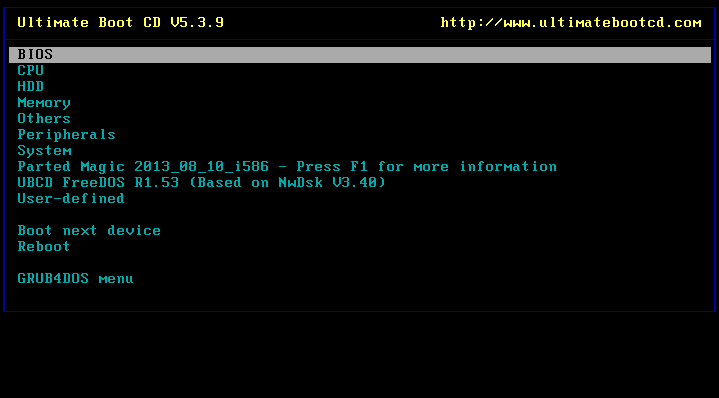
I would like to be able to boot to this CD and be able to run such an application, but I'm more familiar with Bart's PE and that interface than I am with this character driven interface and the accompanying contents.
I'd really appreciate some help on that information . Thanks.

some guy reviewed v5.2.9 on Mar 5, 2014
sweet a must have !
BANDIT- reviewed v5.2.8 on Dec 18, 2013
@Noobs .. A full list of Included Apps to Download as required. If you don't want the whole 560Mb pack. Read up on what these Apps do... & Take care .. ~_^
-http://ubcd.sourceforge.net/
You WILL need some CMD: knowledge... -http://ss64.com/nt/
Used by Myself as Standalones (If Req'd)... One of my favs is "TestDisk" ... ^_^
This is the Dogs .. 5* .. ANY day of the Week / Of the Year / Of 2k+
pressreleasenetwork reviewed v5.1.1 on Aug 9, 2011
I would say its awesome, I think now all the things are being run by remote control in coming future. what you think people??
stephenstud reviewed v5.1 Beta 1 on Jun 23, 2011
This is a great cd to have!
traumadoc reviewed v5.1 Alpha 2 on Apr 11, 2011
Don't complain what-so-ever that it is useless to you, your needs, or doesn't do what it's supposed to do!! Apparently you have no idea what the "beta" of betanews means, nor what "alpha" means regarding software releases!!
wiebelhaus reviewed v5.0.3 on Sep 4, 2010
Fantastic been stable and relevant for years now.
andy2004 reviewed v5.0.3 on Aug 26, 2010
useless for my needs, WesternDigital HDD software didnt run in version 5.02 of this because of a missing License.txt file so couldnt run that check on it, , spinrite didnt see the drive at all, drive is an usb external, WD MYBOOK, most of the programs are old outdated versions from running the few that i did actually run.
beelzebub360 reviewed v5.0.1 on May 25, 2010
Excellent set of utilities. Have been using Ultimatebootcd since version 1.0. Highly recommended for any PC tech.
Not to bad. Its a all in one package. Seems to have most of the bases covered. Nice part is that you can put about 600mb of things on it as well as the main program
Not much to say really apart from its a life saver and i wish i discovered it when the first version came out, i have recomended it to everyone i know and they and i all very happy with it :-)
A must-have !!! Can save your computer
Every computer tech or admin must have this CD in its toolbox.
Very usefull to "simple" user too ;)
saper reviewed v5.0 Beta 11 on Feb 10, 2009
If u hv a USB U cn install on it & run from it & Vola
u hv the perfect Soft to Recover Data OR
LOG in A Protected Cd
JUST Wish It Had A simple meathod to install on a cd
DudeBoyz reviewed v5.0 Beta 11 on Feb 9, 2009
Testing fine, this latest release.
Question though - Does this contain any programs that are similar in function to ScanDisk / ChkDsk / Norton Disk Doctor, et-all?
I would like to be able to boot to this CD and be able to run such an application, but I'm more familiar with Bart's PE and that interface than I am with this character driven interface and the accompanying contents.
I'd really appreciate some help on that information . Thanks.
some guy reviewed v5.0 Beta 10 on Jan 21, 2009
while I do prefur the interface of a live cd like barts PE or vista pe this has some nice tools

mjm01010101 reviewed v5.0 Beta 9 on Jan 19, 2009
So vote a 4 for one version, and a 5 the next. repeat.
I don't recommend using this on a VM. You could damage a host with this CD. Use only when you know WTF you are doing.
DudeBoyz reviewed v5.0 Beta 9 on Jan 16, 2009
May not be the Best at what it does, but it's legal and open source and can be extremely helpful.
I do think they might want to create a supplemental version with a better interface, sort of like what DigiWiz did with PE Builder. Some of these apps can be pretty hard to figure out for people that are only used to GUI's, and perhaps they could make it more user friendly with more help files and wizard-type assistance.
Still, a very solid effort. Too bad they can't bundle Norton Ghost 2003 for DOS and Spinrite 6 in that bad boy. That'd be cool if they could get the companies to donate those tools under the GPL or some such thing.
Also, you may want to experiment with this in a Virtual Machine (VirtualBox, VirtualPC, VMware, etc.) until you become familiar with it. Some things can't easily be undone if you do them and they don't work out as expected.
Lastly, ALWAYS to a backup before making any significant changes to your rig. Hard drives are less expensive per gig than ever, it seems, so a good backup is well within reach for most computer users, I think. Better safe than sorry.
Please keep up the good work.
BTW, I do sorta wish we could vote for a 4.5 score. I think it deserves that, but not a 5. But I understand the appeal in keeping things simple.