File Details |
|
| File Size | 1.2 MB |
|---|---|
| License | Freeware |
| Operating System | Windows XP |
| Date Added | November 18, 2010 |
| Total Downloads | 16,990 |
| Publisher | ZSoft Software |
| Homepage | ZSoft Uninstaller |
Publisher's Description
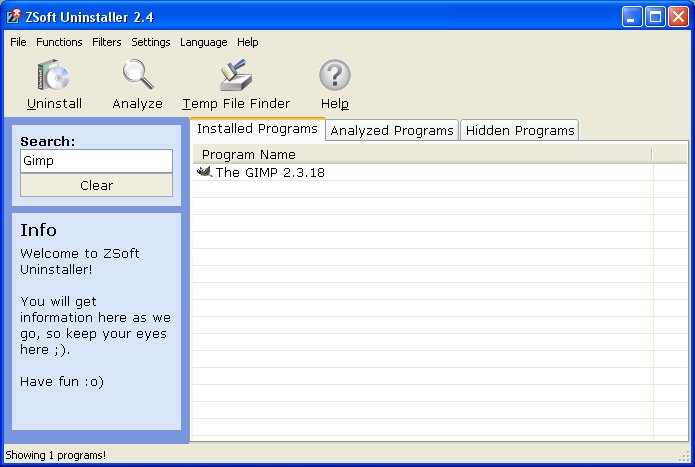
ZSoft Uninstaller is an easy way to uninstall programs on your computer. Location and uninstalling a program with this program is as easy as clicking a button. It also, among other things allows you to analyse an installation so it can be completely uninstalled and find and delete temporary files.
Latest Reviews

soyabeaner reviewed v2.5 on May 29, 2011
This was my favourite tool (in general, not just as an uninstaller) on XP. Too bad it doesn't support 64-bit and development has been slow to non-existent since v2.5. There aren't any free alternatives that has the simple, non-bloated, portable features of Zsoft Uninstaller.
There are others like Revo Uninstaller Pro (free version doesn't include monitoring function) and Advanced Uninstaller, but they appear to come with bells and whistles and no portable version available. Also, they only capture file & registry system changes related specifically to the installer you're monitoring. The drawback to this is that there may be other (unintentional or not) changes during installation that these tools don't capture. If anyone knows of alternative I'd love know.

kadavrul reviewed v2.5 on May 22, 2011
Even is not the fast one it's still the best one! You can be sure that all the garbage is removed if you analyze an installation. Great job by ZSoft!

sls_beta reviewed v2.4.1 on Jan 8, 2008
Works well and is easy to use. Love that you can just right-click on installation file and select "monitor". Only issue I've noticed is that lately it's taking awhile to read the registry - now that I have so many programs installed. Still - best I've tried.

Nikkie reviewed v2.3.2 on Oct 16, 2006
Nice.It found programs cp couldn't and gave great detail for all of them.I am impressed.It is fast and light.
This would be interesting if you added this into reactos..or remove the cp add/rem when making a custom made win cd with nlite etc.

stopbuggingme reviewed v2.3.1 Beta on Aug 15, 2006
Doesn't work for me. It hangs when analyzing.

boaz reviewed v2.3.1 Beta on Aug 12, 2006
I have been using this program since it's conception. It loads much faster than the "Add or Remove Programs" through WinXP's Control Panel. Has a "record" option that monitors a program's installation.

MickyFoley reviewed v2.3.1 Beta on Aug 11, 2006
never thought, that the program, i'm using long time got an update ... this uninstaller is faster, better and more useful than ms own ... great!

JeRrYFaR reviewed v2.3 on Jan 16, 2006
Quote: Very useful program. But one "issue" - when I uninstalled "digital tv... something" at the end asked me if I want to delete "c:\windows" because the program ("digital...") was installed there. Witch was not true either. Scary.
I personally have never had a problem w/ it and it's one of those 'must have' applications when installing a new machine..

BogdanSHA reviewed v2.3 on Jan 16, 2006
No more "del c:\windows\" :D
BogdanSHA reviewed v2.2.6 on Oct 20, 2005
Very useful program. But one "issue" - when I uninstalled "digital tv... something" at the end asked me if I want to delete "c:\windows" because the program ("digital...") was installed there. Witch was not true either. Scary.

soyabeaner reviewed v2.5 on May 29, 2011
This was my favourite tool (in general, not just as an uninstaller) on XP. Too bad it doesn't support 64-bit and development has been slow to non-existent since v2.5. There aren't any free alternatives that has the simple, non-bloated, portable features of Zsoft Uninstaller.
There are others like Revo Uninstaller Pro (free version doesn't include monitoring function) and Advanced Uninstaller, but they appear to come with bells and whistles and no portable version available. Also, they only capture file & registry system changes related specifically to the installer you're monitoring. The drawback to this is that there may be other (unintentional or not) changes during installation that these tools don't capture. If anyone knows of alternative I'd love know.
kadavrul reviewed v2.5 on May 22, 2011
Even is not the fast one it's still the best one! You can be sure that all the garbage is removed if you analyze an installation. Great job by ZSoft!
sls_beta reviewed v2.4.1 on Jan 8, 2008
Works well and is easy to use. Love that you can just right-click on installation file and select "monitor". Only issue I've noticed is that lately it's taking awhile to read the registry - now that I have so many programs installed. Still - best I've tried.
Nikkie reviewed v2.3.2 on Oct 16, 2006
Nice.It found programs cp couldn't and gave great detail for all of them.I am impressed.It is fast and light.
This would be interesting if you added this into reactos..or remove the cp add/rem when making a custom made win cd with nlite etc.
stopbuggingme reviewed v2.3.1 Beta on Aug 15, 2006
Doesn't work for me. It hangs when analyzing.
boaz reviewed v2.3.1 Beta on Aug 12, 2006
I have been using this program since it's conception. It loads much faster than the "Add or Remove Programs" through WinXP's Control Panel. Has a "record" option that monitors a program's installation.
MickyFoley reviewed v2.3.1 Beta on Aug 11, 2006
never thought, that the program, i'm using long time got an update ... this uninstaller is faster, better and more useful than ms own ... great!
JeRrYFaR reviewed v2.3 on Jan 16, 2006
Quote: Very useful program. But one "issue" - when I uninstalled "digital tv... something" at the end asked me if I want to delete "c:\windows" because the program ("digital...") was installed there. Witch was not true either. Scary.
I personally have never had a problem w/ it and it's one of those 'must have' applications when installing a new machine..
BogdanSHA reviewed v2.3 on Jan 16, 2006
No more "del c:\windows\" :D
BogdanSHA reviewed v2.2.6 on Oct 20, 2005
Very useful program. But one "issue" - when I uninstalled "digital tv... something" at the end asked me if I want to delete "c:\windows" because the program ("digital...") was installed there. Witch was not true either. Scary.

ArKay74 reviewed v2.2.1 Beta on Jun 10, 2005
Good and a lot faster then the builtin one. Just one note, please let the user chose WHERE he wants to put the start menu entry. Not everyone wants to have a 3 column menu, some people like to organize and use subfolders.

jer_oh_mee reviewed v2.2.0.0 Beta on Jun 2, 2005
I have been very impressed with this utility. I use it to monitor every software installation. I definately recommend using it over the Add/Remove Control Panel. It is much faster and offers detailed information that you can't obtain from the CP.

pyridox reviewed v2.1.1.0 Beta on Apr 18, 2005
Much faster than windows add/remove programs. The Windows Add/Remove takes a long time to load in WinXP.