
File Details |
|
| File Size | 17.6 MB |
|---|---|
| License | Freeware |
| Operating System | Windows (All) |
| Date Added | December 27, 2024 |
| Total Downloads | 39,091 |
| Publisher | Marek Jasinski |
| Homepage | FreeCommander |
Publisher's Description
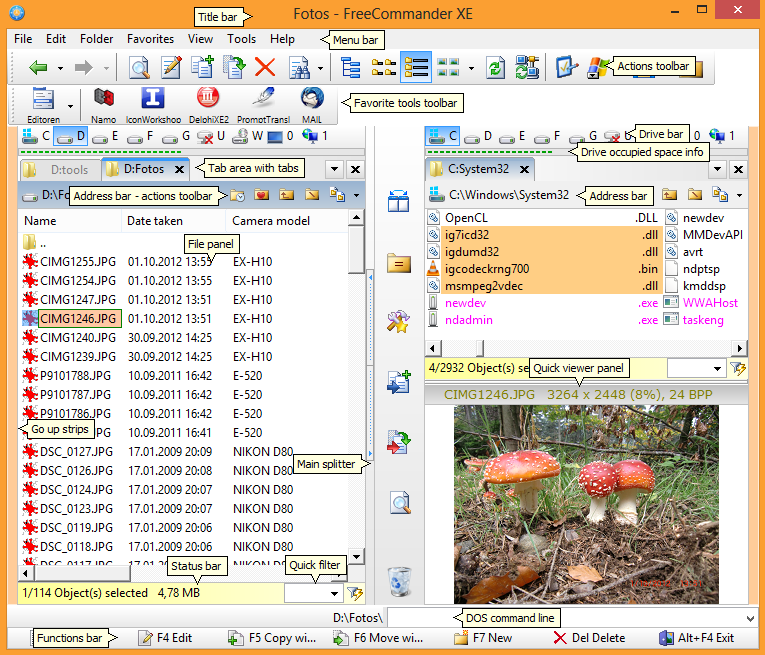
freeCommander is a dual-panel file explorer with many features. In addition to the standard file management features, it can be used to compare directories, display folder sizes, synchronize folders and more. The program can also open/create ZIp and CAB files, and open RAR files as well as search inside those archives. You can set view filters, create folder list (for printing), change file attributes, launch a command prompt, take a desktop screenshot and more.
Latest Reviews

jquigley reviewed vXE 2023 Build 880 on Dec 17, 2022
My favorite file manager. I have been using it for years.

some guy reviewed vXE 2019 Build 790 on Dec 23, 2018
excellent tool indeed especial multi partitions and hard drive browsing and transfers Glad to see this is still being updated !
some guy reviewed vXE 2017 Build 760 Beta on Sep 23, 2017
fantastic !

Music4Ever reviewed vXE 2016 Build 730 Beta on Oct 24, 2016
Used this for some time & is my choice of file managers, great program. The UI is good - Always 5 stars without question.

Vivek Kowshik reviewed vXE 2015 Build 700 Beta on Oct 24, 2015
Unquestionably the best. I have been using this as my default file manager for the last several years. Works just as intended. But have not seen much activity in recent times.

pforbes reviewed vXE 2015 Build 685 on Feb 3, 2015
An excellent program which is improved at every new version. No doubt one of the best.
I keep using it since long ago because of its flexibility and excellent results.

TuxmanXP reviewed vXE 2015 Release 680 Beta on Nov 14, 2014
While FreeCommander might be the best non-payware OFM on Windows, it lacks the user experience of its payware compatitors. The UI looks just cheap.

mikebratley reviewed vXE 2014 Release 650 on Mar 11, 2014
very good

chrispaul reviewed vXE 2014 Release 650 on Feb 17, 2014
good stuff

bobad reviewed vXE 2014 Release 650 on Dec 25, 2013
While not perfect, I think FC is the best out there. It's amazing how many file managers there are, and even more amazing how many shortcomings they have. Many of them simply do not work in an X64 environment, some do not work with external copy programs such as Teracopy, some have garish colors that make your eyes bleed, some have tiny tool bar icons which you can neither see nor adjust. FC is not really X64 compatible, but uses a satisfactory transparent workaround. I especially like the flexibility of FC, and I use single window and a tree (Explorer style). Personally, I think tabs make dual window file managers obsolete. You can do anything with tabs you can do with extra windows, and they're also more compact and flexible. FC tab implementation is very good, BTW. You can choose to close all non-locked tabs on closing FC, a feaure which some FM's inexplicably omit.
Try it, I think you'll like it!

jquigley reviewed vXE 2023 Build 880 on Dec 17, 2022
Pros: Very powerful. The two pane view is great. Besides simple file management it has a large list of extra features. For example, it can do complicated renaming of files. It can change file attributes. It has powerful search options.
Cons: None, except the donor version has features/bug fixes that take a while to filter down to the free version.
Bottom Line: My favorite file manager. I have been using it for years.
some guy reviewed vXE 2019 Build 790 on Dec 23, 2018
Pros: great tool better then stock windows file explorer
Cons: failed to be able to browse network would not load hard drive attached to router
Bottom Line: excellent tool indeed especial multi partitions and hard drive browsing and transfers Glad to see this is still being updated !
some guy reviewed vXE 2017 Build 760 Beta on Sep 23, 2017
Pros: a must have !
Cons: non that I can think of
Bottom Line: fantastic !
Music4Ever reviewed vXE 2016 Build 730 Beta on Oct 24, 2016
Used this for some time & is my choice of file managers, great program. The UI is good - Always 5 stars without question.
Vivek Kowshik reviewed vXE 2015 Build 700 Beta on Oct 24, 2015
Unquestionably the best. I have been using this as my default file manager for the last several years. Works just as intended. But have not seen much activity in recent times.
pforbes reviewed vXE 2015 Build 685 on Feb 3, 2015
An excellent program which is improved at every new version. No doubt one of the best.
I keep using it since long ago because of its flexibility and excellent results.
TuxmanXP reviewed vXE 2015 Release 680 Beta on Nov 14, 2014
While FreeCommander might be the best non-payware OFM on Windows, it lacks the user experience of its payware compatitors. The UI looks just cheap.
mikebratley reviewed vXE 2014 Release 650 on Mar 11, 2014
very good
chrispaul reviewed vXE 2014 Release 650 on Feb 17, 2014
good stuff
bobad reviewed vXE 2014 Release 650 on Dec 25, 2013
While not perfect, I think FC is the best out there. It's amazing how many file managers there are, and even more amazing how many shortcomings they have. Many of them simply do not work in an X64 environment, some do not work with external copy programs such as Teracopy, some have garish colors that make your eyes bleed, some have tiny tool bar icons which you can neither see nor adjust. FC is not really X64 compatible, but uses a satisfactory transparent workaround. I especially like the flexibility of FC, and I use single window and a tree (Explorer style). Personally, I think tabs make dual window file managers obsolete. You can do anything with tabs you can do with extra windows, and they're also more compact and flexible. FC tab implementation is very good, BTW. You can choose to close all non-locked tabs on closing FC, a feaure which some FM's inexplicably omit.
Try it, I think you'll like it!

DKDude reviewed vXE 2014 Release 650 on Dec 21, 2013
A must have filetool, LOVE it.
Keep up the good work.

krgood reviewed vXE Release 641 Beta on Nov 24, 2013
Over the years, I have tried just about every shell out here, including this one and Total Commander registered. It is a decent program but support and features are an issue. I found DirOpus by GPSoft, an Australian company, works like no other. DirOpus is well worth a look. Not free but gives you a 60 day trial to make sure it works for you. Support is outstanding and I have NEVER had an issue with this program.
DKDude reviewed vXE Release 641 Beta on Nov 22, 2013
This is my fav filetool, used it for a long time now, never had a single issue with it,
it packs all you need for managing you files.
Runs fine on win 8.1 64bit.
Do not listen to the trolls and idiots, there is no virus, malware or addware in this program, some people just don't have a life.