File Details |
|
| File Size | 0.9 MB |
|---|---|
| License | Open Source |
| Operating System | Windows 7/Vista/XP |
| Date Added | January 10, 2011 |
| Total Downloads | 3,722 |
| Publisher | Chris Giles |
| Homepage | #7Z |
Publisher's Description
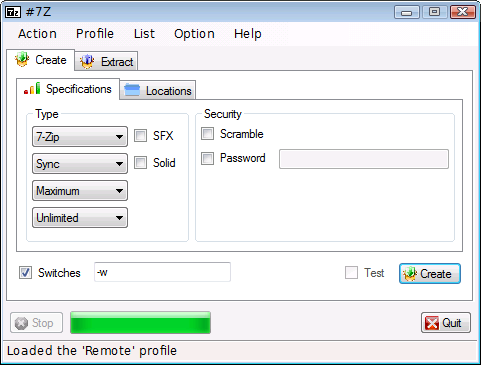
#7Z is a 7-Zip GUI for Windows, which attempts to simplify data compression and backup. Use it if you want to: Update existing archives quickly; Backup folders to a storage location; Create or extract protected archives; Lessen effort by using archiving profiles and lists.
Latest Reviews

CBG reviewed v0.8.1 on Feb 1, 2010
I don't know how many times I need to explain this point. #7Z intends to extend certain aspects that 7-Zip lacks; therefore, it's neither unnecessary nor a clone.

bopb99 reviewed v0.8.1 on Feb 1, 2010
A shobby, bloated, totally unnecessary 7zip clone/wannabe.
CBG reviewed v0.8.0 on May 27, 2009
#7Z intends to better the default 7-Zip GUI in the ways mentioned in the description section, above the screenshot.
In general, few would argue that the '7z' compression format is better than 'RAR' in an overall sense, not to mention that it's OSS.

dhry reviewed v0.8.0 on May 26, 2009
Creating a GUI for something that already has a GUI.. am I missing something? Last time I checked, people submitted feature requests for this sort of thing. Save yourself the download and just stick to the original 7-Zip, or else use something like IZArc (http://www.izarc.org/) which supports far more archive formats and has more features.

emanresU deriseD reviewed v0.8.0 on May 26, 2009
CBG said: "I don't know why you'd bother using 'rar', when '7z' is clearly a superior compression format."
7Z does not support data recovery, RAR does. Yes, I have had to use it, and I was awfully glad I was using RAR and not 7Z.

embers reviewed v0.8.0 on May 26, 2009
I didn't really find this much more useful than 7-Zip's already existing GUI.
CBG reviewed v0.7.5 on Dec 15, 2008
#7Z originated as Q7Z for Linux. I merely ported it to Windows as an afterthought.
I don't know why you'd bother using 'rar', when '7z' is clearly a superior compression format.
You might not realise that #7Z has other features, such as compression profiles and lists.

picsoetje reviewed v0.7.5 on Dec 15, 2008
When is somebody going to make an extended version of the "ZipFolders" already available in XP and Vista ?
With "Extended" I mean not limited to zip-files but also for all the other archive-files (rar etc).
That would finaly be something useful, a lot more useful than what everybody is doing now : creating competing proprietary interfaces that do not have the same really nice user-interface and shell-integration like "ZipFolder".
CBG reviewed v0.7.1 on Aug 19, 2007
I like the "PAQ8l" idea but I'm a bit short on time right now. Thanks for the suggestion and I'll keep it in mind.
I'm sick of the WinRAR nag screen, and 7-Zip has better compression ratios and security.
One of the problems with the 7-Zip Explorer Context Menu GUI is that it doesn't update existing archives by default. The whole archive is recreated, which is majorly annoying for large files.

tinkerdill reviewed v0.7.1 on Aug 18, 2007
hey CBG, you don't have to pay anything if you are using WinRAR, it just gives you a nag screen.

CBG reviewed v0.8.1 on Feb 1, 2010
I don't know how many times I need to explain this point. #7Z intends to extend certain aspects that 7-Zip lacks; therefore, it's neither unnecessary nor a clone.
bopb99 reviewed v0.8.1 on Feb 1, 2010
A shobby, bloated, totally unnecessary 7zip clone/wannabe.
CBG reviewed v0.8.0 on May 27, 2009
#7Z intends to better the default 7-Zip GUI in the ways mentioned in the description section, above the screenshot.
In general, few would argue that the '7z' compression format is better than 'RAR' in an overall sense, not to mention that it's OSS.
dhry reviewed v0.8.0 on May 26, 2009
Creating a GUI for something that already has a GUI.. am I missing something? Last time I checked, people submitted feature requests for this sort of thing. Save yourself the download and just stick to the original 7-Zip, or else use something like IZArc (http://www.izarc.org/) which supports far more archive formats and has more features.
emanresU deriseD reviewed v0.8.0 on May 26, 2009
CBG said: "I don't know why you'd bother using 'rar', when '7z' is clearly a superior compression format."
7Z does not support data recovery, RAR does. Yes, I have had to use it, and I was awfully glad I was using RAR and not 7Z.
embers reviewed v0.8.0 on May 26, 2009
I didn't really find this much more useful than 7-Zip's already existing GUI.
CBG reviewed v0.7.5 on Dec 15, 2008
#7Z originated as Q7Z for Linux. I merely ported it to Windows as an afterthought.
I don't know why you'd bother using 'rar', when '7z' is clearly a superior compression format.
You might not realise that #7Z has other features, such as compression profiles and lists.
picsoetje reviewed v0.7.5 on Dec 15, 2008
When is somebody going to make an extended version of the "ZipFolders" already available in XP and Vista ?
With "Extended" I mean not limited to zip-files but also for all the other archive-files (rar etc).
That would finaly be something useful, a lot more useful than what everybody is doing now : creating competing proprietary interfaces that do not have the same really nice user-interface and shell-integration like "ZipFolder".
CBG reviewed v0.7.1 on Aug 19, 2007
I like the "PAQ8l" idea but I'm a bit short on time right now. Thanks for the suggestion and I'll keep it in mind.
I'm sick of the WinRAR nag screen, and 7-Zip has better compression ratios and security.
One of the problems with the 7-Zip Explorer Context Menu GUI is that it doesn't update existing archives by default. The whole archive is recreated, which is majorly annoying for large files.
tinkerdill reviewed v0.7.1 on Aug 18, 2007
hey CBG, you don't have to pay anything if you are using WinRAR, it just gives you a nag screen.
dhry reviewed v0.7.1 on Aug 18, 2007
Explain to me how this is better than the regular 7Zip interface? "Right click and extract" already existed in the original interface and is not new at all? I suggest that instead of writing a GUI for an archiver which already has one, instead create one for a great archiver which doesn't yet have one (well, not one worth a damn anyway) - PAQ8l (http://cs.fit.edu/~mmahoney/compression/). And maybe make the interface have the archiver compress 2 files at once or do some other trick to make it take advantage of dualcore CPUs.

bobad reviewed v0.7.1 on Aug 18, 2007
Pretty nice program. I wish for 1 button that would register all archive file types, and put a few extensions in the Explorer right-click menu. That would make it a very useful, portable app.

Mystenes reviewed v0.7.0 on Jul 17, 2007
great, finally something with usefull interface ;-)