File Details |
|
| File Size | 3.8 MB |
|---|---|
| License | Freeware |
| Operating System | Windows 7/8/10/Vista/XP |
| Date Added | September 17, 2020 |
| Total Downloads | 3,487 |
| Publisher | Softvoile |
| Homepage | Clipdiary |
Publisher's Description
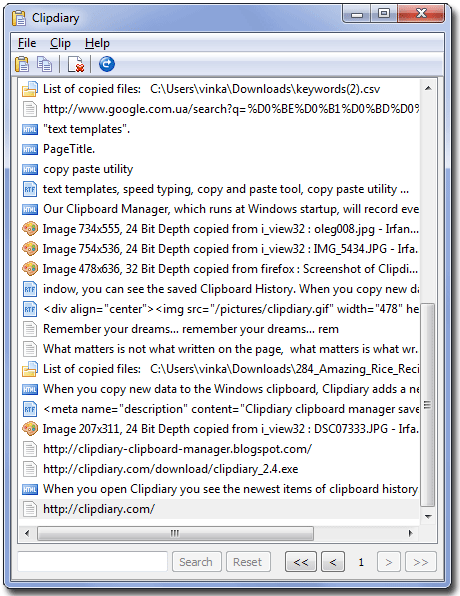
Clipdiary can log clipboard history and record data in several formats: plain text, RTF (Rich Text Format) and images (BMP), html, files and so on. So, besides saving parts of text, you can easily make series of screenshots, and Clipdiary will save them for you.
Latest Reviews

oompoop reviewed v3.5 on Mar 31, 2014
... got it from giveawayoftheday and worked about half a year with it.
Suddenly I had difficulties, it often opened without asking ...
Changed to free http://www.chip.de/downl...rd-Master_48076400.html and now I'm happy ... ;-)) Unfortunately (but not for me ...) it is in German ...

asaenz reviewed v2.8 on Feb 25, 2010
Nice program. Wish I could try it out longer but I'm unwilling to spend too much time on a program that claims to be free yet stops working in 29 days. I only give 5 stars to exceptional programs and -1 for a false claim. I'll keep using ClipX which actually is free.

softvoile reviewed v2.6 on Feb 25, 2010
There is one-day 50% discount for Clipdiary today. You can get it for only $10.
http://clipdiary.com/discount.php

Niksa reviewed v2.0 on Apr 28, 2009
It is realy great program, but it's not freeware at all. It has 30 days trial and stop running, for that, 3 stars

anomoly reviewed v2.0 on Jan 15, 2009
OK but I stick with clipx latest v1.0.3.9g x86
http://bluemars.org/clipx/

tp reviewed v1.98 Beta on Dec 2, 2008
looks fine but i'll stick with clipx.
http://clipx.org/

JEdwardP reviewed v1.97 Beta on Nov 15, 2008
Since I switched to Linux as my primary OS over a year ago, I rarely bother to change or even update my Windows software.
This program was worth changing to however, as it's comparatively lightweight, and seems to have fewer limitations than most other clipboard extenders.

horsecharles reviewed v1.97 Beta on Nov 14, 2008
I'm always in the market for a better Clip utility.
I would like to see a better description though-- esp. as far as limits & formats:
just a simple listing of each format...very important: limits--- how many, how long...
Or is it unlimited? Is 'everything forever' getting autocopied somewhere for easy retrieval?
That would be awesome..

Zerbe reviewed v1.97 Beta on Nov 14, 2008
Tried a few of them, this one was small and just what I wanted, great program.

zeeZee reviewed v1.97 Beta on Nov 14, 2008
Excellent. Keeps a record of anything you copy. Probably tryed like 6 different ones, stayed with this one.

oompoop reviewed v3.5 on Mar 31, 2014
... got it from giveawayoftheday and worked about half a year with it.
Suddenly I had difficulties, it often opened without asking ...
Changed to free http://www.chip.de/downl...rd-Master_48076400.html and now I'm happy ... ;-)) Unfortunately (but not for me ...) it is in German ...
asaenz reviewed v2.8 on Feb 25, 2010
Nice program. Wish I could try it out longer but I'm unwilling to spend too much time on a program that claims to be free yet stops working in 29 days. I only give 5 stars to exceptional programs and -1 for a false claim. I'll keep using ClipX which actually is free.
softvoile reviewed v2.6 on Feb 25, 2010
There is one-day 50% discount for Clipdiary today. You can get it for only $10.
http://clipdiary.com/discount.php
Niksa reviewed v2.0 on Apr 28, 2009
It is realy great program, but it's not freeware at all. It has 30 days trial and stop running, for that, 3 stars
anomoly reviewed v2.0 on Jan 15, 2009
OK but I stick with clipx latest v1.0.3.9g x86
http://bluemars.org/clipx/
tp reviewed v1.98 Beta on Dec 2, 2008
looks fine but i'll stick with clipx.
http://clipx.org/
JEdwardP reviewed v1.97 Beta on Nov 15, 2008
Since I switched to Linux as my primary OS over a year ago, I rarely bother to change or even update my Windows software.
This program was worth changing to however, as it's comparatively lightweight, and seems to have fewer limitations than most other clipboard extenders.
horsecharles reviewed v1.97 Beta on Nov 14, 2008
I'm always in the market for a better Clip utility.
I would like to see a better description though-- esp. as far as limits & formats:
just a simple listing of each format...very important: limits--- how many, how long...
Or is it unlimited? Is 'everything forever' getting autocopied somewhere for easy retrieval?
That would be awesome..
Zerbe reviewed v1.97 Beta on Nov 14, 2008
Tried a few of them, this one was small and just what I wanted, great program.
zeeZee reviewed v1.97 Beta on Nov 14, 2008
Excellent. Keeps a record of anything you copy. Probably tryed like 6 different ones, stayed with this one.

madmike reviewed v1.97 Beta on Nov 14, 2008
Simply a brilliant tool:)

jurgenvdpol reviewed v1.97 Beta on Nov 14, 2008
I give it 5 to compensate for mackley

some guy reviewed v1.95 Beta 1 on Oct 20, 2008
dose what it says very handy
to give it a 2 because its freeware is idiotic