
File Details |
|
| File Size | 0.6 MB |
|---|---|
| License | Freeware |
| Operating System | Windows (All) |
| Date Added | April 23, 2018 |
| Total Downloads | 15,943 |
| Publisher | Carthago Software |
| Homepage | DeskTask |
Publisher's Description
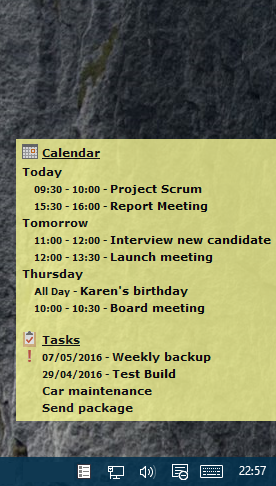
DeskTask connects to Microsoft Outlook and displays your calendar and task items on the desktop. It displays Calendar items in the current week (next 14 days) and the items you may have in your Outlook task list. The window is pinned to your desktop and is transparent, having no impact if you have a wallpaper.
Latest Reviews

Raysy reviewed v1.0 SR1 on Sep 23, 2007
I prever this one over "Outlook on Desktop", too. The type is easy to read and there are more options. Avaiable in different languages.

dkratter reviewed v1.0 SR1 on Jan 23, 2007
This is a good program and works as advertised. I've recently switched to "Outlook on the Desktop" (available on FileForum), which is a bit more useful because you can edit the calendar directly from your desktop, as well as scroll to different dates.

Diam0nd reviewed v1.0 SR1 on Jan 22, 2007
Great proggy! Works as charm.

FmlyRnn reviewed v1.0 on Oct 11, 2006
It might be me but I did Download it, I seen it on my Desktop. Closed it, and it never opened again. I tried to reinstall, and I couldn't. I want to use it, but...

carstereos reviewed v1.0 on Oct 10, 2006
Love this little app. I do want to be able to hide the tray icon, though.
Diam0nd reviewed v1.0 on Oct 10, 2006
Great application!!!

-Lord- reviewed v1.0 RC10 on Sep 10, 2006
Anything that hits Release Candidate TEN, shouldn't be a release candidate at all. If you have to go past 2-3, then you're obviously not ready to come out of beta mode.
It does what it says, but like all the other posts, it ONLY works with Outlook, and ONLY works with the default calendar etc. While it can be a useful program, it's limited in its functionality. Use it if you need and it does what you need... otherwise, for more advanced stuff, look elsewhere.

niloch reviewed v1.0 RC10 on Sep 9, 2006
Nice but as said does not work with anything else, remind me is a good program that does a similer thing and it does not depend on any other program
Diam0nd reviewed v1.0 RC8 on Jul 2, 2006
The best!
Good point, nordlicht.

nordlicht reviewed v1.0 RC8 on Jul 2, 2006
Cool thing. Too bad that it only works with Outlook.

Raysy reviewed v1.0 SR1 on Sep 23, 2007
I prever this one over "Outlook on Desktop", too. The type is easy to read and there are more options. Avaiable in different languages.
dkratter reviewed v1.0 SR1 on Jan 23, 2007
This is a good program and works as advertised. I've recently switched to "Outlook on the Desktop" (available on FileForum), which is a bit more useful because you can edit the calendar directly from your desktop, as well as scroll to different dates.
Diam0nd reviewed v1.0 SR1 on Jan 22, 2007
Great proggy! Works as charm.
FmlyRnn reviewed v1.0 on Oct 11, 2006
It might be me but I did Download it, I seen it on my Desktop. Closed it, and it never opened again. I tried to reinstall, and I couldn't. I want to use it, but...
carstereos reviewed v1.0 on Oct 10, 2006
Love this little app. I do want to be able to hide the tray icon, though.
Diam0nd reviewed v1.0 on Oct 10, 2006
Great application!!!
-Lord- reviewed v1.0 RC10 on Sep 10, 2006
Anything that hits Release Candidate TEN, shouldn't be a release candidate at all. If you have to go past 2-3, then you're obviously not ready to come out of beta mode.
It does what it says, but like all the other posts, it ONLY works with Outlook, and ONLY works with the default calendar etc. While it can be a useful program, it's limited in its functionality. Use it if you need and it does what you need... otherwise, for more advanced stuff, look elsewhere.
niloch reviewed v1.0 RC10 on Sep 9, 2006
Nice but as said does not work with anything else, remind me is a good program that does a similer thing and it does not depend on any other program
Diam0nd reviewed v1.0 RC8 on Jul 2, 2006
The best!
Good point, nordlicht.
nordlicht reviewed v1.0 RC8 on Jul 2, 2006
Cool thing. Too bad that it only works with Outlook.
Diam0nd reviewed v1.0 RC7 on Jun 13, 2006
One of the most useful programs out there! Keep up the GOOD work guys, and a big THANK YOU! :D

henrypeck reviewed v1.0 RC6 on May 8, 2006
Excellent. Now I can get rid of my PalmPilot.

vrknkr00 reviewed v1.0 RC6 on May 7, 2006
Very useful! I love "The window is pinned to your desktop." There is no reason to use any other type of desktop calendars, if you have already installed MS Outlook. Thank you.